

Blood Pressure Monitor & Log
YIZE LIAO · Medical
Independent analytics for this App Store listing. AppTracker is not affiliated with YIZE LIAO.
Chart standing · US
What changed · US
Listing changes AppTracker has observed for this app in this storefront — new versions, price moves, rating shifts, and store copy.
• Redesigned home screen: the Save button now sits in the input card, the blood pressure level updates as you slide, and new −/+ buttons let you fine-tune values • New Trends page: 7-day average, highest and lowest, plus a daily chart with the normal range shaded • The color guide now shows all 6 levels • A clearer history list that labels the level of every entry • Removed the sharing feature; your readings stay on your iPhone
In-app purchases · US
No in-app purchases.
Screenshots


About
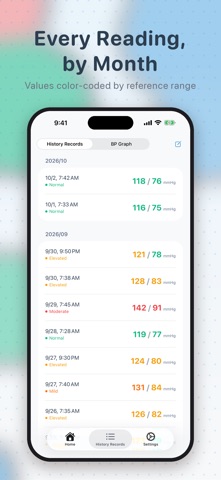
BP Helper is a simple blood pressure log. After you take a reading with your own cuff, set the systolic and diastolic values with two sliders and tap Save. The date and time are recorded for you, entries are grouped by month, and your 7-day average, highest and lowest values are always one tap away. KEY FEATURES • Quick logging: enter systolic (upper) and diastolic (lower) values with sliders or fine-tune them with −/+; the date and time are saved automatically • Latest reading: your most recent systolic and diastolic values in large, easy-to-read numbers • Color guide: each value is color-labeled as low, normal, elevated, mild, moderate or severe based on common reference ranges, for quick comparison • History: all entries grouped by month, newest first • Trends: 7-day average, maximum and minimum for systolic and diastolic, plus a daily chart with the normal range shaded • Tidy up: select several entries at once and delete them • Available in 9 languages PRIVACY No account is needed. Your readings are stored only on your iPhone and are never uploaded to a server. IMPORTANT This app is not a medical device and does not replace professional medical advice. It cannot measure blood pressure; please take readings with your own blood pressure monitor and enter the values. Color labels are for reference only. Talk to your doctor about any health concerns.
What's new · 1.4.0
• Redesigned home screen: the Save button now sits in the input card, the blood pressure level updates as you slide, and new −/+ buttons let you fine-tune values • New Trends page: 7-day average, highest and lowest, plus a daily chart with the normal range shaded • The color guide now shows all 6 levels • A clearer history list that labels the level of every entry • Removed the sharing feature; your readings stay on your iPhone
Details