

Reverse Text Generator
Muhammad Awais Younas · Utilities
Independent analytics for this App Store listing. AppTracker is not affiliated with Muhammad Awais Younas.
Chart standing · US
What changed · US
Listing changes AppTracker has observed for this app in this storefront — new versions, price moves, rating shifts, and store copy.
Reverse Text Generator is now Text Editor! • A brand-new editor: headings, highlights, lists and checklists • Turn your notes into PDF, DOCX or TXT files • Clean messy text, change case, sort and number lines • Find and replace, word counter and share text as an image • Light and dark theme, and it works offline
Price & rating history · US
Reconstructed from the listing changes AppTracker has observed in this storefront. A field is charted once it has changed more than once, and each line starts at the value it moved from.
Average rating · ★ 3.00 now · 2 changes on record
Screenshots



About
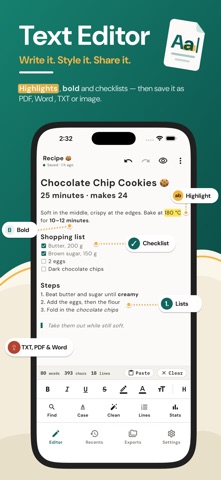
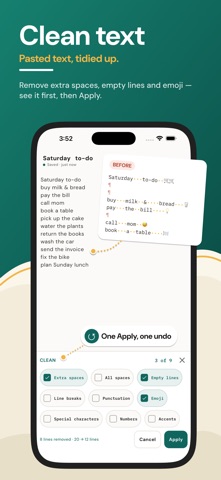
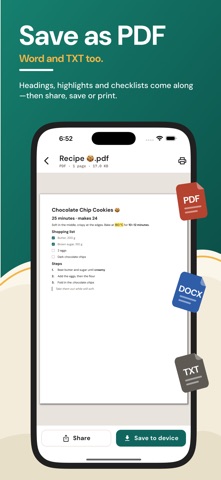
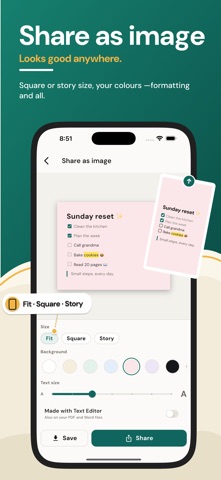
Write it, style it, share it. Text Editor is a simple text editor and notepad that turns your notes into good-looking PDF and DOCX files. Clean up messy text in seconds, see every change before you keep it, and share your work with anyone. No sign-up and no internet needed. WRITE NOTES THAT LOOK GREAT • Headings (6 sizes), bold, italic, underline and strikethrough • Highlight words in 6 colors and change the text color • Bullet lists, numbered lists (1, i, a, A) and checklists you can check off • Quotes, links, divider lines, inline code and code blocks • Align text left, center, right or justified • Reading view shows your note like the finished page • Undo and redo, auto-save as you type, and a text size you choose TURN TEXT INTO PDF, DOCX OR TXT Convert text to PDF right from the editor. Headings, highlights, lists and checklists come along, so the PDF looks like your note. Save the same note as a DOCX document or a plain TXT file. • Text to PDF and notes to PDF in one app • TXT to PDF: open a TXT file from Files and save it as a PDF • PDFs show many languages correctly, including Arabic, Urdu and Hindi • Open your PDF, DOCX and TXT files inside the app • Share them, print PDFs, or save them to Files • Clean, ready-to-send pages for school, work and everyday notes TXT FILE EDITOR Open any TXT file from the Files app, edit it like a note and keep it with your documents. Turn any note back into a TXT file any time. A quick TXT editor for lists, notes and any plain text. TEXT TOOLS WITH A PREVIEW Every tool shows the result in your note first; nothing changes until you tap Apply, and one tap on Undo brings it back. • Case converter, 14 styles: UPPERCASE, lowercase, Sentence case, Title Case, Capitalized Case, aLtErNaTiNg, iNVeRsE, camelCase, PascalCase, snake_case, kebab-case, dot.case, CONSTANT_CASE and Train-Case • Smart Title Case keeps small words like "a", "of" and "and" lowercase • Clean text: remove extra spaces, all spaces, empty lines, line breaks, punctuation, emoji, special characters, numbers or accents, several at once • Sort lines A to Z, Z to A, by number or by length • Shuffle lines, reverse line order and remove duplicate lines • Number lines (1. 1) 01. [1]) and add a prefix or suffix to every line • Find and replace with match case, whole word and regex, each match lit up • Use any tool on the whole note or only on selected text WORD COUNTER AND STATS A live word counter, character counter and line count sit under your text. Stats add sentences, paragraphs, reading and speaking time, your most used words, and the emails, links and numbers in your text. Great for essays and posts. SHARE TEXT AS AN IMAGE Turn a note into a picture for chats and stories. Pick Fit, Square or Story size, a background color and the text size; highlights and checklists stay in the picture. ALL YOUR NOTES IN ONE PLACE • Search your notes and pin the ones you use most • Notes grouped by day, with the last tool used on each • Rename, duplicate, or make a note read-only • Copy or share any note as plain text • Trash keeps deleted notes for 30 days • Light and dark theme PRIVATE AND OFFLINE Your notes stay on your device. Text Editor works without internet and never asks you to sign up. Looking for a notepad that can also make PDFs? Write here, then use notes to PDF or TXT to PDF whenever you need a file to send. MADE FOR EVERYDAY WRITING • Students: write essays, check the word count and save them as PDF • Work: turn meeting notes into a neat PDF or DOCX to send • Lists: sort a shopping list A to Z, number it and check it off • Copied text: remove extra spaces and empty lines in one go • Social posts: change the case, count characters and share as an image One app as your notepad, text editor, word counter, case converter and text to PDF maker. Made for students, writers and anyone who writes on the go. Terms of Use: https://codifyappsprivacy.blogspot.com/p/terms-of-use.html
What's new · 1.1
Reverse Text Generator is now Text Editor! • A brand-new editor: headings, highlights, lists and checklists • Turn your notes into PDF, DOCX or TXT files • Clean messy text, change case, sort and number lines • Find and replace, word counter and share text as an image • Light and dark theme, and it works offline
Details