

Flowtica: AI Voice Recorder
FLOWTICA AI PTE. LTD. · Productivity
Independent analytics for this App Store listing. AppTracker is not affiliated with FLOWTICA AI PTE. LTD.
Chart standing · US
What changed · US
Listing changes AppTracker has observed for this app in this storefront — new versions, price moves, rating shifts, and store copy.
Bug fixes and performance improvements.
Ratings breakdown · US
The star breakdown behind this app's rating in this storefront.
In-app purchases · US
What this app sells inside itself, grouped by kind and priced for this storefront.
Screenshots


Keywords this app targets
Search terms AppTracker associates with this app — estimates, not search volume. ❝ = in the app's title; a highlighted number is its current position for that term.
Similar apps
Competitors and close alternatives, as estimated by AppTracker.
 Voice Recorder AI Notes: Spiik
Fadel.io OU
2 shared topics · 4 shared title words
Voice Recorder AI Notes: Spiik
Fadel.io OU
2 shared topics · 4 shared title words
 Flow Note:Smart AI Note
亚丽 王
1 shared topic · 1 shared title word
Flow Note:Smart AI Note
亚丽 王
1 shared topic · 1 shared title word
 Recco: AI Meeting Note Taker
Next Pixel Limited
3 shared topics · 1 shared title word
Recco: AI Meeting Note Taker
Next Pixel Limited
3 shared topics · 1 shared title word
 Cue: AI Note Taker & Recorder
44pixels
2 shared topics · 2 shared title words
Cue: AI Note Taker & Recorder
44pixels
2 shared topics · 2 shared title words
 CraftNote: Smart AI Note Taker
Joyolabs dijital hizmetler anonim sirketi
2 shared topics · 1 shared title word
CraftNote: Smart AI Note Taker
Joyolabs dijital hizmetler anonim sirketi
2 shared topics · 1 shared title word
 Summary - AI Note Taker
Labhouse Mobile
1 shared topic · 1 shared title word
Summary - AI Note Taker
Labhouse Mobile
1 shared topic · 1 shared title word
 SpeakApp AI: Voice Notes
VoicePop Inc.
1 shared topic · 2 shared title words
SpeakApp AI: Voice Notes
VoicePop Inc.
1 shared topic · 2 shared title words
 Wave AI Note Taker & Recorder
Mohrer Associates LLC
1 shared topic · 2 shared title words
Wave AI Note Taker & Recorder
Mohrer Associates LLC
1 shared topic · 2 shared title words
About
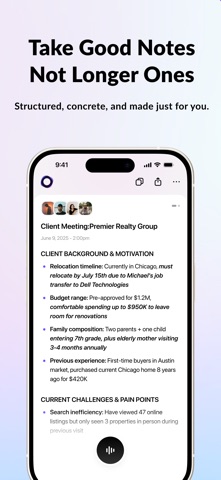
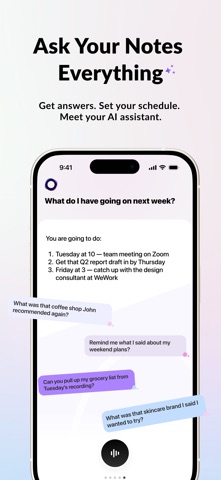
Meet Flowtica, your AI note-taker and thinking partner. Flowtica turns your meetings into clear notes and your next move, right from your phone. For the moments when what's said needs to count. A full AI note taker, on your phone Forgot your Scribe pen, or going phone-only today? Open the Flowtica app, hit record, and get an accurate transcript and a clean AI summary. A full AI note taker and voice recorder app that works entirely on its own. Notes that show your next move Clean, structured notes that highlight decisions and action items, not a 10-paragraph recap. Flowtica shows you what to do next. Ask your notes anything "What did we commit to?" "Am I free Wednesday?" Your meetings become searchable, and the AI note taker answers, or drafts the follow-up email for you. Flowtica remembers your preferences and past work, so you never start from scratch. Ask about something from last week or last quarter and get one answer that ties it together. Manage or turn memory off anytime in Settings. Snap anything into a note Snap a photo of handwritten notes, a whiteboard, or slides and it syncs into your knowledge base. Talk while you snap: say "Remind me to follow up next week," and it becomes a task. Meet Scribe: fully hands-free When you do bring it, Scribe, the AI pen, lets you write on paper and record at the same time, with no laptop and no phone on the table. Client meeting, site walk, or consultation, stay fully present. One tap on FlowMark™ marks the key moment. This recording pen picks up the whole room (up to 16.4 ft, 15 voices), with up to 100 hours of continuous recording. Keep recording, even offline Scribe owners can keep recording and getting standard transcription for as long as they own their Scribe, even after the month's AI minutes are used. No subscription required to record, ever. Private by design Data is encrypted in storage and in transit. AI Summary is everywhere. AI Clarity is rare. Beyond audio. Write the unspoken. r/Flowtica · X: @Flowtica_AI · support@flowtica.ai
What's new · 1.9.6
Bug fixes and performance improvements.
Details