

Super Zoom 200x - Tele Camera
Dhani Saiful Huda · Photo & Video
Independent analytics for this App Store listing. AppTracker is not affiliated with Dhani Saiful Huda.
Chart standing · US
What changed · US
Listing changes AppTracker has observed for this app in this storefront — new versions, price moves, rating shifts, and store copy.
New User Interface + New style Zoom Slider + Sky Index
Price & rating history · US
Reconstructed from the listing changes AppTracker has observed in this storefront. A field is charted once it has changed more than once, and each line starts at the value it moved from.
Average rating · ★ 4.43 now · 12 changes on record
Ratings breakdown · US
The star breakdown behind this app's rating in this storefront.
In-app purchases · US
What this app sells inside itself, grouped by kind and priced for this storefront.
Screenshots



About
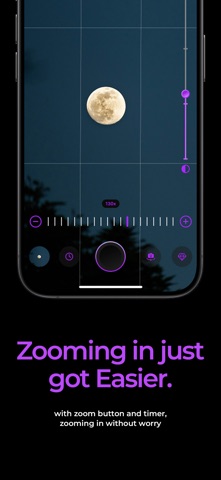
Experience a different photography sensation with Super Zoom 200x - Tele Camera, a tool with powerful zoom capabilities and specifically made for photographing very distant objects. Super Zoom 200x - Tele Camera, unlock the capabilities of your iPhone camera and capture amazing photos of the moon, maximize the zoom feature of Super Zoom to get clearer, high quality photos. Key Features: - Super Zoom Camera up to 200x - Video Zoom (available via in-app purchase) - Gallery How does it work? You can zoom in and out in real-time up to 200x allowing you to magnify object while taking photos and videos, by just simply moving the slider. Download Super Zoom 200x - Tele Camera right now and explore a new experience of photography! Capture stunning photos with the dynamic zoom camera. With a Premium Membership you can: -> Enjoy full experience feature -> Unlock Video Mode with Zoom 120x To get access to the Premium content and functionality, you can choose between a lifetime, weekly, monthly, and yearly auto-renewable subscription. Subscription auto-renew at the end of current period, unless cancelled 24-hours in advance prior to the end of the current period. The subscription fee is charged to your ¡Tunes account at confirmation of purchase. You may manage your subscription and turn off auto-renewal by going to your Account Settings after purchase. Per Apple policy, no cancellation of the current subscription is allowed during active subscription period. Once purchased, refunds will not be provided for any unused portion of the term. Terms of use: https://dhanisaifulhudaios.blogspot.com/p/terms-of-service.html Privacy policy: https://dhanisaifulhudaios.blogspot.com/p/privacy-policy.html
What's new · 1.1.6
New User Interface + New style Zoom Slider + Sky Index
Details