

Color Timer - Full Screen
Seulki Eom · Utilities
Independent analytics for this App Store listing. AppTracker is not affiliated with Seulki Eom.
Chart standing · US
What changed · US
Listing changes AppTracker has observed for this app in this storefront — new versions, price moves, rating shifts, and store copy.
• A redesigned visual countdown with vivid color and large numbers. • Save named timers with a duration and color, then start with one tap. • Pause, add a minute and lock the controls. • Refined alarm sounds, vibration and finishing-soon settings. • Removed app-open and full screen ads. Ads appear only on the home screen.
In-app purchases · US
No in-app purchases.
Screenshots



About
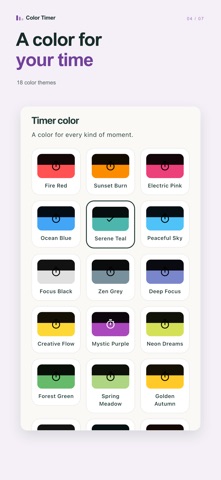
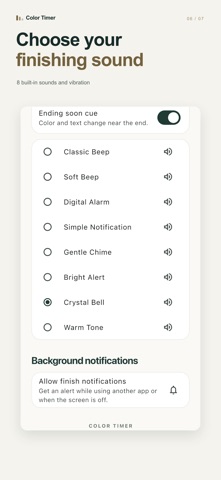
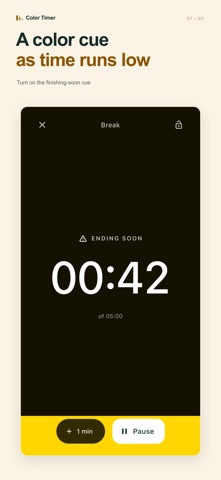
See how much time is left at a glance. Color Timer is a visual timer with a full screen countdown. As time passes, the colored area shrinks, giving you a clear sense of the time remaining. Set it on your desk for a study session, glance over while cooking, or keep your next presentation on time. A clear screen for your countdown Large numbers and vivid color fill the timer screen. There are no ads on the countdown screen and no full screen ads to wait through before starting. Keep the timer open and your screen stays awake while the countdown runs. Save it once. Start with one tap. Save your favorite timers with a name, duration and color, then start them directly from the home screen. Choose 1, 5, 10 or 25 minutes with quick duration buttons, reuse a recent duration, or set your own hours, minutes and seconds. Big numbers, in portrait or landscape Use your phone or tablet upright on your desk or sideways for a meeting, presentation or class. Choose from 18 color themes. Turn on the finishing-soon cue for a change in color and an on-screen message as time runs low. Pause, adjust and keep going Pause and resume, add a minute, or restart when you need to. Lock the controls to avoid accidental taps. Adding a minute to a running countdown leaves your saved timer's duration unchanged. Choose how your timer ends Preview and choose from 8 built-in alarm sounds. Switch sound and vibration on or off separately. In a quiet space, turn both off and use the visual display. Time for everyday moments • Study and work: set aside time for one task. • Cooking and tea: check the time with a quick glance while your hands are busy. • Presentations, meetings and classes: share an easy-to-see countdown. • Stretching and breaks: make room for a few minutes away from your desk. For a simple Pomodoro routine, start a 25-minute focus timer, then start a 5-minute timer for your break. No account is needed. The timer itself works offline. The app interface follows your device language, with Korean and English supported. Ads appear only on the home screen. Allow notifications to receive an end-of-timer alert while the app is in the background. Sounds and vibration depend on device capabilities and system settings.
What's new · 1.4.0
• A redesigned visual countdown with vivid color and large numbers. • Save named timers with a duration and color, then start with one tap. • Pause, add a minute and lock the controls. • Refined alarm sounds, vibration and finishing-soon settings. • Removed app-open and full screen ads. Ads appear only on the home screen.
Details