

Albumly - Sort & Clean Photos
Aidaluu Inc. · Utilities
Independent analytics for this App Store listing. AppTracker is not affiliated with Aidaluu Inc.
Chart standing · US
What changed · US
Listing changes AppTracker has observed for this app in this storefront — new versions, price moves, rating shifts, and store copy.
- Faster browsing and filtering on large libraries - Updated charts and breakdowns in Filter & Sort - Bug fixes and stability improvements We would love to hear your feedback and suggestions for new features, reach out to us at aidaluu.com
Screenshots



About
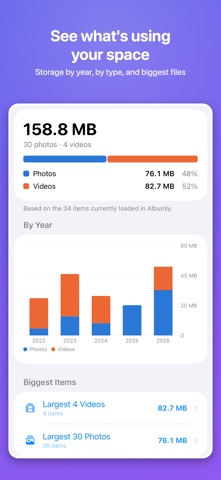
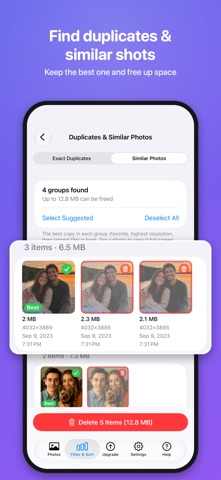
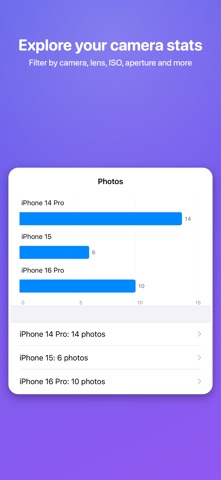
Most photo cleaners do one thing: they help you delete. Albumly helps you organize too. File photos into albums with one tap, understand your library in depth, and clear out clutter, all in one app. Private by design, Albumly works entirely on your device. No ads, no accounts, no cloud processing. Proudly made in Canada. ONE-TAP ALBUM FILING: OUR SIGNATURE FEATURE Choose your favorite albums and they appear as buttons while you browse. Tap a button to add the current photo or video to that album. Tap it again to remove it. It works in the list view, in full screen and in Swipe to Sort, so you can file hundreds of photos without leaving the screen you're on. Other cleaners make you pick keep or delete. Albumly lets you keep a photo, file it, and move on. FIND EVERY PHOTO YOU HAVEN'T FILED "Photos Not in Any Album" shows every photo and video that isn't in one of your albums yet, including albums inside folders. Open the list, start Swipe to Sort, and file them. MORE THAN 30 WAYS TO FILTER YOUR LIBRARY Albumly sorts your photos by things the Photos app doesn't show you: • Camera data (EXIF): camera model, lens, ISO, aperture, shutter speed, focal length • Time: hour of day, time of day, day of week, month, season, year, or a custom date range • Size and quality: photo resolution, video resolution, video length, file size • Type: screenshots, selfies, portraits, panoramas, HDR, bursts, GIFs, Live Photos, slo-mo, time-lapse, cinematic • Status: favorites, hidden, by album BUILT FOR PHOTOGRAPHERS See which lens you actually use most, which focal lengths you prefer, and how often you shoot at high ISO. Albumly turns your camera data into insights about how you shoot. DUPLICATES & SIMILAR PHOTOS Albumly finds exact copies, and also groups near-identical shots taken seconds apart using on-device image analysis. Compare them side by side at full resolution, keep the best one, and delete the rest. SEE WHERE YOUR STORAGE GOES The Storage Overview breaks down your space by photos and videos, by year and by type, and lists your largest files. It points out the clutter that piles up quietly: old videos, screenshots, screen recordings and bursts. MORE TOOLS • Full-screen viewer with album buttons for photos and videos • Video playback from 0.5× to 8× • Select many items at once to add them to an album or delete them • Create albums without leaving the app Apple Watch Companion App Albumly now extends to your wrist with a powerful Apple Watch experience designed for quick insights and creative utility on the go. EXIF Viewer - View key photo metadata right from your Apple Watch, including camera settings, exposure details, and more. Text‑to‑Image Creation - Generate simple text‑based images directly on your watch. Ideal for placeholders, quick notes, or minimal graphics when you need them fast. PRIVATE BY DESIGN Albumly works entirely on your device. Your photos are never uploaded, and there are no accounts and no cloud processing. When you purchase a subscription, payment will be charged to your Apple ID Account upon confirmation of purchase. The subscription will renew automatically unless you cancel it at least 24 hours prior to the end of the current subscription period. You can manage and cancel your subscriptions by going to your account settings on the App Store after purchase. Privacy Policy https://www.aidaluu.com/privacy/Photomatics.html Terms of Use https://www.aidaluu.com/tos/Photomatics.html
What's new · 3.0
- Faster browsing and filtering on large libraries - Updated charts and breakdowns in Filter & Sort - Bug fixes and stability improvements We would love to hear your feedback and suggestions for new features, reach out to us at aidaluu.com
Details