

CosmiCut: Spatial Video Editor
Cloverfield Technologies LLC · Photo & Video
Independent analytics for this App Store listing. AppTracker is not affiliated with Cloverfield Technologies LLC.
Chart standing · US
What changed · US
Listing changes AppTracker has observed for this app in this storefront — new versions, price moves, rating shifts, and store copy.
Version 4.0 (2026-11) New Timing Control * Reverse the direction of a clip. * Speed up or slow down a clip (and choose between a couple of motion smoothing options). Clip Volume Control * Adjust the volume for each clip. New Keyboard and Mouse Controls * On Mac, the mouse scroll-wheel now scrubs the project time forward and back. Performance Improvements * When returning to the Project Timeline, after editing a clip, the whole of the timeline no longer re-renders (only the thumbnails for the just-edited clip). Export Project as Gif * A more flexible export routine provides new 2D export options, including saving projects as animated gifs
In-app purchases · US
What this app sells inside itself, grouped by kind and priced for this storefront.
Screenshots


About
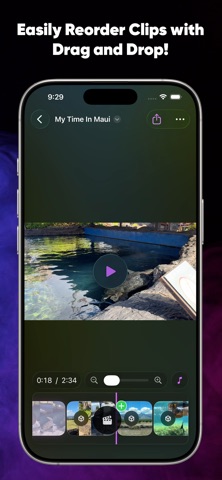
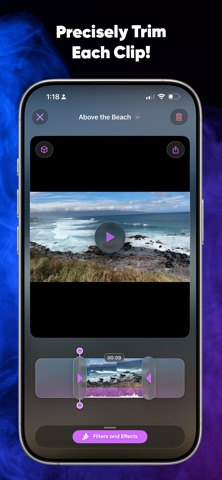
Edit spatial videos seamlessly across iPhone, iPad, Mac, and Apple Vision Pro — and even preview the 3D effect without a headset. Built from the ground-up for Apple platforms in SwiftUI. • Edit non-destructively. Your original clips are never altered. • Generate spatial videos from regular 2D clips using custom on-device machine learning models and rendering pipelines. • Import common packed 3D video formats, including side-by-side and top/bottom, and automatically convert detected clips into spatial videos. • Convert every 2D video in a project to spatial at once from the Project Inspector. • Rearrange clips with simple drag-and-drop timeline editing. • Trim clips, apply filters, and add visual effects. • Crop ordinary and spatial videos with freeform bounds or built-in aspect ratios, and scrub through the clip to preview the framing before applying it. • Rotate individual clips left or right in 90-degree increments. • Add images with automatically applied Ken Burns-style pans and zooms. • Add Cross Dissolve, Dip to Black, Wipe, and Push transitions between clips, customize their timing, and choose a direction for Wipe and Push. • Preview the 3D effect of spatial videos on iPhone, iPad, and Mac, and view individual clips directly in 3D on Apple Vision Pro. • View spatial videos in true 3D on Apple Vision Pro. • Export an animated “spatial GIF” based on a frame from a spatial clip. • Use the export sheet to choose destination, optional spatial conversion, and output format, including Spatial Video, Side by Side, Side by Side Half, Top/Bottom, and Top/Bottom Half. • Swap in your own music or audio tracks, then trim and tweak them. 100% Private CosmiCut never collects or transmits your data. Everything stays on your device, always. A subscription or one-time purchase is required to export videos without a watermark. Payment will be charged to your Apple account at confirmation of purchase. Subscriptions renew automatically unless auto-renew is turned off at least 24 hours before the end of the current billing period. Your account will be charged according to your plan for renewal within 24 hours before the end of the current billing period. You can manage or turn off auto-renew in your Apple ID account settings at any time after purchase. Privacy Policy: https://www.cosmicut.app/#privacy Terms of Service: https://www.apple.com/legal/internet-services/itunes/dev/stdeula/ Please reach out for support at: cloverfield.tech.llc@gmail.com Find the User Manual at: https://cosmicut.app/docs.html
What's new · 4.0
Version 4.0 (2026-11) New Timing Control * Reverse the direction of a clip. * Speed up or slow down a clip (and choose between a couple of motion smoothing options). Clip Volume Control * Adjust the volume for each clip. New Keyboard and Mouse Controls * On Mac, the mouse scroll-wheel now scrubs the project time forward and back. Performance Improvements * When returning to the Project Timeline, after editing a clip, the whole of the timeline no longer re-renders (only the thumbnails for the just-edited clip). Export Project as Gif * A more flexible export routine provides new 2D export options, including saving projects as animated gifs
Details