

APDL - Airline Pilot Logbook
NC Software, Inc. · Utilities
Independent analytics for this App Store listing. AppTracker is not affiliated with NC Software, Inc.
Chart standing · US
What changed · US
Listing changes AppTracker has observed for this app in this storefront — new versions, price moves, rating shifts, and store copy.
NEW FEATURES - Live Activities & Dynamic Island: Rebuilt with countdown timers, real-time gates, hotel and rest info, and FAA airport delays and ground stops with color-coded severity - Next Flight Widget: Long-press the Home Screen > Edit > Add Widget > APDL. Tap the widget to open your current trip - Widgets and Live Activities now open directly to Trip View - Enhanced Airport Weather: D-ATIS, METAR, and TAF - Flight Crew View import in Schedule Importer - Safari Share Extension: Highlight a trip in Safari, tap Share, then tap APDL to open Schedule Importer - Flight Search: Tap a result to view flight options in FlightAware - Custom Reserve Availability Period (RAP) time entry - Trip View Report: Choose Trip Sheet or Legality Detail - Updated Trip, Legality, Settings, and Résumé reports - Pay Period Charts now include trip and cumulative totals IMPROVEMENTS - APDL stays current when you return to the app - Alerts now show upcoming notifications without tapping refresh - Improved flight route maps and error handling - Paste & Process for AA bidline imports now asks for the trip start date - Switching a leg to a reserve legality type now prompts you to add a RAP first - Tapping Estimated Out on a new leg now explains the leg must be saved first - Added safeguards for reserve legality calculations when RAP data is missing - Airport database updates (PBI/DJT, MMSM/NLU) FIXES - Schedule importer and Paste & Process completion issues, including an empty success screen
Ratings breakdown · US
The star breakdown behind this app's rating in this storefront.
In-app purchases · US
What this app sells inside itself, grouped by kind and priced for this storefront.
Screenshots





About
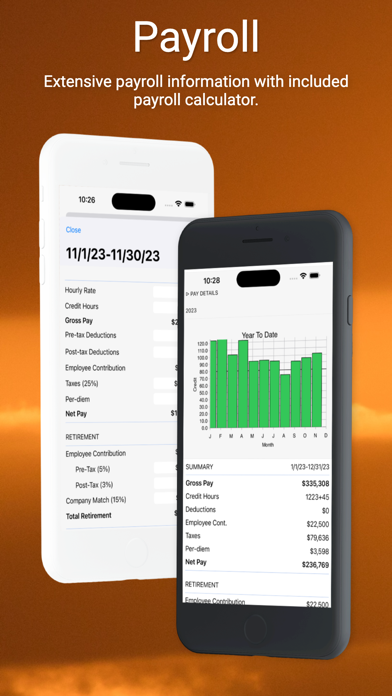
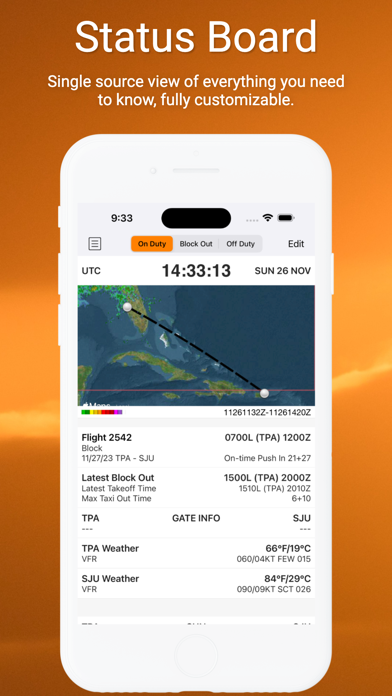
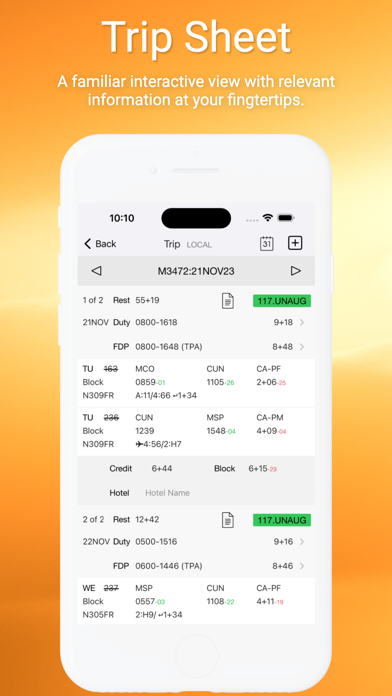
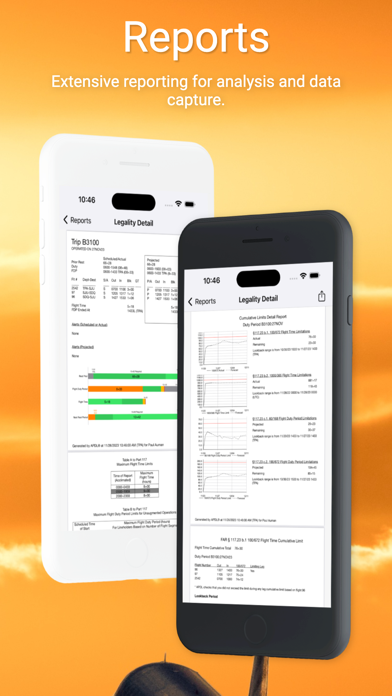
FIRST 90 DAYS FREE for new users. APDL is the airline pilot logbook built by airline pilots, for airline pilots. Designed specifically for Part 117 scheduled operations, APDL combines your logbook with real-time legality, duty and rest tracking, payroll, and schedule importing in one app. LEGALITY & DUTY - Complete 14 CFR Part 117 coverage with up-to-the-minute legality calculations - What-If legality calculations to see how changes affect you - Color-coded legality and projected delay status - Duty and rest charts with color-coded progress bars - Latest Available Takeoff Time (LATT) using planned taxi-out, enroute, and taxi-in times - Automatic duty adjustments based on your report/release settings - Default rest facility support - FAR 1.1 flight time and automatic night calculation SCHEDULE IMPORT - FREE schedule importer supporting 200+ airline formats with time zone support - Direct Flight Crew View integration - Safari share extension for quick importing - Sync flights to the calendar of your choice - Schedule and Calendar views for monthly duty review; tap to add duty LOGGING & TRIP SHEET - Familiar trip sheet format showing gates, turn times, aircraft changes, and projected delays - Cloud data automatically fills in gates, aircraft, and OOOI times - Gate and equipment change notifications - CrossCheck validator flags incomplete or inaccurate entries - Aircraft photos synced across devices - Export flights on APDL.net for import into Logbook Pro STATUS BOARD, WIDGETS & ALERTS - Customizable Status Board with widgets for each duty phase, including LATT and EDCT - Home Screen widgets, Dynamic Island, Live Activities, and CarPlay - Alerts for legality changes, ready-to-fly status, and hotel van departures COMMUTING & TRAVEL - Advanced commute tools and deadhead flight search - Tap a search result to view flight options in FlightAware - Hotel management - Leg resources for EDCT, airport diagrams, and more WEATHER - TAF, METAR, and decoded summaries - Weather map with planned and actual overlays; tap endpoints for weather and FAA delay info PAYROLL & REPORTS - Detailed payroll tracking and calculator - Pay period charts with trip and cumulative totals - Payroll and summary views - On-time performance reporting - Exportable reports in the app and on APDL.net; use Handoff to open reports in your Mac browser - Automatic résumé generation DATA & SYNC - Sync across all your devices with automatic online backup included - Data organized by airline/employer, with archiving - Extensive settings for complete customization Share APDL with fellow crewmembers from the app menu. Subscriptions do not auto-renew. Purchases are charged to your Apple Account. Subscription terms and pricing are available under My Account in the app. Privacy Policy: https://nc-software.com/privacy Terms of Use: https://nc-software.com/tos APDL is a registered trademark of NC Software, Inc.
What's new · 15.5.0
NEW FEATURES - Live Activities & Dynamic Island: Rebuilt with countdown timers, real-time gates, hotel and rest info, and FAA airport delays and ground stops with color-coded severity - Next Flight Widget: Long-press the Home Screen > Edit > Add Widget > APDL. Tap the widget to open your current trip - Widgets and Live Activities now open directly to Trip View - Enhanced Airport Weather: D-ATIS, METAR, and TAF - Flight Crew View import in Schedule Importer - Safari Share Extension: Highlight a trip in Safari, tap Share, then tap APDL to open Schedule Importer - Flight Search: Tap a result to view flight options in FlightAware - Custom Reserve Availability Period (RAP) time entry - Trip View Report: Choose Trip Sheet or Legality Detail - Updated Trip, Legality, Settings, and Résumé reports - Pay Period Charts now include trip and cumulative totals IMPROVEMENTS - APDL stays current when you return to the app - Alerts now show upcoming notifications without tapping refresh - Improved flight route maps and error handling - Paste & Process for AA bidline imports now asks for the trip start date - Switching a leg to a reserve legality type now prompts you to add a RAP first - Tapping Estimated Out on a new leg now explains the leg must be saved first - Added safeguards for reserve legality calculations when RAP data is missing - Airport database updates (PBI/DJT, MMSM/NLU) FIXES - Schedule importer and Paste & Process completion issues, including an empty success screen
Details