
Chart standing · US
What changed · US
Listing changes AppTracker has observed for this app in this storefront — new versions, price moves, rating shifts, and store copy.
- Transaction lists now show ledgers, tags, and reimbursement status - The input field supports multiple lines, making longer entries easier to review and edit - Smoother sign-in, reimbursement actions, and navigation, with several reliability fixes
Price & rating history · US
Reconstructed from the listing changes AppTracker has observed in this storefront, so each line starts at the first change on record.
Average rating
Ratings breakdown · US
The star breakdown behind this app's rating in this storefront.
Screenshots



About
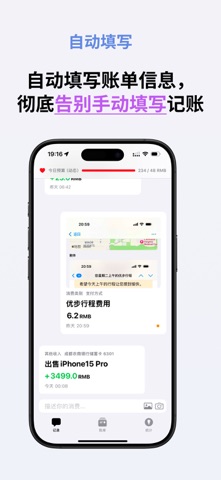
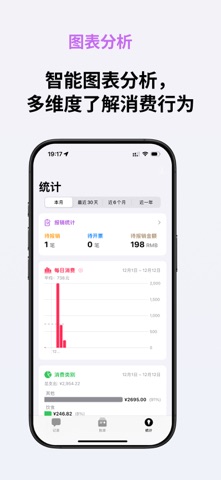
Type a message, take a screenshot, or snap a photo — MONO uses AI to recognize amounts, merchants, and categories automatically. Done in 1 second, no manual input needed. 【AI-Powered Recognition】 Three ways to log expenses automatically: text, screenshots, and photos. Expense tracking has never been this easy. 【Multiple Ways to Log】 • Chat-style entry: record expenses like sending a message • Screenshot recognition: import payment screenshots directly • Photo capture: point at receipts for auto-recognition • Siri Shortcuts: log expenses with a single voice command • Manual input: traditional entry, still fast and easy 【Smart Categories & Reports】 • Auto-categorize your spending • Multi-dimensional charts (monthly trends, category breakdown, calendar view) • Customizable expense categories and payment methods 【Multi-Currency Support】 Track expenses in any major currency — perfect for travel and international spending. 【Subscription Management】 Keep all your subscriptions in one place with renewal reminders to avoid surprise charges. 【Data Security】 • iCloud sync — seamless device switching • Additional cloud backup for extra protection • CSV export — your data, your control 【More Features】 • Dynamic Island live display for instant feedback • Multi-person expense analysis • Account balance management • Home screen widgets for quick spending overview MONO — clarity for every transaction. Terms of Use: https://www.apple.com/legal/internet-services/itunes/dev/stdeula/ Privacy Policy: https://www.weisenjoy.com/privacy
What's new · 26.20.0
- Transaction lists now show ledgers, tags, and reimbursement status - The input field supports multiple lines, making longer entries easier to review and edit - Smoother sign-in, reimbursement actions, and navigation, with several reliability fixes
Details