

BABYMONSTER LIGHT STICK
FANLIGHT Co., Ltd · Entertainment
Independent analytics for this App Store listing. AppTracker is not affiliated with FANLIGHT Co., Ltd.
Chart standing · US
What changed · US
Listing changes AppTracker has observed for this app in this storefront — new versions, price moves, rating shifts, and store copy.
Price & rating history · US
Reconstructed from the listing changes AppTracker has observed in this storefront. A field is charted once it has changed more than once, and each line starts at the value it moved from.
Average rating · ★ 4.67 now · 2 changes on record
Ratings breakdown · US
The star breakdown behind this app's rating in this storefront.
In-app purchases · US
No in-app purchases.
Screenshots




Keywords this app targets
Search terms AppTracker associates with this app — estimates, not search volume. ❝ = in the app's title; a highlighted number is its current position for that term.
Similar apps
Competitors and close alternatives, as estimated by AppTracker.
 LE SSERAFIM Light Stick
HYBE Co., Ltd
2 shared topics · 3 shared title words
LE SSERAFIM Light Stick
HYBE Co., Ltd
2 shared topics · 3 shared title words
 BOYNEXTDOOR Light Stick
HYBE Co., Ltd
1 shared topic · 3 shared title words
BOYNEXTDOOR Light Stick
HYBE Co., Ltd
1 shared topic · 3 shared title words
 CORTIS Official Light Stick
HYBE Co., Ltd
1 shared topic · 3 shared title words
CORTIS Official Light Stick
HYBE Co., Ltd
1 shared topic · 3 shared title words
 BTS Official Light Stick Ver.4
HYBE Co., Ltd
3 shared title words
BTS Official Light Stick Ver.4
HYBE Co., Ltd
3 shared title words
 &TEAM Official Light Stick V1
HYBE Co., Ltd
&TEAM Official Light Stick V1
HYBE Co., Ltd
 Stray Kids Light Stick V2
UMK Entertainment
3 shared title words
Stray Kids Light Stick V2
UMK Entertainment
3 shared title words
 &TEAM Official Light Stick V2
HYBE Co., Ltd
&TEAM Official Light Stick V2
HYBE Co., Ltd
 TWS Official Light Stick
HYBE Co., Ltd
TWS Official Light Stick
HYBE Co., Ltd
About
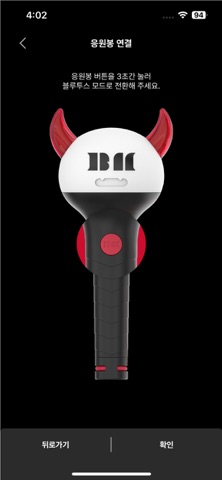
This is the mobile app for the BABYMONSTER LIGHT STICK. The app supports BABYMONSTER official light stick. [MAIN FEATURES] 1. CONCERT MODE Pair your light stick with your concert seat information to enjoy various light stick performance during the concert. This menu will only be available during the concert period. 2. CONNECTING TO BLUETOOTH ON YOUR SMARTPHONE Press the button on the light stick for 3 seconds to set up the “Bluetooth mode”. Turn on the Bluetooth function of your smartphone and hold your smartphone close to the light stick to sync them together. Some smartphones require the GPS function to be turned on to enable Bluetooth connectivity. If you cannot connect to Bluetooth, please turn on the GPS function. 3. SELF MODE When your light stick is successfully connected to your smartphone, changing the color on the color wheel of the app will change your light stick color accordingly. 4. BATTERY LEVEL CHECK In the “SELF MODE” page of the app, click the “Check Battery Status” button at the bottom of the screen to check the battery level of your light stick and replace the battery if needed. ※ This function may differ depending on battery performance and smartphone model. [NOTICE BEFORE CONCERT] - Check the seat information on your ticket before the concert and enter it into your light stick using the app. - To take part in the light stick performance, be sure to set the light stick to “Concert mode” by pressing its button for 3 seconds after pairing it with your seat information on the app. - If the light stick’s wireless performance does not work properly, it may be due to unsuccessful pairing or not completing the pairing process. Please complete the pairing process using the app. - Please be seated in the same seat you registered for your light stick. Moving to another seat may result in different light stick performance. - Check the battery level of your light stick in advance to ensure battery sufficiency during the concert. - There will be a Wireless Control Fanlight Support Center located at the venue. [REQUIRED ACCESS] To use the app and the light stick, the following accesses are required. ※ To grant access, please tap the [Allow] button when the pop-up appears. - DEVICE STORAGE: To store the QR/barcode, seat information, etc. - PHONE: To read the phone status and its identity - CAMERA: To read the QR/barcode - GPS: To connect to Bluetooth - BLUETOOTH: To connect the light stick
What's new · 1.0.6
Bug Fix
Details