

Wedding Planner - No Stress!
Ilia Efremov · Lifestyle
Independent analytics for this App Store listing. AppTracker is not affiliated with Ilia Efremov.
Chart standing · US
What changed · US
Listing changes AppTracker has observed for this app in this storefront — new versions, price moves, rating shifts, and store copy.
Something not working or have an idea? Write to Support in the app, we reply quickly. • Invitation cover: guests see your names and date first • Email notifications: get an email when a guest replies or changes an answer • Album: save all photos and videos at once • Album QR cards: print them for the tables so guests can add their photos • Dashboard: star the invitation you want to see there • Wedding Newspaper: now with a crossword • Settings: change your email address
Price & rating history · US
Reconstructed from the listing changes AppTracker has observed in this storefront. A field is charted once it has changed more than once, and each line starts at the value it moved from.
Average rating · ★ 4.79 now · 6 changes on record
Ratings breakdown · US
The star breakdown behind this app's rating in this storefront.
Screenshots


About
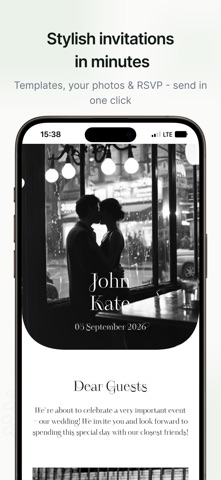
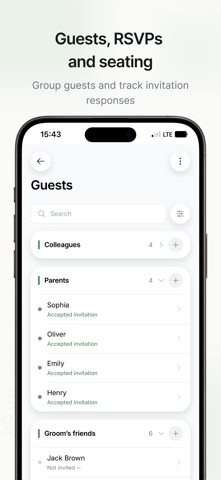
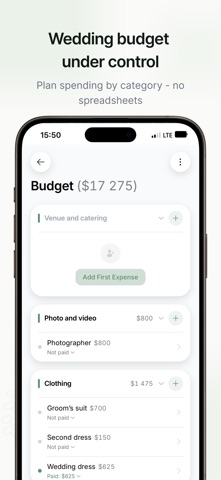
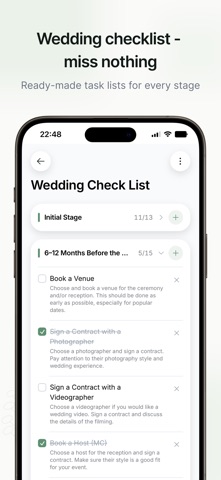
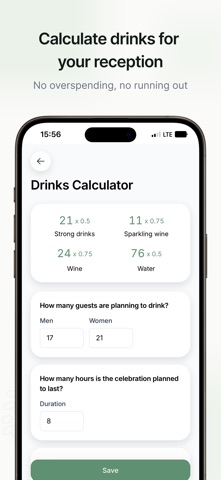
Congratulations on your engagement! One of the happiest stretches of your life is ahead. And one of the busiest. Wedding Planner takes on the busy part: everything that usually scatters across notes, group chats and spreadsheets lives here instead, where none of it gets lost. INVITATIONS AND YOUR WEDDING WEBSITE Pick a template, add your photos, your names and the running order for the day, and you have a page your guests can open from a link. There is nothing for them to download. Guests reply inside the invitation: whether they're coming, who they're bringing, what they eat and drink, whether they need a lift and where they're staying. You watch the answers arrive instead of collecting them out of a dozen chats. If the date or the venue changes, fix it once. Every guest's copy updates itself, and there is nothing to send again. GUEST LIST Who's invited, who's said yes, who's declined, all on one screen. Sort guests into groups: family, the groom's friends, the bridesmaids. Everyone gets a card with contact details, dietary notes and a plus-one. CHECKLIST A ready-made plan laid out by time: a year out, six months out, a month out, and the wedding day itself. Every task comes with a line on why it matters and when to start it. Edit it freely, because no two weddings are the same. BUDGET Costs by category, planned vs actual, marked as paid. At any point you can see what you've spent and what you have left. SEATING Arrange the tables, seat your guests, print the place cards. Share the finished plan with your planner and the venue manager, or export it as a PDF. STYLE AND PALETTE If you don't have a look yet, build one here. Choose a style, pick your colors, gather ideas on a mood board and see how they sit together. TOGETHER Plan as a couple or as a team: both of you, the bridesmaids, your planner. Everyone sees every change straight away. AND MORE Bride chat, wedding day timeline, drinks calculator, a photo album with a QR code for guest pictures, vendor list, banquet menu, playlist, guest book, gift list, and a countdown widget for your home screen. SUPPORT Write to us any time. A real person answers, usually within the hour. And if something is missing, say so: a lot of what is here arrived because a couple asked for it. WHAT IT COSTS Start free, no card required. The trial opens everything up. After that, stay on the free version or unlock a paid pack. It isn't a subscription. No auto-renewal, no repeat charge: you pay once through the App Store, and it lasts the whole engagement plus a month after the wedding. Download Wedding Planner & Invitations and start today: calmly, without the rush, and actually enjoying it.
What's new · 1.8.5
Something not working or have an idea? Write to Support in the app, we reply quickly. • Invitation cover: guests see your names and date first • Email notifications: get an email when a guest replies or changes an answer • Album: save all photos and videos at once • Album QR cards: print them for the tables so guests can add their photos • Dashboard: star the invitation you want to see there • Wedding Newspaper: now with a crossword • Settings: change your email address
Details