

Uptime-monitor
Pedro Ferreira · Developer Tools
Independent analytics for this App Store listing. AppTracker is not affiliated with Pedro Ferreira.
Chart standing · US
What changed · US
Listing changes AppTracker has observed for this app in this storefront — new versions, price moves, rating shifts, and store copy.
New in 1.6.0: - Reliability reports with custom periods, monitor or tag selection, and CSV/PDF export. - 30- and 90-day uptime calendars with daily metrics and logs. - Incident history with outage details, associated checks, and CSV/JSON export. - Optional recovery webhooks, separate templates, and saved delivery history with bounded retries. - Custom maintenance end times. - Network-aware pausing, visible offline gaps, and fresh checks after reconnecting. - Italian, Arabic, and Simplified Chinese support. Also improves upgrade performance, restores failure alerts after maintenance or webhook edits, and keeps incident backfill accurate across HTTP method changes.
In-app purchases · US
What this app sells inside itself, grouped by kind and priced for this storefront.
Screenshots




About
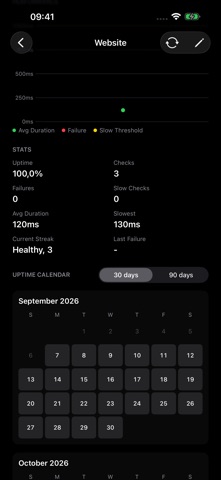
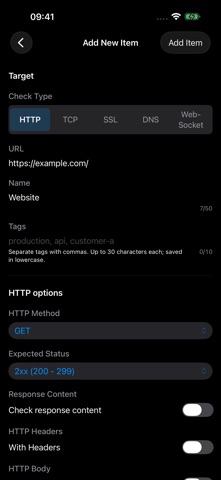
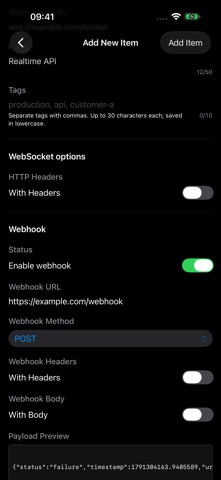
Private uptime monitoring for websites, APIs, WebSockets, TCP ports, DNS records, and SSL certificates. Run checks from your Mac, iPhone, or iPad, with local history, performance charts, failure notifications, and webhook alerts. Explore a 30- or 90-day uptime calendar for each monitor. Tap a day for availability, observation coverage, incidents, and latency, then open or export that day’s logs. Gray days show no observations, and dashed borders mark incomplete observation. Generate reliability reports for 24 hours, 7 days, 30 days, or a custom period. Include all active monitors, a tag, or selected monitors. Review availability from recorded checks, estimated observation coverage, outages, and P50/P95 latency, then export as CSV or PDF. Browse incident history with first and latest failure reasons, observed recovery, and downtime estimates that exclude offline and missing-check gaps. Filter by date, open associated checks, and export incidents as CSV or JSON. Create checks for websites, HTTP APIs, WebSocket endpoints, TCP ports, DNS hostnames, and SSL certificates. Set the interval that makes sense for each kind of check, choose request timeouts and slow-response thresholds, and see whether each service is healthy, slow, unreachable, or close to certificate expiry. Fine-tune HTTP checks with raw, JSON, or form-encoded bodies, expected status matching, and response content assertions. When you need to troubleshoot, open diagnostics for response headers and DNS lookups, then export logs as CSV or JSON for sharing or archiving. Choose how many consecutive failures trigger an alert. Enable local failure and recovery notifications, failure webhooks, and optional recovery webhooks with separate templates. Each webhook event keeps a stable ID and delivery history, with up to six delivery attempts. Mute alerts during maintenance with a preset or custom end time while checks and logs continue. Every check is saved to local history. Review the full log with status, check type, date, and target filters, or open an item's detail page for current status, recent history, performance chart, uptime stats, configuration, and item-specific logs. Organize monitors with tags and filters. A monitoring confidence indicator shows scheduler activity and the effective interval. When your device has no network path, scheduled checks pause and record an observation gap; monitors are checked again when connectivity returns. For deeper debugging, copy ready-to-run terminal commands for each check type: cURL for HTTP, websocat for WebSocket, nc for TCP, dig for DNS, and openssl for SSL. Uptime Monitor runs client-side. Checks run when your device and the app are able to perform them; your checks and logs stay on your device unless you configure your own webhook endpoint. Terms of Use: https://www.apple.com/legal/internet-services/itunes/dev/stdeula/
What's new · 1.6.0
New in 1.6.0: - Reliability reports with custom periods, monitor or tag selection, and CSV/PDF export. - 30- and 90-day uptime calendars with daily metrics and logs. - Incident history with outage details, associated checks, and CSV/JSON export. - Optional recovery webhooks, separate templates, and saved delivery history with bounded retries. - Custom maintenance end times. - Network-aware pausing, visible offline gaps, and fresh checks after reconnecting. - Italian, Arabic, and Simplified Chinese support. Also improves upgrade performance, restores failure alerts after maintenance or webhook edits, and keeps incident backfill accurate across HTTP method changes.
Details