

Mona: Budget & Expense Tracker
Anh Nguyen · Finance
Independent analytics for this App Store listing. AppTracker is not affiliated with Anh Nguyen.
Chart standing · US
What changed · US
Listing changes AppTracker has observed for this app in this storefront — new versions, price moves, rating shifts, and store copy.
Find what you spent without opening Mona. • Type "coffee" into iPhone Search and your transactions, accounts and categories come back — Mona doesn't have to be open, and Siri can answer from the same index • It stays off until you turn it on, in Settings under Search. Turn it off again and everything Mona added is taken back out • Siri now learns from the entries you type as well as the ones you speak, so what it offers matches how you actually use Mona On iOS 27, more of what you write stays with Apple. • When the model on your iPhone can't read a description, Mona asks Apple's Private Cloud Compute before anything goes to a third-party service • Your iPhone still goes first: it is faster, costs nothing and works with no signal Eight languages read as written, not translated. • A second pass over German, Spanish, French, Portuguese, Japanese, Korean, Vietnamese and Simplified Chinese: one word per idea on every screen, one level of formality per language • And a swipe action that offered to make several copies now says what it does — it makes one Thank you for using Mona. Know what you can spend.
Ratings breakdown · US
The star breakdown behind this app's rating in this storefront.
In-app purchases · US
No in-app purchases.
Screenshots




Keywords this app targets
Search terms AppTracker associates with this app — estimates, not search volume. ❝ = in the app's title; a highlighted number is its current position for that term.
Similar apps
Competitors and close alternatives, as estimated by AppTracker.
 Money Tracker - Mona AI
Viet Long Le
2 shared topics · 2 shared title words
Money Tracker - Mona AI
Viet Long Le
2 shared topics · 2 shared title words
 Moneon – My budget & expenses
CleverPumpkin Ltd.
3 shared topics · 1 shared title word
Moneon – My budget & expenses
CleverPumpkin Ltd.
3 shared topics · 1 shared title word
 Monni – Budget & Expenses
Safa Shams
2 shared topics · 1 shared title word
Monni – Budget & Expenses
Safa Shams
2 shared topics · 1 shared title word
 Budget - Expense Tracker
EHM TECH LLC
2 shared topics · 4 shared title words
Budget - Expense Tracker
EHM TECH LLC
2 shared topics · 4 shared title words
 Money Tracker: Budget Manager
Pham Thi Hong Nhung
3 shared topics · 2 shared title words
Money Tracker: Budget Manager
Pham Thi Hong Nhung
3 shared topics · 2 shared title words
 Monefy: Bills & Money Tracker
Reflective Technologies ApS
3 shared topics · 1 shared title word
Monefy: Bills & Money Tracker
Reflective Technologies ApS
3 shared topics · 1 shared title word
 Money Manager & Spend Tracker
Timofei Voropaev
3 shared topics · 1 shared title word
Money Manager & Spend Tracker
Timofei Voropaev
3 shared topics · 1 shared title word
 Expense Tracker - MonAi
Florian Vates
2 shared topics · 3 shared title words
Expense Tracker - MonAi
Florian Vates
2 shared topics · 3 shared title words
About
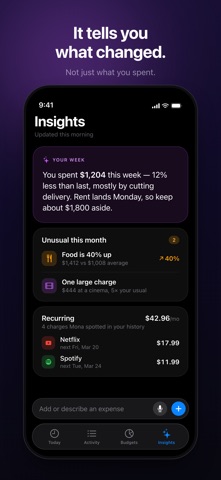
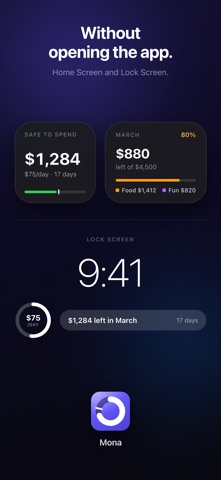
Mona answers the one question a money app should: how much can I actually spend? Not your balance. Not what is left in the account. What is genuinely yours to spend today — once this month's budget and the bills already on their way out have been counted. Free — every feature, no subscription, no ads. SAFE TO SPEND One number, at the top of the screen. Your budget, minus what you have spent, minus the rent and subscriptions Mona has found in your own history and set aside before showing you the figure. No app should tell you the rent is available to spend. AN ANSWER FOR TODAY Mona divides what is left across the days remaining, so every day has a number. Stay near it and you land inside your budget. SEE WHERE THE MONTH LANDS One bar carries two things at once: how much you have spent, and how much of the month has gone. Fill behind the marker means you are pacing well. Mona projects where you will finish while there is still time to change it. ADD AN EXPENSE IN SECONDS • A purpose-built keypad — no menus to scroll • Or describe it: type "coffee 5" and Mona files it • Or say it out loud • Your most-used categories sit one tap away EVERYTHING ELSE • Cash, bank accounts and cards in one place • Budgets by month, week, quarter or year — and by category • Transfers between your own accounts, which never count as spending • Recurring charges found in your own history • A weekly read on your spending, and a quiet word when something is unusual • Home Screen and Lock Screen widgets • An evening reminder, if you want one FREE, YOURS, AND PRIVATE • Free — every feature, for everyone, with nothing locked • No subscription, no ads, no upsell • No account to create • Works offline • Your data stays on your device and in your own iCloud • Encrypted backups you keep yourself • Export everything as a spreadsheet, whenever you like IN YOUR LANGUAGE English, Vietnamese, German, French, Spanish, Portuguese, Japanese, Korean and Simplified Chinese — with every amount, date and number written the way your country writes it. Know what you can spend. Privacy Policy: https://get-mona.app/privacy/ Terms of Use: https://get-mona.app/terms/
What's new · 2.3.1
Find what you spent without opening Mona. • Type "coffee" into iPhone Search and your transactions, accounts and categories come back — Mona doesn't have to be open, and Siri can answer from the same index • It stays off until you turn it on, in Settings under Search. Turn it off again and everything Mona added is taken back out • Siri now learns from the entries you type as well as the ones you speak, so what it offers matches how you actually use Mona On iOS 27, more of what you write stays with Apple. • When the model on your iPhone can't read a description, Mona asks Apple's Private Cloud Compute before anything goes to a third-party service • Your iPhone still goes first: it is faster, costs nothing and works with no signal Eight languages read as written, not translated. • A second pass over German, Spanish, French, Portuguese, Japanese, Korean, Vietnamese and Simplified Chinese: one word per idea on every screen, one level of formality per language • And a swipe action that offered to make several copies now says what it does — it makes one Thank you for using Mona. Know what you can spend.
Details