

Myro:Home Pro for Leviton/HAI
Myro Control, LLC · Lifestyle
Independent analytics for this App Store listing. AppTracker is not affiliated with Myro Control, LLC.
Chart standing · US
What changed · US
Listing changes AppTracker has observed for this app in this storefront — new versions, price moves, rating shifts, and store copy.
Your HAI / Leviton home, with room for more. Myro:Home Pro 2.0 continues our focus on Omni and Lumina systems and introduces NESS / ELK controller support as a preview. HAI / LEVITON • Reliability — Fixed a crash that could occur while queued commands were being cleared or sent during connection changes. • Everything you rely on works as before. ELK adds to Myro:Home Pro; it changes nothing for Omni and Lumina owners. • Connects at home — If your controller uses its outside address, Pro now connects at home too, using the LAN address it learns from Myro:Home Helper 5.0. About shows it once learned. NESS / ELK (PREVIEW) • Add an ELK controller and use Pro's screens for areas, zones, lighting, outputs, tasks and thermostats. M1 / M1 Gold, EZ8 and EZ24 through an M1XEP, M1XIP or C1M1 interface. • Security in the same place — View live zone status, bypass individual or violated burglar zones, restore zones, step arming modes, and follow reported countdowns and alarm memory. Panel tools under the area's settings add chime, function keys and user-code area checks. • Sync feedback — Sync Controller Data in Utilities shows progress and reports completion or an interrupted sync. • Shortcuts — Run core device actions and request fresh status with Siri and Shortcuts. Security commands use your user code, entered in the shortcut or the one saved in the app. • Lighting timers and outputs — Use lighting timers in the existing controls and add specific unnamed outputs through 208 from controller settings. • Face ID, widgets and location — Arm with Face ID using your saved code, widgets refresh in the background, and location automations run once the panel connects, as HAI controllers do. • Numeric controls — Edit counters and custom settings in Pro's drawers, with confirmed saves. • Sensors — Keypad and zone probe temperatures in Climate, read automatically, and zone voltage from the zone's settings. • Companions — Core controls on Apple Watch and in CarPlay. Optionally enable Companion Security in iPhone settings for arming and disarming. • Zones by type — Zones carry their panel definition, such as Burglar Entry/Exit or Fire Alarm, and filter into the same Entry/Exit, Perimeter, Interior, Fire and Emergency sections used for HAI. • Events — The panel's event log on the Events tab, with the panel's own names for each event. • Messages — The panel's ten custom words are message tiles: Say speaks the recording, Show puts the tile's name on your keypads, and the Spoken Sentence tile says whatever you name it, in the panel's own voice. • Users — Change a user's code or prox card, restrict a user, or remove a restriction, with your authorization code and no codes kept in the app. • Equipment — A light's Insteon address is set from its settings. Legacy M1XEP audio zones still appear in the Audio tab when your panel reports them. • Panel settings — User code length and temperature units come from the panel itself. • Notifications — Scan Helper's push code in the ELK controller's settings, as with HAI, for alerts and Live Activities. FOR EVERYONE • Apple Home — HomeKit control leaves preview. Accessories sit alongside your panel in Status, Rooms, Favorites, Watch, CarPlay, widgets and Shortcuts, now with occupancy, carbon monoxide and air quality sensors, heater-coolers, low-battery badges, jammed locks and live updates from the Home app. • Add HomeKit anytime — Start with a HAI or ELK controller, then add HomeKit Support from Utilities when you're ready. ELK support is a preview; features vary by panel, firmware and equipment. ELK controllers pair with Myro:Home Helper 5.0 using the code under Helper's Connection > Pairing. HAI and Leviton remain our core focus. If you're trying ELK, tell us at https://myrocontrol.com/support.
Price & rating history · US
Reconstructed from the listing changes AppTracker has observed in this storefront. A field is charted once it has changed more than once, and each line starts at the value it moved from.
Average rating · ★ 3.67 now · 2 changes on record
In-app purchases · US
What this app sells inside itself, grouped by kind and priced for this storefront.
Screenshots




About
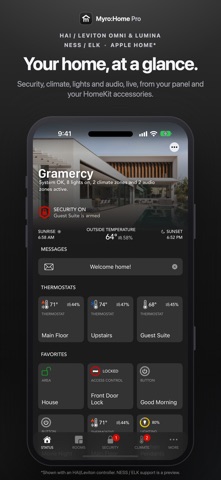
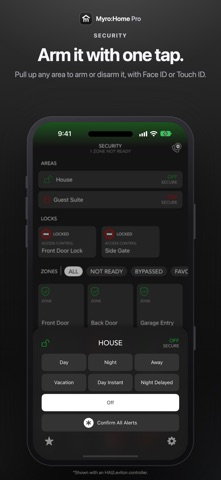
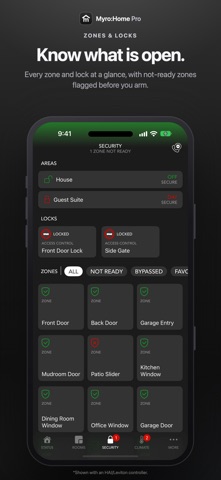
Your HAI / Leviton home, beautifully connected. Myro:Home Pro puts your Omni or Lumina system at your fingertips: security, lights, climate and cameras in a clear, customizable interface on iPhone and iPad. HAI and Leviton remain at the heart of Myro:Home Pro. Add Apple HomeKit accessories alongside your controller's devices, organize everything by room and keep the controls you use most close at hand. New in 2.0: NESS / ELK controller support is available as a preview, bringing ELK M1 security and automation into the same Myro:Home Pro experience. BUILT FOR HAI / LEVITON • Monitor security areas and zones, arm or disarm, and bypass or restore zones. • Switch and dim lights, adjust thermostats and control blinds. • Manage supported multi-zone audio systems, including HAI Hi-Fi 2 direct control. • Run automation buttons and manage flags, outputs, messages and controller events. • Group devices into rooms and create favorites for quick access. • Manage multiple controllers and properties with a subscription. ADD HOMEKIT ANYTIME Bring compatible HomeKit lights, switches, outlets, fans, locks, blinds, garage doors, thermostats, sensors, security systems and cameras into Myro:Home Pro. Add HomeKit Support from your HAI or ELK controller's settings whenever you're ready. You can also use Myro:Home Pro with a HomeKit-only setup, without a HAI or ELK panel. NESS / ELK PREVIEW • View areas and zones; arm, step modes, bypass or restore burglar zones, and use keypad/chime controls. • Follow arming countdowns and alarm memory. • Edit named counters and custom number, duration and time settings. • Control lights, outputs, tasks and thermostats, with lighting timers and optional unnamed outputs. • See system trouble and current activity on Home, with connection warnings. • View reporting keypad and configured zone probe temperatures, and read zone voltage. • Say the panel's custom words, show text on keypads and speak sentences from the Messages tab; legacy M1XEP audio zones in the Audio tab. • Keep your manually added rooms and cameras, and add HomeKit accessories alongside your ELK devices. ELK support is a preview. Available features depend on your panel, firmware and connected equipment. Tell us what works well and what your setup needs at myrocontrol.com/support. CAMERAS IN ONE PLACE View compatible RTSP and MJPEG cameras, add cameras manually or import them from UniFi Protect. YOUR HAI / HOMEKIT HOME, ACROSS APPLE DEVICES Use supported HAI/Leviton controls with Apple Watch, CarPlay, widgets, Siri and Shortcuts, and your HomeKit accessories on Apple Watch and in CarPlay. HomeKit security systems also arm with Siri. ELK preview adds core controls through Siri, Shortcuts, Apple Watch and CarPlay. Enable optional Companion Security in iPhone settings for Watch and CarPlay arming. MYRO:HOME HELPER Pair your Omni, Lumina or ELK system with Myro:Home Helper for Mac for features such as push notifications, logging, graphing, scripting and a HomeKit bridge. ELK pairs with Helper 5.0 using the code under Connection > Pairing. TRY IT FREE Security control is free. HomeKit-only setups can try up to four accessories at no cost. A subscription unlocks additional controls and multiple controllers. The Complete Bundle subscription covers both Myro:Home and Myro:Home Pro. HAI Hi-Fi 2 direct control is also available through a one-time purchase. HARDWARE REQUIREMENTS HAI/Leviton: Ethernet-enabled OmniPro II, Omni IIe, Omni LTe, Lumina or Lumina Pro, with controller firmware 3.5 or later. NESS / ELK preview: M1 / M1 Gold, EZ8 and EZ24 configurations require an ELK network interface: M1XEP, M1XIP or C1M1, which all speak the same M1 protocol. Model and firmware compatibility are being validated during the preview. HomeKit: compatible accessories configured in Apple Home. Control away from home requires an Apple home hub. Privacy Policy: https://myrocontrol.com/privacy_policy.asp Terms of Use: https://myrocontrol.com/terms_of_use.asp
What's new · 2.0.0
Your HAI / Leviton home, with room for more. Myro:Home Pro 2.0 continues our focus on Omni and Lumina systems and introduces NESS / ELK controller support as a preview. HAI / LEVITON • Reliability — Fixed a crash that could occur while queued commands were being cleared or sent during connection changes. • Everything you rely on works as before. ELK adds to Myro:Home Pro; it changes nothing for Omni and Lumina owners. • Connects at home — If your controller uses its outside address, Pro now connects at home too, using the LAN address it learns from Myro:Home Helper 5.0. About shows it once learned. NESS / ELK (PREVIEW) • Add an ELK controller and use Pro's screens for areas, zones, lighting, outputs, tasks and thermostats. M1 / M1 Gold, EZ8 and EZ24 through an M1XEP, M1XIP or C1M1 interface. • Security in the same place — View live zone status, bypass individual or violated burglar zones, restore zones, step arming modes, and follow reported countdowns and alarm memory. Panel tools under the area's settings add chime, function keys and user-code area checks. • Sync feedback — Sync Controller Data in Utilities shows progress and reports completion or an interrupted sync. • Shortcuts — Run core device actions and request fresh status with Siri and Shortcuts. Security commands use your user code, entered in the shortcut or the one saved in the app. • Lighting timers and outputs — Use lighting timers in the existing controls and add specific unnamed outputs through 208 from controller settings. • Face ID, widgets and location — Arm with Face ID using your saved code, widgets refresh in the background, and location automations run once the panel connects, as HAI controllers do. • Numeric controls — Edit counters and custom settings in Pro's drawers, with confirmed saves. • Sensors — Keypad and zone probe temperatures in Climate, read automatically, and zone voltage from the zone's settings. • Companions — Core controls on Apple Watch and in CarPlay. Optionally enable Companion Security in iPhone settings for arming and disarming. • Zones by type — Zones carry their panel definition, such as Burglar Entry/Exit or Fire Alarm, and filter into the same Entry/Exit, Perimeter, Interior, Fire and Emergency sections used for HAI. • Events — The panel's event log on the Events tab, with the panel's own names for each event. • Messages — The panel's ten custom words are message tiles: Say speaks the recording, Show puts the tile's name on your keypads, and the Spoken Sentence tile says whatever you name it, in the panel's own voice. • Users — Change a user's code or prox card, restrict a user, or remove a restriction, with your authorization code and no codes kept in the app. • Equipment — A light's Insteon address is set from its settings. Legacy M1XEP audio zones still appear in the Audio tab when your panel reports them. • Panel settings — User code length and temperature units come from the panel itself. • Notifications — Scan Helper's push code in the ELK controller's settings, as with HAI, for alerts and Live Activities. FOR EVERYONE • Apple Home — HomeKit control leaves preview. Accessories sit alongside your panel in Status, Rooms, Favorites, Watch, CarPlay, widgets and Shortcuts, now with occupancy, carbon monoxide and air quality sensors, heater-coolers, low-battery badges, jammed locks and live updates from the Home app. • Add HomeKit anytime — Start with a HAI or ELK controller, then add HomeKit Support from Utilities when you're ready. ELK support is a preview; features vary by panel, firmware and equipment. ELK controllers pair with Myro:Home Helper 5.0 using the code under Helper's Connection > Pairing. HAI and Leviton remain our core focus. If you're trying ELK, tell us at https://myrocontrol.com/support.
Details