

HighlightMe - Teleprompter
GINtech Systems LLC · Productivity
Independent analytics for this App Store listing. AppTracker is not affiliated with GINtech Systems LLC.
Chart standing · US
What changed · US
Listing changes AppTracker has observed for this app in this storefront — new versions, price moves, rating shifts, and store copy.
What's New in HighlightMe 2.5.0 - Use a second iPhone or iPad as a remote. Turn on Allow Remote Control on the device you're reading from, then tap Use as Remote on the other to record, pause, flip the camera and change the scroll speed from across the room. - Dyslexia-friendly fonts: OpenDyslexic and Lexend are now in the font list. - Settings now has a Remote Control section, including your keyboard shortcuts. - Stability and performance improvements.
Price & rating history · US
Reconstructed from the listing changes AppTracker has observed in this storefront. A field is charted once it has changed more than once, and each line starts at the value it moved from.
Average rating · ★ 4.85 now · 2 changes on record
Ratings breakdown · US
The star breakdown behind this app's rating in this storefront.
Screenshots



About
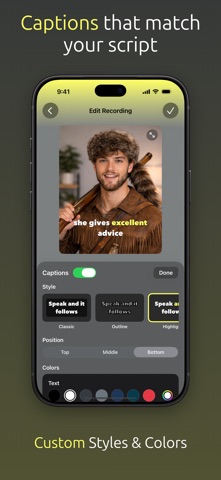
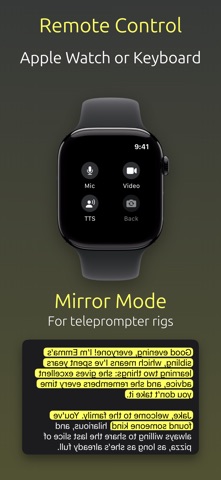
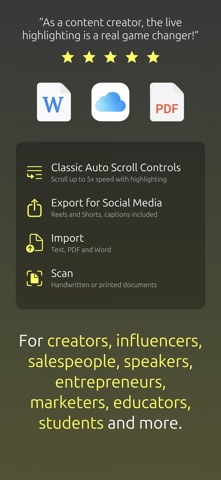
Deliver confident, polished videos and presentations with HighlightMe, the teleprompter app that highlights and scrolls your script as you speak. HighlightMe follows your voice with Smart Progression: every word lights up as you say it and the script keeps pace, even when you skip ahead. Your eyes stay on the camera and your delivery sounds natural. Made for content creators, coaches, teachers, speakers, pastors and students. Record a video, rehearse a speech or present live, and HighlightMe keeps you on track, hands-free. Key Features: • Smart Progression: real-time word tracking that highlights and scrolls your script as you speak, even when you skip words. • Video Recording: record in 1080p or 4K with your script over the camera. Pause, resume and undo a segment as often as you like, and it all becomes one take. • Captions: add captions to your videos in your script's own words, timed to your voice. Choose the style, colors, font, size and position. • Filters and Backgrounds: smooth your skin and blur or replace your background while you record. • AI Script Writer: describe what you need and get a script in seconds, or let AI rewrite, shorten or polish the one you have. • Text Scanner: point your camera at printed pages or handwriting and turn them into a script. • Import Documents: bring in PDFs, Word documents and text files as scripts. • Remote Control: start, pause and change speed from your Apple Watch or a Bluetooth keyboard. • Picture in Picture: keep your script scrolling in a floating window while you use other apps. • Classic Auto-Scroll: prefer timed scrolling? Set the speed and let your script flow. • Countdown and Script Timer: a countdown before you start and a timer while you read. • Audio-Only Recording: rehearse or record voice-overs without video. • Text to Speech: hear your script read aloud to check its flow and timing. • Mirror Mode: flip the script for beam-splitter teleprompters and reflected glass. • Text Size, Fonts and Colors: choose what reads best from a distance. • Cloud Sync: your projects on every device where you sign in. Speech recognition available in English, French, German and Spanish.
What's new · 2.5.0
What's New in HighlightMe 2.5.0 - Use a second iPhone or iPad as a remote. Turn on Allow Remote Control on the device you're reading from, then tap Use as Remote on the other to record, pause, flip the camera and change the scroll speed from across the room. - Dyslexia-friendly fonts: OpenDyslexic and Lexend are now in the font list. - Settings now has a Remote Control section, including your keyboard shortcuts. - Stability and performance improvements.
Details