

ChMirror - Apple TV Recorder
龙 陈 · Utilities
Independent analytics for this App Store listing. AppTracker is not affiliated with 龙 陈.
Chart standing · US
What changed · US
Listing changes AppTracker has observed for this app in this storefront — new versions, price moves, rating shifts, and store copy.
• A redesigned interface with dedicated Devices, Library, and Settings tabs. • Start and stop recording directly from the mirroring screen. • Keep screenshots and recordings organized in your media library. • View photos full screen and play recordings with native playback controls. • Easily share captures, save them to Photos, or export them to Files. • Clearer network access guidance and connection error messages. • Improved mirroring stability, audio playback, and recording reliability.
In-app purchases · US
What this app sells inside itself, grouped by kind and priced for this storefront.
Screenshots
About
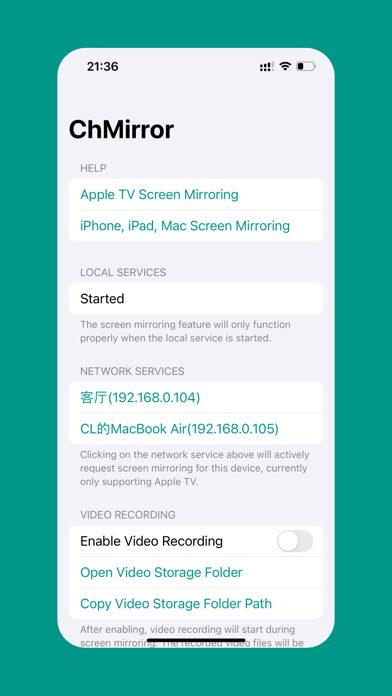
Welcome to ChMirror, a powerful app designed to effortlessly enhance your entertainment experience. It allows you to easily take screenshots and record videos of your Apple TV screen, while also supporting AirPlay to seamlessly receive screen casting from other devices. Whether you want to share memorable moments or present important content, ChMirror has you covered. === Key Features === 1. Screenshots: Capture moments on your Apple TV screen with a single tap and save them as high-quality images for easy sharing or storage. 2. Video Recording: Record high-quality videos of your Apple TV screen, whether you're watching movies, playing games, or giving presentations. Easily share or save them online. 3. Simple and Intuitive Interface: ChMirror features a clean and user-friendly interface, making it easy for anyone to get started. === User Feedback === We value your feedback. Please contact us using the methods below to help us continuously improve and enhance your experience. === Compatibility === ChMirror supports the latest versions of Apple TV, ensuring you can fully enjoy all features. Download ChMirror now and discover a new way to use Apple TV, capturing more amazing moments! === Others === Features such as screen mirroring require a purchase to unlock. You can subscribe monthly/yearly or purchase a lifetime membership. Privacy Policy: https://www.termsfeed.com/live/8d4ee817-b6c1-4559-b9d0-c6efa7286e37 Terms of Use: http://www.apple.com/legal/itunes/appstore/dev/stdeula
What's new · 1.2.0
• A redesigned interface with dedicated Devices, Library, and Settings tabs. • Start and stop recording directly from the mirroring screen. • Keep screenshots and recordings organized in your media library. • View photos full screen and play recordings with native playback controls. • Easily share captures, save them to Photos, or export them to Files. • Clearer network access guidance and connection error messages. • Improved mirroring stability, audio playback, and recording reliability.
Details