

Billiard Shot Studio
Razor Pool, LLC · Sports
Independent analytics for this App Store listing. AppTracker is not affiliated with Razor Pool, LLC.
Chart standing · US
What changed · US
Listing changes AppTracker has observed for this app in this storefront — new versions, price moves, rating shifts, and store copy.
• New simulation engine: Updated shot physics and frame-by-frame playback to examine every collision. • Zoom and fine-tune: Pinch to zoom up to 4× for easier ball placement and precise aiming. • More ways to practice: Customize random shots and generate 8-ball, 9-ball, and 10-ball break setups with Premium.
Price & rating history · US
Reconstructed from the listing changes AppTracker has observed in this storefront. A field is charted once it has changed more than once, and each line starts at the value it moved from.
Average rating · ★ 4.72 now · 10 changes on record
Ratings breakdown · US
The star breakdown behind this app's rating in this storefront.
In-app purchases · US
What this app sells inside itself, grouped by kind and priced for this storefront.
Screenshots





Keywords this app targets
Search terms AppTracker associates with this app — estimates, not search volume. ❝ = in the app's title; a highlighted number is its current position for that term.
Similar apps
Competitors and close alternatives, as estimated by AppTracker.
 Cue Lab | Shots & Layouts
Bright Mediums
2 shared topics
Cue Lab | Shots & Layouts
Bright Mediums
2 shared topics
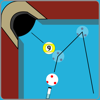 Billard Aiming Calculator Pro
EscuSoft
1 shared topic
Billard Aiming Calculator Pro
EscuSoft
1 shared topic
 Aim Master 8 Ball Pool Pro
ADITYA DEBNATH
2 shared topics
Aim Master 8 Ball Pool Pro
ADITYA DEBNATH
2 shared topics
 WPB: Pool Training & Drills
Parrent Ventures LLC
2 shared topics
WPB: Pool Training & Drills
Parrent Ventures LLC
2 shared topics
 Trick Shot Scorekeeper
Brett Brooks
Trick Shot Scorekeeper
Brett Brooks
 iShooter Mobile
TOO SHOOTING-SOFT
iShooter Mobile
TOO SHOOTING-SOFT
 Shot Tracer
Visual Vertigo Software Technologies GmbH
1 shared title word
Shot Tracer
Visual Vertigo Software Technologies GmbH
1 shared title word
 Golf Round Log: Shot Review
hiroshi itagaki
Golf Round Log: Shot Review
hiroshi itagaki
About
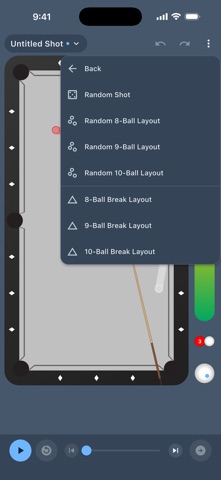
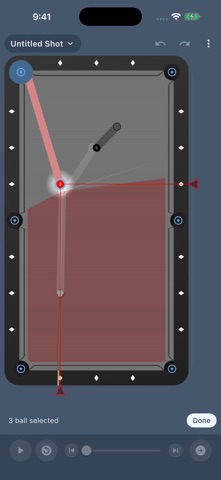
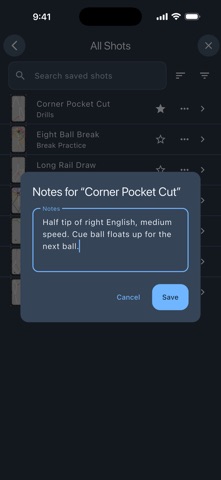
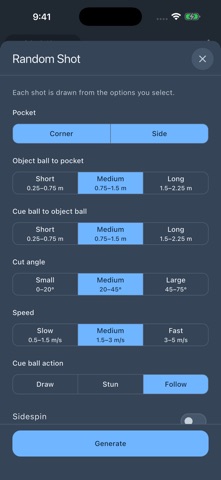
Design a shot. See how it plays. Take it to the table. Billiard Shot Studio helps pool players and coaches explore shot ideas, understand cue ball movement, and build a personal practice library. Adjust aim, speed, and cue tip position, then watch the simulation to see how each change affects the shot. SIMULATE AND STUDY • Play, pause, scrub, and step through shots frame by frame. • Explore how speed, spin, and ball position affect the result. • Follow ball paths, inspect collisions, and continue from the end of a shot. • Pinch to zoom up to 4× for a closer look and precise adjustments. DESIGN YOUR SHOTS • Position balls and fine-tune your aim with direct controls. • Try changes with undo and redo, or flip a setup horizontally or vertically. • Use ball paths, aiming guides, a tangent line, and optional diamond grids. • Select an object ball and pocket to find an aiming solution with Pocket Ball. • Export shot images to Photos or share them with a player, coach, or friend. FIND CUE BALL POSITION Choose an object ball and place a target for the cue ball. Find Positioning Shot searches for a shot that pockets the selected ball and brings the cue ball toward your target. Adjust search precision to balance speed and detail. ORGANIZE YOUR PRACTICE Keep saved shots in collections, add notes, and mark favorites. Browse All Shots or Favorites, search by name, filter for shots with notes, and sort by name, recently added, or recently viewed. Rename, move, and update existing shots as your ideas develop. MORE WAYS TO PRACTICE WITH PREMIUM • Customize random shots by pocket type, distance, cut angle, speed, sidespin, and draw, stun, or follow. • Generate random 8-ball, 9-ball, and 10-ball layouts. • Set up full 8-ball, 9-ball, and 10-ball break racks. • Add more object balls and visualize shape zones for a selected ball and pocket. • Save new shots, create collections, and copy saved shots. • Use Find Positioning Shot beyond the free daily allowance. Core editing, simulation, playback, image sharing, and the first two object balls are free. Find Positioning Shot includes three successful results per device each day. Cloud library features require sign-in; creating new saved shots and collections requires Premium. Browsing and updating existing saved shots is free. Terms of use: https://www.apple.com/legal/internet-services/itunes/dev/stdeula/
What's new · 3.0.0
• New simulation engine: Updated shot physics and frame-by-frame playback to examine every collision. • Zoom and fine-tune: Pinch to zoom up to 4× for easier ball placement and precise aiming. • More ways to practice: Customize random shots and generate 8-ball, 9-ball, and 10-ball break setups with Premium.
Details