

Archie: Architecture ID
Jason Girouard · Education
Independent analytics for this App Store listing. AppTracker is not affiliated with Jason Girouard.
Chart standing · US
What changed · US
Listing changes AppTracker has observed for this app in this storefront — new versions, price moves, rating shifts, and store copy.
Archie 3.13 shows its work while it reads a building, and asks for your location where it helps. • The scan screen is now a checklist. Each step ticks off as Archie reads your photo, checks its building database, compares reference photos and matches the style. When it has to look further, a new set of steps shows the city records or the web search, and the style appears as soon as Archie knows it. • The welcome tour has a new last step about location. With location on, Archie checks the buildings in front of you, so lesser-known buildings get named and answers come faster. Location stays optional. • When a photo went without a location, the end of its result says what location adds, with a button to turn it on or to open Settings. • Haptics: a tap when the answer lands, and light ticks as you pinch through the zoom stops, scroll the feature cards, or browse places on the map. • The "you found" banner on results is gone. Photographing a building from the map still collects it. • If you create an account in the EU, the UK, Switzerland or Canada, the box for news and research emails starts unticked. • Privacy links in the app now open our privacy policy at thearchieapp.com. • Fixed: closing the plan screen in the welcome tour could leave you stuck on its last page.
Price & rating history · US
Reconstructed from the listing changes AppTracker has observed in this storefront. A field is charted once it has changed more than once, and each line starts at the value it moved from.
Average rating · ★ 4.80 now · 3 changes on record
Ratings breakdown · US
The star breakdown behind this app's rating in this storefront.
Screenshots


About
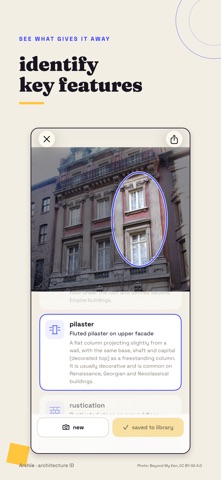
Point your camera at any building and know what you're looking at. Archie identifies the architectural style of any building from a photo, then teaches you why. Snap a facade and get the style, the era, the visible features that give it away, and the story behind it. It's like having an architecture professor in your pocket. HOW IT WORKS • Snap a building (or import a photo from your library) • Archie matches it against 146 architectural styles, from Gothic to Googie, Brutalism to Beaux-Arts, Brooklyn brownstones to Czech Cubism • See the features that signal the style (pointed arches, corbels, tracery) circled on your photo and explained in plain language • Archie looks for the exact building in a database of 826,291 buildings, then on the web, and names it only when it can check the match • Named buildings open with their own history and their architect's story • Tap Tell me more for suggested questions about the building, its style, or its architect • Every result includes a note about the exact building in your photo EXPLORE YOUR NEIGHBORHOOD The Map puts 5,700+ noteworthy buildings at your feet across 135 U.S. cities: famous landmarks and hidden gems, each with photos and the story of why it matters. See what's near you, filter for hidden gems, walk over, and photograph a mapped building to collect it. More cities on the way. LISTEN AS YOU LOOK Every section of a result has its own play button, from the building's history to the style's, and so does every mapped building. It's a walking tour that starts wherever you're standing. BUILD YOUR LIFELIST Every style you identify unlocks in your LifeList: a field guide of all 146 styles to collect, with real-world examples from around the globe. Spotting styles becomes a game you play with every walk. YOUR PERSONAL LIBRARY Every save keeps the photo and its full analysis, searchable and readable offline. Vacation buildings, hometown gems: your record of everything you've learned. MADE FOR EXPLORERS • Works worldwide, on anything from cathedrals to bungalows • Offline queue: snap now, analyze when you're back online • City map packs work offline once downloaded • Share cards for your best finds • Optional account: sign in with Apple, Google, or your email to back up your Library and LifeList across your iPhones. Identifying needs no account. No ads. PRIVACY FIRST Identifying a building needs no account. Photos are analyzed in the cloud and aren't kept on Archie's servers unless you save one to your account or report a wrong answer. If you allow location, your position and the direction you're facing go with the photo to work out which building it is, and aren't stored apart from those saves and reports. Sign in only if you want your saves backed up; they're stored for you alone until you delete them. With an account we may email you now and then about new features or research; you choose when you sign up and can turn it off in Settings. No ads in the app and no tracking across other apps: Archie never touches your advertising identifier. FREE & PREMIUM Your first 3 identifications are free, no strings. Archie Unlimited removes the limit and unlocks every place on the map, as a yearly plan that starts with a 7-day free trial or a one-time lifetime unlock. The yearly plan auto-renews until cancelled in your App Store settings; cancel at least 24 hours before the trial ends and you won't be charged. Your Library and LifeList stay fully readable without a subscription. Terms of Use (EULA): https://www.apple.com/legal/internet-services/itunes/dev/stdeula/ Privacy Policy: https://thearchieapp.com/privacy/
What's new · 3.13
Archie 3.13 shows its work while it reads a building, and asks for your location where it helps. • The scan screen is now a checklist. Each step ticks off as Archie reads your photo, checks its building database, compares reference photos and matches the style. When it has to look further, a new set of steps shows the city records or the web search, and the style appears as soon as Archie knows it. • The welcome tour has a new last step about location. With location on, Archie checks the buildings in front of you, so lesser-known buildings get named and answers come faster. Location stays optional. • When a photo went without a location, the end of its result says what location adds, with a button to turn it on or to open Settings. • Haptics: a tap when the answer lands, and light ticks as you pinch through the zoom stops, scroll the feature cards, or browse places on the map. • The "you found" banner on results is gone. Photographing a building from the map still collects it. • If you create an account in the EU, the UK, Switzerland or Canada, the box for news and research emails starts unticked. • Privacy links in the app now open our privacy policy at thearchieapp.com. • Fixed: closing the plan screen in the welcome tour could leave you stuck on its last page.
Details