

GridQuilt: Collage & Split
文阳 贺 · Graphics & Design
Independent analytics for this App Store listing. AppTracker is not affiliated with 文阳 贺.
Chart standing · US
What changed · US
Listing changes AppTracker has observed for this app in this storefront — new versions, price moves, rating shifts, and store copy.
This update makes long screenshots, collages, and image splitting easier to use. • Improved screenshot stitching and recording processing to better preserve the final frames. • Added collage templates. • Refined the interface, toolbars, and export panel, including Liquid Glass effects and dark mode. • Improved back navigation, photo selection, and purchase restoration. • Refined translations and layouts across supported languages.
Ratings breakdown · US
The star breakdown behind this app's rating in this storefront.
In-app purchases · US
What this app sells inside itself, grouped by kind and priced for this storefront.
Screenshots




Similar apps
Competitors and close alternatives, as estimated by AppTracker.





About
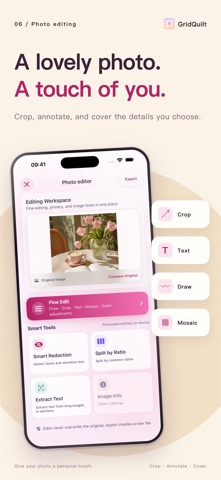
GridQuilt is a focused image tool for splitting photos, creating collages, and making long screenshots. Organize chat history, web pages, tutorials, receipts, and social media images with a fast, local workflow. Key features • Long screenshot stitching Select consecutive screenshots and automatically remove overlapping areas as they are stitched into one long image. Open any seam for precise manual adjustment when needed. • Scrolling screen capture Use the system screen broadcast to capture scrolling content and create a long screenshot. Frames are analyzed on your device and are not uploaded to a server. • Grid image splitting Split one photo into 2×2, 3×3, and other grid layouts. Adjust grid size, spacing, aspect ratio, and shapes for social media layouts and image slicing. • Photo collages Combine multiple photos into horizontal, vertical, or grid layouts. Adjust spacing, color, ratio, and crop position. • Flexible export Export as PNG, JPEG, HEIC, or PDF. Save to Photos, export to Files, or share with the system share sheet. Privacy first Photo processing, screen-recording frame analysis, and long screenshot stitching happen locally on your device. Screen capture starts only after you explicitly confirm the system screen broadcast. Core features are available to use. GridQuilt Pro adds larger grids, higher output limits, and higher-quality screen-recording long screenshots.
What's new · 2.2
This update makes long screenshots, collages, and image splitting easier to use. • Improved screenshot stitching and recording processing to better preserve the final frames. • Added collage templates. • Refined the interface, toolbars, and export panel, including Liquid Glass effects and dark mode. • Improved back navigation, photo selection, and purchase restoration. • Refined translations and layouts across supported languages.
Details