

Didly - Hack Your Productivity
rakTech LLC · Productivity
Independent analytics for this App Store listing. AppTracker is not affiliated with rakTech LLC.
Chart standing · US
In-app purchases · US
What this app sells inside itself, grouped by kind and priced for this storefront.
Screenshots





About
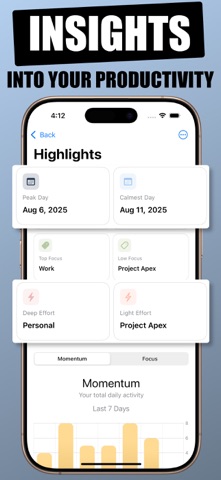
This is Didly! Flip the script on your to-do lists by focusing on what you’ve already accomplished. Discovering your wins (big or small) triggers a sense of progress, lifts your mood, and builds momentum for what's next. Whether you’re tracking a work project, indie development, customer initiatives, or personal achievements, Didly is your feel-good list focused on what you've done. FEATURES • Unobtrusive and Lightning Quick: Didly for iOS features insanely quick data entry, providing immediate access to logging your completed tasks. • Automatic Time Logging: A timestamp is recorded automatically, with optional time tracking. • Tagging System: Assign tasks to specific projects or categories using customizable tags. • Visual Insights: Charts provide visual representations of your task activity, showcasing daily goals, time spent, and tag distribution. • Data Export: Export your logged tasks as CSV, JSON, or Text files to share with your team or report to your manager. • Apple Reminders Integration: Sync your completed Apple Reminders to Didly • Shortcuts Support: Integrate task logging into your workflows with the built-in Siri Shortcuts support. • iCloud Support: Your entries are automatically backed up to iCloud and synced across your devices EASY ENTRY • Automatic Time Logging: Automatically logs the time of task entry. • Optional Time Tracking: Add time spent on tasks. • Tag Assignment: Use tags for project tracking and categorization. HIGHLIGHTS • See your time and effort distribution and make informed decisions • Visualize Activity: View task activity from the previous 7 days. • Distribution and Time Spent: See task distribution, time spent, and tag types. DATA EXPORT • Custom Date Range: Select the range for exporting data. • Multiple Formats: Export to CSV, JSON, or Text file. • Data Sharing: Share exported data with your team or management. PRIVACY • Didly is designed with privacy as a first-class citizen. For more details, refer to our Privacy Policy. == TERMS & PRIVACY == https://thatvirtualboy.com/didly#terms https://thatvirtualboy.com/didly#privacy https://www.apple.com/legal/internet-services/itunes/dev/stdeula/
What's new · 2026.4
Didly is smoother and more reliable on iPhone in this update. • Fixed quick task editing so assigning a time, tag, or duration now saves properly. • Fixed day grouping issues that could place midnight tasks on the wrong day. • Improved tag suggestions so multi-tag entries are recognized more accurately. • Added haptic feedback for key actions like saves, deletes, warnings, and errors. • Improved reminders and notification settings with clearer permission handling. • Improved charts and exports for more accurate stats and cleaner data output. • Various usability fixes and reliability improvements.
Details