

Fine Volume Control
Morikawa Tatsunosuke · Utilities
Independent analytics for this App Store listing. AppTracker is not affiliated with Morikawa Tatsunosuke.
Chart standing · US
What changed · US
Listing changes AppTracker has observed for this app in this storefront — new versions, price moves, rating shifts, and store copy.
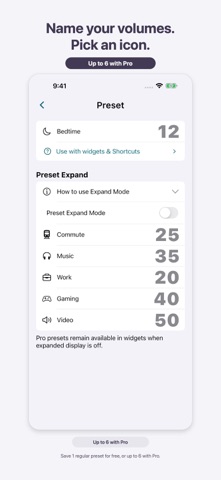
- Give your volume presets names and icons. - Choose and apply saved presets from new Home Screen and Lock Screen widgets or Shortcuts. - Access presets from a dedicated Control Center button on iOS 18 or later. - Added a guide to using presets outside the app. - A brief notice now appears on the main screen when Safety Max limits the volume. - Added a “Rate on the App Store” link in Settings. - Improved layouts with larger text and display updates after changing the app language.
Price & rating history · US
Reconstructed from the listing changes AppTracker has observed in this storefront. A field is charted once it has changed more than once, and each line starts at the value it moved from.
Average rating · ★ 4.75 now · 3 changes on record
In-app purchases · US
What this app sells inside itself, grouped by kind and priced for this storefront.
Screenshots


About
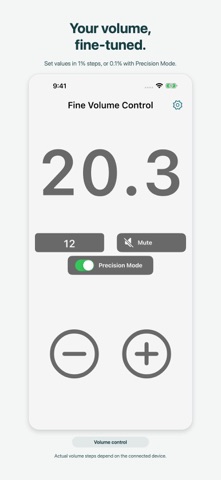
Fine Volume Control lets you adjust iPhone system volume in small steps from within the app. It is not a volume booster. Key features • On-screen controls in 1% steps • Precision mode with 0.1% steps • Mute • Save frequently used volume levels as presets with names and icons • Customize the colors of the standard design • Access presets from Home Screen and Lock Screen widgets • Apply saved presets with Shortcuts • Use Safety Max to limit volume values set through the app The app sends volume values to the iPhone in 1% or 0.1% steps. The smallest change and available range actually applied depend on the iPhone and the connected earphones, speakers, or other audio device. The side buttons continue to use the iPhone’s standard volume steps. Free and Pro The free version includes the standard design, color customization, one preset with a name and icon, widgets, and Shortcuts. You can also turn Safety Max on or off for free. Pro unlocks additional designs, including Zen Garden and Sky, up to six presets, changes to the legacy widget’s dedicated volume value, and changes to the Safety Max limit. Widgets and Shortcuts Widgets for selecting saved presets require iOS 17 or later. Choose a saved preset or the legacy widget’s dedicated volume value. Tapping a widget opens the app and applies the volume. Applying saved presets with Shortcuts requires iOS 17 or later. Naming a preset “Sleep” does not create a schedule, timer, or automatic action. Control Center On iOS 18 or later, add a dedicated control to access a selected preset. Using the control opens the app and applies the saved volume. Safety Max When enabled, Safety Max limits volume values set through the app. A brief notice appears on the main screen when the requested volume exceeds the limit. Changing the limit requires Pro. Sky Switch between Sunrise and Moonrise, then drag up or down on the sky to adjust the volume. Bluetooth and external audio devices Depending on the device and connection method, fine values requested by the app may be applied in larger steps.
What's new · 1.11.0
- Give your volume presets names and icons. - Choose and apply saved presets from new Home Screen and Lock Screen widgets or Shortcuts. - Access presets from a dedicated Control Center button on iOS 18 or later. - Added a guide to using presets outside the app. - A brief notice now appears on the main screen when Safety Max limits the volume. - Added a “Rate on the App Store” link in Settings. - Improved layouts with larger text and display updates after changing the app language.
Details