

Text Editor: PWEditor Next
Masatsugu Futamata · Utilities
Independent analytics for this App Store listing. AppTracker is not affiliated with Masatsugu Futamata.
Chart standing · US
What changed · US
Listing changes AppTracker has observed for this app in this storefront — new versions, price moves, rating shifts, and store copy.
- File information is now retrieved sequentially in Google Drive, Dropbox, OneDrive, and Box file lists. - Fixed an issue where Google Drive file lists were not restored correctly after restarting the app.
In-app purchases · US
What this app sells inside itself, grouped by kind and priced for this storefront.
Screenshots



Keywords this app targets
Search terms AppTracker associates with this app — estimates, not search volume. ❝ = in the app's title; a highlighted number is its current position for that term.
Similar apps
Competitors and close alternatives, as estimated by AppTracker.
 GoCoEdit - Code & Text Editor
Christoph Gogolin
GoCoEdit - Code & Text Editor
Christoph Gogolin
 Text Editor - LiquidLogic
MEGASOFT Inc.
Text Editor - LiquidLogic
MEGASOFT Inc.
 Web IDE - AI Code Editor
Tahmiez Sandaim
Web IDE - AI Code Editor
Tahmiez Sandaim
 Code Editor - Compiler & IDE
Rhythm Software
Code Editor - Compiler & IDE
Rhythm Software
 Neon Vision Editor
Hilthart Pedersen
Neon Vision Editor
Hilthart Pedersen
 Textastic Code Editor
Alexander Blach
Textastic Code Editor
Alexander Blach
 GTW - Markdown & Text Editor
Christoph Gogolin
GTW - Markdown & Text Editor
Christoph Gogolin
 Koder Code Editor
Reny Mustika
Koder Code Editor
Reny Mustika
About
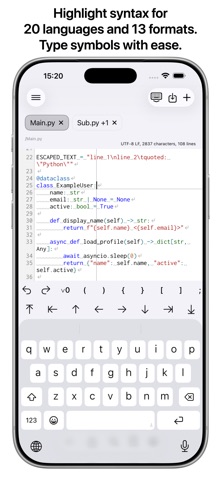
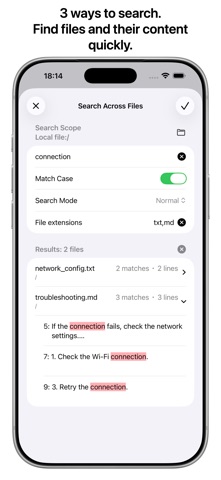
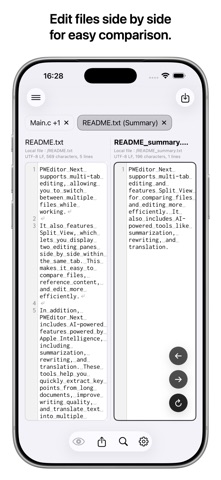
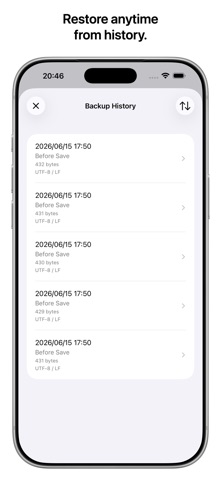
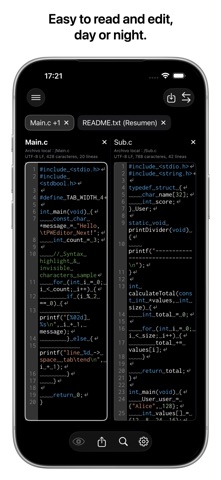
PWEditor Next is a powerful text editor that lets you edit text files directly across a wide range of storage services. You can edit in real time while viewing a preview tailored to each file format. Based on the original PWEditor app, PWEditor Next has been redesigned for the latest iOS and iPadOS environments. ・Supports 10 storage types Supports local files, five cloud storage services (iCloud Drive, Google Drive, Dropbox, OneDrive, and Box), and four server types (FTP, SFTP, SMB, and WebDAV). - SFTP supports username and password authentication. - WebDAV supports username and password authentication and connects over HTTP or HTTPS. ・Previews 16 file formats - Dedicated previews: PDF and images - Document formats: HTML, Markdown, and AsciiDoc - Diagram and chart formats: Mermaid, PlantUML, Graphviz, D2, and Pikchr - Tree formats: JSON, YAML, XML, and PropertyList - Table formats: CSV and TSV The 14 formats other than PDF and images also support real-time previews. For CSV and TSV, you can configure whether the file has a header row and choose the delimiter. ・Advanced editor features - Syntax highlighting - 20 languages: Arduino、Bash/Shell、C、C++、C#、Dart、GO、Java、JavaScript、Kotlin、Lua、Objective-C、PHP、Python、R、Ruby、Rust、SQL、Swift、TypeScript - 13 formats: AsciiDoc, CSS, D2, Graphviz, HTML, JSON, Markdown, Mermaid, Pikchr, PropertyList, PlantUML, XML, and YAML - Display of invisible characters (half-width spaces, full-width spaces, tabs, and line breaks) - Status information (character encoding, line endings, character count, and line count) - File path display - Line numbers - Horizontal and vertical guide lines - Auto-indentation - Symbol input, including Undo and Redo - Cursor movement - Character encoding and line ending conversion ・Multiple tabs and split-screen view Open and edit multiple files at the same time in tabs. The free plan supports up to two tabs; the Pro plan removes the tab limit. In split-screen view, you can display two files or a file and its preview side by side within a single tab. Split-screen view is available on the free plan for local files and iCloud Drive. The Pro plan is required for all other storage services. ・Three types of search - Find and replace within a file - Search for file and directory names - Search across multiple files ・File manager features - File list - Rename, copy, move, and delete files and directories - Export files - Recently opened files - Favorites ・Backup history Files are backed up before saving, before converting character encoding or line endings, and before restoring from backup history. You can use the history to restore an earlier version of a file. ・AI features Use Apple Intelligence to summarize, rephrase, and translate text. ・Other features - Switch the display language (Japanese, English, Spanish, or Chinese) - Switch between light and dark themes - Support for cloud storage sharing links - Support for files shared from other apps ・Free plan and Pro plan Basic features are available for free. The following features require the Pro plan: - More than two tabs across all storage services - Split-screen view, AI features, copy, move, and export for storage services other than local files and iCloud Drive - Search within subdirectories and search filters for some storage services ・Terms of Use (Apple’s Standard EULA): https://www.apple.com/legal/internet-services/itunes/dev/stdeula/
What's new · 3.18.0
- File information is now retrieved sequentially in Google Drive, Dropbox, OneDrive, and Box file lists. - Fixed an issue where Google Drive file lists were not restored correctly after restarting the app.
Details