

How Many Times Counter
Bill Harned · Productivity
Independent analytics for this App Store listing. AppTracker is not affiliated with Bill Harned.
Chart standing · US
What changed · US
Listing changes AppTracker has observed for this app in this storefront — new versions, price moves, rating shifts, and store copy.
Count together. Share any counter with up to 4 friends or family members, and see everyone's counts in their own color on a shared calendar. Your own counter and history stay exactly as they are. • Share from any counter with the new person button, or turn on "Share with others" when you create one • Pick your color and name, and see everyone's counts right on the card • New Shared Counter widget: everyone's counts at a glance, with a + button for your own • Leave or stop sharing any time — your own counts always stay on your phone Shared counters are part of Premium
Ratings breakdown · US
The star breakdown behind this app's rating in this storefront.
In-app purchases · US
What this app sells inside itself, grouped by kind and priced for this storefront.
Screenshots


About
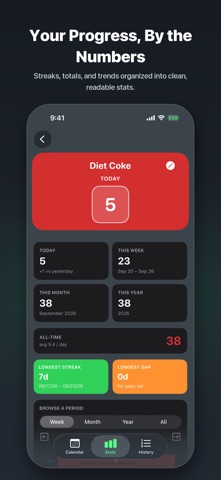
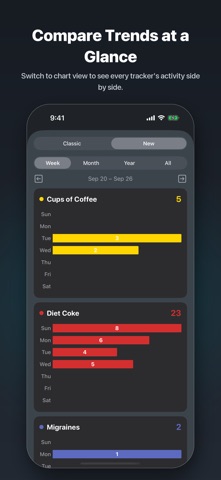
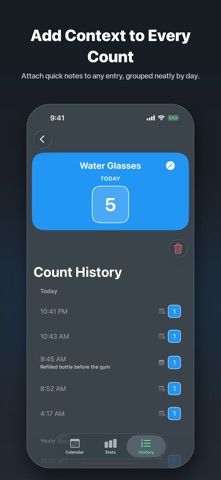
Here's the full revised version — plain text, ready to paste into App Store Connect: How Many Times is a simple tally counter for anything you want to track — soda, migraines, workouts, cigarettes, water, coffee, or any habit that matters to you. Log a count in one tap, then see it laid out on a calendar, in your stats, or in a running history — all in one clean, fast app. Here's what you can expect: Effortless Tracking: Create as many counters as you need and log entries in a single tap, whether it's a daily habit like soda intake or an occasional occurrence like a migraine episode. Add Context: Attach a quick note to any logged entry, so you remember exactly what happened — visible right in your history, grouped neatly by day. Calendar View: Visualize your counts on a calendar to quickly spot patterns and trends over time, with color-coded dots when viewing all your trackers at once. Customizable Timeframes: View your counts by week, month, year, or lifetime for a complete picture of your data. Convenient Logging: Forgot to log a count for a particular day? Use the calendar view to retroactively add counts as needed. Chart View: Analyze your counts with visual bar charts to uncover trends across all your trackers side by side. Detailed History: Browse a full, day-by-day history of every count you've logged, with notes included. iCloud Sync: Back up your data to iCloud and pick up right where you left off on any of your devices. Secure and Private: Protect the app with Face ID, and lock individual counters for added privacy. Data Export & Import: Export your data with the press of a button, or import it from a formatted CSV file to migrate your existing records. How Many Times Premium ($2.99/year, auto-renewing) unlocks unlimited counters, individual count locking, Face ID app lock, data import/export, and iCloud sync. You can start tracking for free — Premium is there when you're ready for more. Download now and start tracking what matters to you. Terms of Use: https://www.apple.com/legal/internet-services/itunes/dev/stdeula/
What's new · 2.1
Count together. Share any counter with up to 4 friends or family members, and see everyone's counts in their own color on a shared calendar. Your own counter and history stay exactly as they are. • Share from any counter with the new person button, or turn on "Share with others" when you create one • Pick your color and name, and see everyone's counts right on the card • New Shared Counter widget: everyone's counts at a glance, with a + button for your own • Leave or stop sharing any time — your own counts always stay on your phone Shared counters are part of Premium
Details