

Magic Retouch: AI Photo Editor
Yajing Qian · Graphics & Design
Independent analytics for this App Store listing. AppTracker is not affiliated with Yajing Qian.
Chart standing · US
What changed · US
Listing changes AppTracker has observed for this app in this storefront — new versions, price moves, rating shifts, and store copy.
- Improved the user experience.
Ratings breakdown · US
The star breakdown behind this app's rating in this storefront.
Screenshots



About
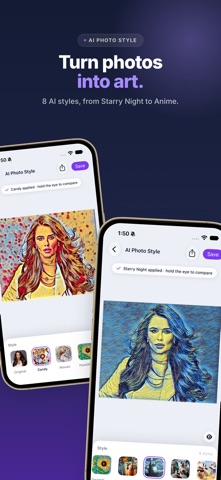
An all-in-one AI photo editor: remove unwanted objects, erase backgrounds, cut out subjects, turn photos into art, and fix blurry, dark or noisy shots — all on your iPhone. ERASE & CUT • Object Eraser: brush, lasso or tap to remove people, text and clutter • Background Eraser: swap in a photo, a camera shot, a solid color or keep it transparent • Photo Cutout: auto-select the main subject, or refine it with Lasso, Tap and Paint AI PHOTO STYLE Turn any photo into art with 8 AI styles, including Van Gogh's Starry Night, Candy, Mosaic, Pointillism and Anime. Hold to compare with the original. RESTORE & ENHANCE • Super Resolution: upscale photos and bring back fine detail • Deblurring: recover detail from shaky or soft photos • Denoising: clean up grain from high-ISO shots • Low Light: brighten dark photos while keeping noise down • Contrast: balance light and shadow so flat photos pop • Deraining: clear rain streaks from outdoor photos EASY TO USE • Pinch to zoom, crop and rotate • Undo, compare with the original or revert anytime • Save to Photos, copy to the clipboard or share in one tap PRIVATE BY DESIGN All AI runs on your iPhone. Your photos are never uploaded, and there is no account to create.
What's new · 1.3
- Improved the user experience.
Details