

SnipKey - Keyboard Extension
Jonathan Taveras · Utilities
Independent analytics for this App Store listing. AppTracker is not affiliated with Jonathan Taveras.
Chart standing · US
What changed · US
Listing changes AppTracker has observed for this app in this storefront — new versions, price moves, rating shifts, and store copy.
- Improve Tags order and creation - Full QWERTY Keyboard: Complete keyboard with letters, numbers, symbols, and instant snippet access. Type naturally without switching apps. (Experimental) - Slash Commands: Type / + snippet name for instant autocomplete—just like Slack or Notion. Smart fuzzy search finds matches as you type. - Open Source: View the code on GitHub. Transparent, privacy-first development. - Smart Keyboard Features: Auto-capitalization, smart punctuation, and biometric security for secure snippets. - Enhanced Performance: Faster keyboard response, lower memory usage, smoother typing experience. - Bug Fixes: Improved stability and iCloud sync reliability.
Price & rating history · US
Reconstructed from the listing changes AppTracker has observed in this storefront. A field is charted once it has changed more than once, and each line starts at the value it moved from.
Average rating · ★ 4.87 now · 5 changes on record
Ratings breakdown · US
The star breakdown behind this app's rating in this storefront.
In-app purchases · US
What this app sells inside itself, grouped by kind and priced for this storefront.
Screenshots



About
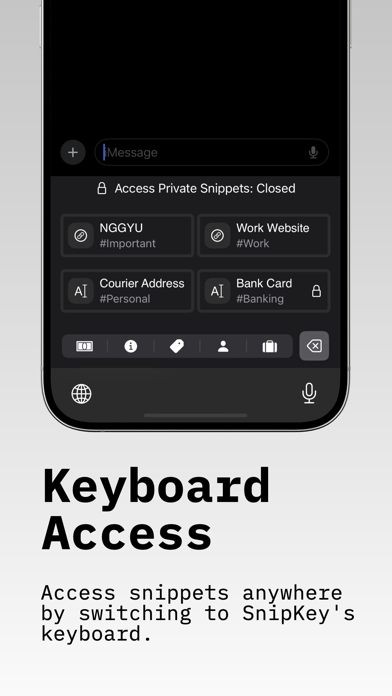
Introducing SnipKey, the simple and modern solution for managing text snippets and images, complete with a sleek custom keyboard extension. SnipKey seamlessly integrates into your digital workflow, revolutionizing how you interact with content across all your apps—from personal reminders to sensitive work information. SnipKey is a Keyboard Extension. Why SnipKey Stands Out? - Simple & Modern Design Intuitive interface that's a joy to use Clean, minimalist aesthetics for distraction-free productivity - Effortless Management Easily create, store, and categorize snippets and images Custom tags for quick retrieval and organization - Smart Keyboard Extension Access snippets instantly in any app Seamlessly switch to SnipKey without leaving your current task - Advanced Filtering Find exactly what you need with tag-based filtering Categorize snippets by type (Personal, Work, Banking) or custom tags - Enhanced Security Protect sensitive data with robust encryption Secure snippets with FaceID or TouchID for privacy - Universal Compatibility Works flawlessly across your favorite apps Access snippets wherever you are, whenever you need them SnipKey isn't just a snippet manager—it's a comprehensive, modern solution designed to enhance your productivity and simplify your digital life. With its sleek interface and powerful features, SnipKey transforms how you handle information. Learn more at https://snipkey.jrtv.online Terms of Service: https://snipkey.jrtv.online/terms-conditions Privacy Policy: https://snipkey.jrtv.online/privacy-policy EULA: https://www.apple.com/legal/internet-services/itunes/dev/stdeula/
What's new · 6.5
- Improve Tags order and creation - Full QWERTY Keyboard: Complete keyboard with letters, numbers, symbols, and instant snippet access. Type naturally without switching apps. (Experimental) - Slash Commands: Type / + snippet name for instant autocomplete—just like Slack or Notion. Smart fuzzy search finds matches as you type. - Open Source: View the code on GitHub. Transparent, privacy-first development. - Smart Keyboard Features: Auto-capitalization, smart punctuation, and biometric security for secure snippets. - Enhanced Performance: Faster keyboard response, lower memory usage, smoother typing experience. - Bug Fixes: Improved stability and iCloud sync reliability.
Details