

Singapore Bus
Meiwin Fu · Navigation
Independent analytics for this App Store listing. AppTracker is not affiliated with Meiwin Fu.
Chart standing · US
What changed · US
Listing changes AppTracker has observed for this app in this storefront — new versions, price moves, rating shifts, and store copy.
Your bus, wherever you look. • Bus stop widget: every bus at your stop, with its times, on your Home Screen. Whenbus Pro. • Apple Watch app: nearby stops, every bus, and the countdown from your wrist. Starting the countdown is free; bus times on the watch are Whenbus Pro. • One press to start: from Control Center, the Lock Screen or the Action Button. On iOS 26 and later, starting without opening the app is Whenbus Pro. • A clearer countdown on your Lock Screen and in the Dynamic Island: every bus you follow, one line each. Thank you for riding with Whenbus. Whenbus Pro helps keep it running.
In-app purchases · US
What this app sells inside itself, grouped by kind and priced for this storefront.
Screenshots



About
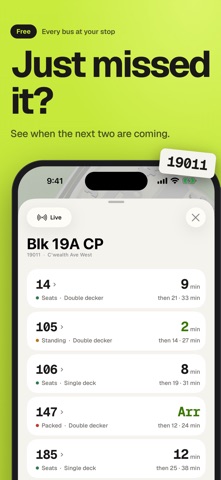
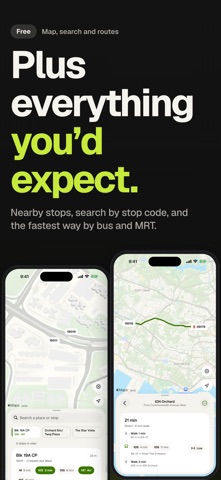
Never miss your bus again. Whenbus counts your bus down on your Lock Screen, so you can wait in the aircon and step out just as it pulls in. No more checking again and again, no more running for the bus. Arrival times come straight from LTA DataMall, the same source that feeds the panels at the stop. FREE • Your bus counting down on your Lock Screen and in the Dynamic Island, for up to 3 buses at a stop, and in the Smart Stack on your Apple Watch, while the app is closed • Every bus at every stop, with the next three arrivals, how full it is and the bus type • Nearby stops on a map that opens where you are, or search by stop name, code or road • Ways there: the fastest way by bus and MRT • MRT and LRT connections on stop cards, and the stops along every service • Start the countdown from your Apple Watch • No account, no sign-up WHENBUS PRO • Bus stop widget: every bus at your stop, with its times, on your Home Screen • Bus times on Apple Watch: nearby stops and every bus at a stop, on your wrist • One press to start: Control Center, the Lock Screen or the Action Button starts the countdown without opening the app (iOS 26 and later; on earlier versions the control starts it on every plan) • Follow up to 6 buses at a stop • No ads Whenbus Pro is an optional auto-renewing subscription: weekly, monthly or yearly. The monthly and yearly plans start with a 7-day free trial if you have not had one. Everything in the free list stays free; the free version shows ads. HOW THE COUNTDOWN WORKS Open a stop, tap Live, pick the buses you can take and start. The countdown keeps updating while the app is closed, and ends by itself once your buses have gone. Swiping the banner away does not stop it; end it in the app. Privacy: your location stays on your iPhone to sort nearby stops. Requires an internet connection. During LTA DataMall maintenance, live times may be unavailable. Not affiliated with LTA, SimplyGo, or any Singapore bus operator. Terms of Use: https://www.apple.com/legal/internet-services/itunes/dev/stdeula/ Privacy: https://whenbus.app/privacy/ Support: https://whenbus.app/support/
What's new · 2.10
Your bus, wherever you look. • Bus stop widget: every bus at your stop, with its times, on your Home Screen. Whenbus Pro. • Apple Watch app: nearby stops, every bus, and the countdown from your wrist. Starting the countdown is free; bus times on the watch are Whenbus Pro. • One press to start: from Control Center, the Lock Screen or the Action Button. On iOS 26 and later, starting without opening the app is Whenbus Pro. • A clearer countdown on your Lock Screen and in the Dynamic Island: every bus you follow, one line each. Thank you for riding with Whenbus. Whenbus Pro helps keep it running.
Details