

Only Practice - Music Journal
昇 陈 · Music
Independent analytics for this App Store listing. AppTracker is not affiliated with 昇 陈.
Chart standing · US
What changed · US
Listing changes AppTracker has observed for this app in this storefront — new versions, price moves, rating shifts, and store copy.
Only Practice 4.0 adds reference performances to your practice. • Add reference performances from Apple Music search or song links, audition available previews, or extract audio from your own videos. Listen while practicing. • The metronome supports time signatures including 6/8. Player controls and returning to an unsaved timer from a widget have been improved.
Price & rating history · US
Reconstructed from the listing changes AppTracker has observed in this storefront. A field is charted once it has changed more than once, and each line starts at the value it moved from.
Average rating · ★ 4.67 now · 2 changes on record
Ratings breakdown · US
The star breakdown behind this app's rating in this storefront.
In-app purchases · US
What this app sells inside itself, grouped by kind and priced for this storefront.
Screenshots







About
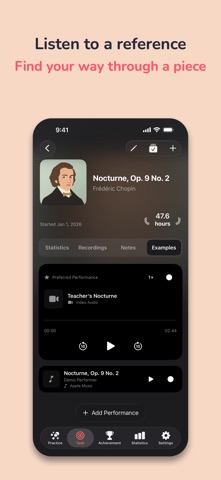
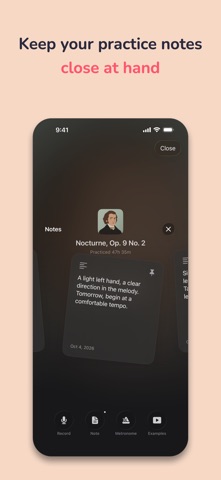
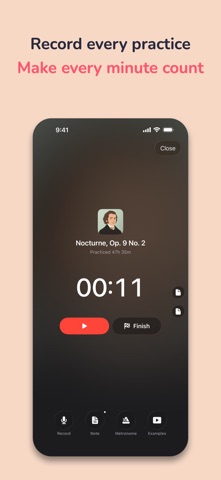
Only Practice — a music practice journal, one session at a time. For musicians who play piano, violin, cello, guitar, and more. Choose a piece, start the timer, capture an idea, or record a passage to listen to later. Keep a record of your practice, whether you are just starting or refining your repertoire. Record each practice session Use a stopwatch or countdown to track your time and follow your practice streaks. Tap a recently practiced piece on the home screen to pick up where you left off. Give every piece its own cover Create square covers using symbols, emoji, composer illustrations, or your photos. Choose soft background colors, gradients, and symbol colors, or crop a photo. Your cover appears across the list, home screen, and piece details. Keep notes within reach Write, read, and edit notes during practice. Pin useful reminders to the side of the screen and find them again the next time you open that piece. The timer keeps running while you use your notes. Set the beat Open the metronome popover on the practice screen to adjust tempo, beats, and sound, or save a preset. Tuck the panel away when you are ready to focus. Listen back and see your progress Save recordings and notes with your pieces, then revisit them in piece details and the timeline. Explore your practice time in Statistics and organize completed pieces into achievements and collections. Continue across your devices Made for iPhone and iPad, with iCloud sync. Supports iOS 18 and later, with glass effects that adapt to your system version. Only Practice offers free features, monthly and yearly subscriptions, and a lifetime purchase. Pro unlocks unlimited piece management. Current prices are shown in the app, and Restore Purchases is available. Turn your love of music into a lasting practice habit with Only Practice. Review and share your practice See weekly and monthly practice charts for each piece. Browse recordings and notes with the timeline calendar. Turn notes into images or animated Live Photos, choose a style and edit the sharing text separately. A Home Screen widget shows a piece’s cover and saved practice hours. Listen to reference performances Save multiple reference performances for each piece. Search Apple Music or paste a song link and audition available previews before adding. You can also extract audio from a video you choose. Listen from piece details or during practice, with speed controls for video audio. Full Apple Music playback requires an eligible subscription. Terms of Use: https://www.apple.com/legal/internet-services/itunes/dev/stdeula/ Privacy Policy: https://github.com/shawnchenxmu/Practice_Privacy_Policy/tree/main
What's new · 4.0
Only Practice 4.0 adds reference performances to your practice. • Add reference performances from Apple Music search or song links, audition available previews, or extract audio from your own videos. Listen while practicing. • The metronome supports time signatures including 6/8. Player controls and returning to an unsaved timer from a widget have been improved.
Details