

My Altitude: Chart & Compass
Shenzhen Jirry Jirry Technology Co., Ltd. · Travel
Independent analytics for this App Store listing. AppTracker is not affiliated with Shenzhen Jirry Jirry Technology Co., Ltd.
Chart standing · US
What changed · US
Listing changes AppTracker has observed for this app in this storefront — new versions, price moves, rating shifts, and store copy.
Meet the new My Altitude. • A redesigned home, journey recorder and personal journal. • An altitude camera with postcard and photo-overlay styles, shutter-time elevation and optional direction. • A compass with true or magnetic north and bearing lock. • Elevation profiles, pause and resume, journey photos and shareable story cards. • Improved camera location guidance and photo-sharing presentation. • A new mountain icon, refreshed launch screen and light and dark appearances. • English, Simplified Chinese, Traditional Chinese, Japanese, German and French. Privacy Policy: https://compassnow.github.io/privacy.html Terms of use: https://compassnow.github.io/terms.html
Ratings breakdown · US
The star breakdown behind this app's rating in this storefront.
In-app purchases · US
What this app sells inside itself, grouped by kind and priced for this storefront.
Screenshots






About
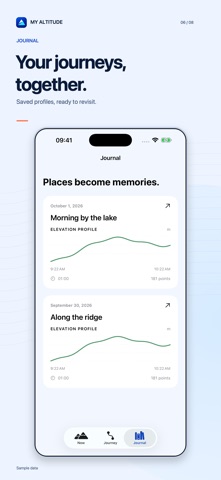
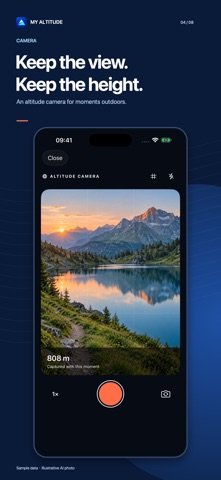
A little higher. A little more to remember. My Altitude brings elevation, a compass and your outdoor memories together. Check your height above sea level, record a walk and bring home more than a number. KNOW YOUR ELEVATION View GPS elevation, reported vertical accuracy and direction. Switch between metres and feet, or calibrate against a known elevation. Clear signal states tell you when a reading is unavailable. RECORD THE JOURNEY Start, pause, resume and save an elevation recording. Review your elevation profile, ascent, descent, highest point and recorded time. Add elevation reminders. Recording can continue while the screen is locked; force-quitting stops collection. GPS gaps remain visible in the profile. FIND YOUR BEARING Choose true or magnetic north, check sensor uncertainty and lock a bearing to help keep your orientation. The compass is an orientation aid, not turn-by-turn navigation. CAPTURE THE MOMENT Take a photo with the elevation and direction available at the shutter moment. Choose a postcard or photo overlay, add a note, then save to Photos, share or attach it to a journey. Precise coordinates are hidden by default; exported altitude photos do not retain the source image's GPS metadata. BUILD YOUR JOURNAL Keep completed journeys, profiles and up to eight photos per journey on your device. Create a story card to share. Light and dark appearances make the journal feel at home throughout the day. Live Activities and Shortcuts help you access recording. YOUR CHOICES No account is required. Journeys and photos are stored locally and may be included in your device backups. Usage statistics and crash diagnostics are separate, optional settings, off by default. ALTITUDE PLUS Core elevation, compass, camera and journal features are available without a subscription. Optional Altitude Plus unlocks CSV and JSON journey exports. Subscription price, period and any eligible trial are shown before purchase. Payment is charged to your Apple Account; the subscription renews automatically unless cancelled at least 24 hours before the end of the current period. Manage or cancel it in Apple Account subscription settings. Elevation and direction are estimates affected by your device and surroundings. My Altitude is not a surveying, medical or emergency navigation instrument.
What's new · 2.0.0
Meet the new My Altitude. • A redesigned home, journey recorder and personal journal. • An altitude camera with postcard and photo-overlay styles, shutter-time elevation and optional direction. • A compass with true or magnetic north and bearing lock. • Elevation profiles, pause and resume, journey photos and shareable story cards. • Improved camera location guidance and photo-sharing presentation. • A new mountain icon, refreshed launch screen and light and dark appearances. • English, Simplified Chinese, Traditional Chinese, Japanese, German and French. Privacy Policy: https://compassnow.github.io/privacy.html Terms of use: https://compassnow.github.io/terms.html
Details