

Paranormal Spirit Bell
Spotted Ghosts · Lifestyle
Independent analytics for this App Store listing. AppTracker is not affiliated with Spotted Ghosts.
Chart standing · US
What changed · US
Listing changes AppTracker has observed for this app in this storefront — new versions, price moves, rating shifts, and store copy.
Ratings breakdown · US
The star breakdown behind this app's rating in this storefront.
In-app purchases · US
No in-app purchases.
Screenshots

Keywords this app targets
Search terms AppTracker associates with this app — estimates, not search volume. ❝ = in the app's title; a highlighted number is its current position for that term.
Similar apps
Competitors and close alternatives, as estimated by AppTracker.
 Necrometer PRO: Spirit Box EVP
HDHB
1 shared topic · 1 shared title word
Necrometer PRO: Spirit Box EVP
HDHB
1 shared topic · 1 shared title word
 Paranormal investigation tools
WhatsGoodApps LLC
1 shared topic · 1 shared title word
Paranormal investigation tools
WhatsGoodApps LLC
1 shared topic · 1 shared title word
 Spirit Whisper - Ghost Talker
Jorge Gregorio Martin Bello
1 shared topic · 1 shared title word
Spirit Whisper - Ghost Talker
Jorge Gregorio Martin Bello
1 shared topic · 1 shared title word
 SP Music Box
Haunted Scotland Investigates LTD
1 shared topic
SP Music Box
Haunted Scotland Investigates LTD
1 shared topic
 Necrometer - Spirit box
Minh Nhat Dang
1 shared topic · 1 shared title word
Necrometer - Spirit box
Minh Nhat Dang
1 shared topic · 1 shared title word
 Ghost Detector: Haunted Radar
Kai Chi Tsao
Ghost Detector: Haunted Radar
Kai Chi Tsao
 Ghost Detector Radar™
SUMO SOUNDS LLC
Ghost Detector Radar™
SUMO SOUNDS LLC
 Ghost EVP Radio - Paranormal
Exelerus
1 shared topic · 1 shared title word
Ghost EVP Radio - Paranormal
Exelerus
1 shared topic · 1 shared title word
About
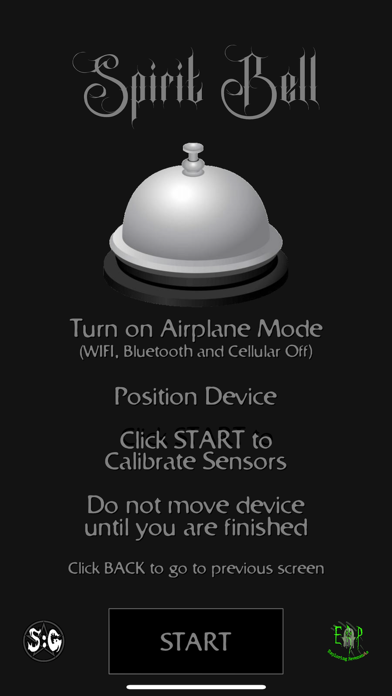
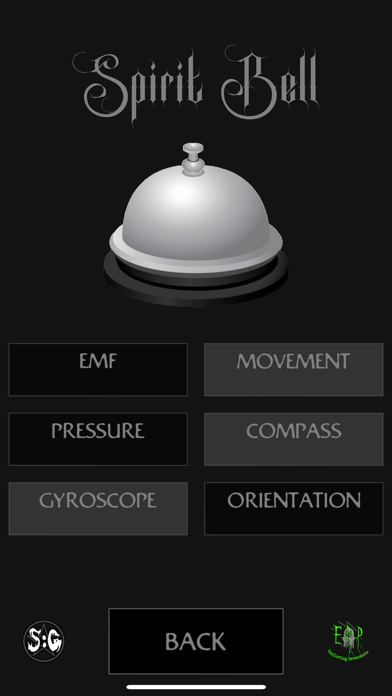
Spirit Bell – Paranormal Detection Tool A modern take on the infamous Dead Bell device – but with more sensors! The Spirit Bell app detects environmental changes and rings the bell when anomalies are detected. Whether you're on a ghost hunt or conducting a paranormal investigation, this tool can help you monitor unseen activity. ******************************* How to Use Place your phone in the desired area Tap "Calibrate" – This sets a baseline for sensor readings Step away & let the app do its work If movement or environmental changes are detected, the bell will ring! DO NOT move the phone after calibration. If you need to reposition, simply press "Back", move the device, and recalibrate. ******************************* Multiple Sensor Detection The Spirit Bell app uses a variety of sensors to detect environmental changes: The sensors used are: Magnetometer - This senses Magnetic and Electromagnet fields around the device Accelerometer - This senses any device movement and the slightest vibrations around the device Barometer - Detects any change in the Ambient Air Pressure around the device Compass - Detects the slightest change in magnetic interference to Magnetic North GyroScope - Detects the slightest movement of the device Orientation - Detects the slightest movement to the position of the device Not all devices have every sensor! The app will automatically use the available sensors and display "Sensor Not Found" for missing ones. ******************************* Adjust Sensitivity – If certain sensors are too sensitive and generating false positives, you can disable individual sensors by tapping their box on the screen. ******************************* Disclaimer Use at your own risk! The developer is not responsible for any paranormal or other outcomes resulting from using this app. Refer to our website for a full list of terms and conditions http://www.spottedghosts.com
What's new · 1.1
New Graphics and UI
Details