

Spellar: AI Meeting Note Taker
Spellar LTD · Productivity
Independent analytics for this App Store listing. AppTracker is not affiliated with Spellar LTD.
Chart standing · US
What changed · US
Listing changes AppTracker has observed for this app in this storefront — new versions, price moves, rating shifts, and store copy.
Spellar 3.5.1 keeps your action items in sync between Mac and iPhone, names the people in your meetings from your calendar, and fixes the rough edges of 3.5. New & Improved: • Action items sync across your devices — tick one off on your Mac and it's done on your iPhone too, and it stays done when you re-analyse the note. • Speakers named from your calendar — Spellar uses the names of the people you invited, so the other voice in a 1:1 is that person rather than "Speaker 1". Rename someone once and Spellar remembers them for your next meetings. • Summaries and AI Chat use the speaker names you see, including any you've renamed. • Notion export now includes the whole transcript, not just its first few minutes. Under the Hood: • The Copilot pill can be dragged again on macOS 27, and stays out of screen shares. • Slack, WhatsApp and Discord no longer trigger "Meeting detected" just for being open — only when a call is actually using the mic. • Closing Copilot now gives you 15 quiet minutes without meeting prompts, as intended. • Calendar reminders count toward the daily reminder limit, so busy days are less noisy. • Auto-record no longer starts a recording on a locked Mac, or long after a meeting began. • A recording left running on a sleeping Mac with no sound now stops on time. • Choosing "No folder" on a template now takes it out of its folder. • Older recaps load again when you scroll back. • Retry now actually retries a failed on-device transcription model download. • Better transcription coverage across languages.
Price & rating history · US
Reconstructed from the listing changes AppTracker has observed in this storefront. A field is charted once it has changed more than once, and each line starts at the value it moved from.
Average rating · ★ 4.65 now · 2 changes on record
Ratings breakdown · US
The star breakdown behind this app's rating in this storefront.
In-app purchases · US
What this app sells inside itself, grouped by kind and priced for this storefront.
Screenshots


About
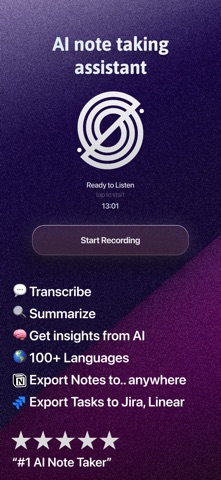
Spellar AI — Professional Note Taker used by founders, investors, and managers. Featuring full synchronization across iOS, iPadOS, Web, and macOS. Focus on the negotiation, not data entry. Spellar AI provides seamless transcription and conversation analysis, turning audio into structured business assets. Launch the app and start a session — Spellar automatically recognizes context, highlights key points, and generates a professional summary with a clear action plan. ACCESS TO ADVANCED LLMs • Multi-model Architecture: Select your data processing engine from market leaders — Gemini, GPT, Claude, and Perplexity. • Task Optimization: Switch models based on meeting specifics to achieve maximum result relevance. • Deep Analysis: Technology ensures high-precision understanding of context and technical terminology. AI COPILOT: REAL-TIME ASSISTANT • Interactive Engagement: Ask the AI questions directly during the meeting to clarify details or retrieve instant information. • Specialized Modes & Commands: Use distinct Copilot "modes" and voice/text commands to steer the analysis and assistance in real-time. • Active Support: Copilot acts as a digital assistant, helping you moderate the meeting and maintain focus on what matters. MEETING PREP NOTES • Walk in Ready: Jot down your agenda, talking points, and links right on a calendar event before the meeting starts. • Always at Hand: Your prep appears beside Copilot the moment you start recording — with clickable links and checklist formatting. • Synced Everywhere: Notes sync across your Apple devices and the Web, even when written offline. FLEXIBLE REPORT CUSTOMIZATION • Adaptive Templates: Customize summary structures for specific event types — from daily stand-ups to strategic sessions. • Format Builder: Utilize professional templates and configure your own logic for summary display to standardize reporting. AUTOMATION & INTEGRATIONS • Efficient Workflows: Tools to build complex workflows that convert text into action. • Task Export: Direct integration with project management systems to automatically create Action Items based on agreements. UNIFIED ECOSYSTEM • Seamless Synchronization: Start recording on mobile and continue working on the text via desktop. • Centralized Storage: All recordings, transcriptions, and analytics are securely stored and accessible across all your Apple devices (iOS, iPadOS, macOS) and the Web. • Focus on Communication: Technology allows you to completely eliminate manual note-taking during negotiations. How it Works: • Sync your calendar for automatic meeting detection. • Start a new recording session via the app on iPhone, iPad, or Mac. • Select the required AI model and, if needed, use Copilot for assistance. • Conduct the meeting while using Copilot commands for real-time insights. • Receive a structured document and export tasks to your task manager. "True Value" Monetization Model: We adhere to principles of transparent pricing. Subscription costs reflect the product's real value — saved work hours and increased business process efficiency, with no hidden fees. Optimize your meetings with Spellar AI today. Please access the following links to our essential policy documents • Terms of Subscription: https://spellar.ai/terms-of-subscription • Privacy Policy: https://spellar.ai/privacy • AI Usage Policy: https://spellar.ai/ai-usage-policy • Contact us: support@spellar.ai
What's new · 3.5.2
Spellar 3.5.1 keeps your action items in sync between Mac and iPhone, names the people in your meetings from your calendar, and fixes the rough edges of 3.5. New & Improved: • Action items sync across your devices — tick one off on your Mac and it's done on your iPhone too, and it stays done when you re-analyse the note. • Speakers named from your calendar — Spellar uses the names of the people you invited, so the other voice in a 1:1 is that person rather than "Speaker 1". Rename someone once and Spellar remembers them for your next meetings. • Summaries and AI Chat use the speaker names you see, including any you've renamed. • Notion export now includes the whole transcript, not just its first few minutes. Under the Hood: • The Copilot pill can be dragged again on macOS 27, and stays out of screen shares. • Slack, WhatsApp and Discord no longer trigger "Meeting detected" just for being open — only when a call is actually using the mic. • Closing Copilot now gives you 15 quiet minutes without meeting prompts, as intended. • Calendar reminders count toward the daily reminder limit, so busy days are less noisy. • Auto-record no longer starts a recording on a locked Mac, or long after a meeting began. • A recording left running on a sleeping Mac with no sound now stops on time. • Choosing "No folder" on a template now takes it out of its folder. • Older recaps load again when you scroll back. • Retry now actually retries a failed on-device transcription model download. • Better transcription coverage across languages.
Details