

AnnotateUp - Image Annotation
Aidaluu Inc. · Business
Independent analytics for this App Store listing. AppTracker is not affiliated with Aidaluu Inc.
Chart standing · US
What changed · US
Listing changes AppTracker has observed for this app in this storefront — new versions, price moves, rating shifts, and store copy.
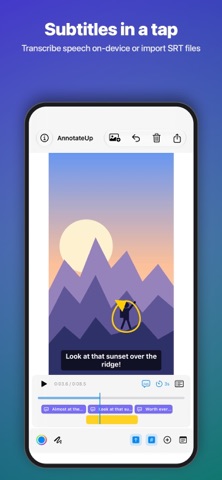
NEW: VIDEO ANNOTATIONS • Add text and arrows to videos • Add subtitles • Transcribe the video's speech NEW: MAGNIFIER • Enlarge small details in a circular callout • Works in videos too. NEW: CALLOUTS • Speech bubbles with a pointer you can aim at anything. Choose Speech, Box, Oval, Thought, or Shout. • Works in videos too. NEW: SPOTLIGHT • Dim everything except what matters, in an oval or rounded rectangle, with adjustable darkness. • Works in videos too. NEW: BLUR & PIXELATE • Hide faces, names, and private details. Redactions are burned into exported photos and videos. One + button in the toolbar now holds Callout, Magnifier, Spotlight, Blur, and Pixelate. We would love to hear your feedback and suggestions for new features, reach out to us at aidaluu.com
In-app purchases · US
What this app sells inside itself, grouped by kind and priced for this storefront.
Screenshots





About
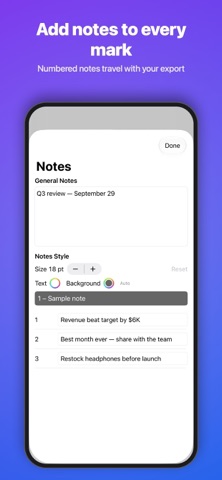
AnnotateUp is the fastest way to mark up photos and videos. Point things out, explain what's happening, hide what's private - then share a clean, professional result in seconds. Proudly made in Canada, this app is free to download and offers a simple one‑time upgrade. No subscriptions, no ads, and absolutely no data collection. Fast, Direct Markups Draw directly on your images and videos with tools built for quick, accurate labeling. Just mark what matters and move on. Automatic Numbering Each new mark is numbered for you, keeping annotations organized without any manual setup. Turn numbering off anytime for a cleaner layout. Notes That Stay Attached Add notes linked to each numbered label, making it easy to connect details to the exact point they refer to. Designed for “Label and Go” Work No formatting. No layout adjustments. No extra steps. Just fast, consistent annotation that helps you capture information clearly and get back to the real work. Apple Watch Companion A companion app for Apple Watch allows for simplified drawing and adding text to images. The free version carries watermarks on saved images and videos. Upgrade to the Pro Edition to export without watermarks.
What's new · 3.0
NEW: VIDEO ANNOTATIONS • Add text and arrows to videos • Add subtitles • Transcribe the video's speech NEW: MAGNIFIER • Enlarge small details in a circular callout • Works in videos too. NEW: CALLOUTS • Speech bubbles with a pointer you can aim at anything. Choose Speech, Box, Oval, Thought, or Shout. • Works in videos too. NEW: SPOTLIGHT • Dim everything except what matters, in an oval or rounded rectangle, with adjustable darkness. • Works in videos too. NEW: BLUR & PIXELATE • Hide faces, names, and private details. Redactions are burned into exported photos and videos. One + button in the toolbar now holds Callout, Magnifier, Spotlight, Blur, and Pixelate. We would love to hear your feedback and suggestions for new features, reach out to us at aidaluu.com
Details