

ShiftFlow: Track Team Hours
Pixnbit Inc. · Business
Independent analytics for this App Store listing. AppTracker is not affiliated with Pixnbit Inc.
Chart standing · US
What changed · US
Listing changes AppTracker has observed for this app in this storefront — new versions, price moves, rating shifts, and store copy.
Color-Code Your Schedule: Add color tags to scheduled shifts for a clearer view of personal calendars, team calendars, and the scheduler. See what’s what at a glance. Fix A Forgotten Clock-Out: If someone forgets to clock out, managers can end their punched shift at an earlier time. Keep recorded hours aligned with when work actually stopped. Find The Right Job Code Fast: Search job codes by name or description, or find them through a linked work site’s name and address. Less scrolling, faster selections. Permissions In One Place: Check location, camera, and notification access from App Preferences. Quickly spot and restore any permission that’s switched off. Your Time Clock, On Your Wrist: Clock in, clock out, and start or end breaks from Apple Watch when your team’s requirements allow. Add a timer to your watch face to keep time in view. Feel Your Team’s Pulse: Team Pulse widgets put who’s in and out, staffing coverage, and each person’s work and break timeline on your Home Screen. Stay on top of the day at a glance. Team Radar On Your Home Screen: View your team’s locations and work sites on a Home Screen map. You can also see how many people are working or on break.
Price & rating history · US
Reconstructed from the listing changes AppTracker has observed in this storefront. A field is charted once it has changed more than once, and each line starts at the value it moved from.
Average rating · ★ 4.79 now · 3 changes on record
Ratings breakdown · US
The star breakdown behind this app's rating in this storefront.
In-app purchases · US
What this app sells inside itself, grouped by kind and priced for this storefront.
Screenshots



About
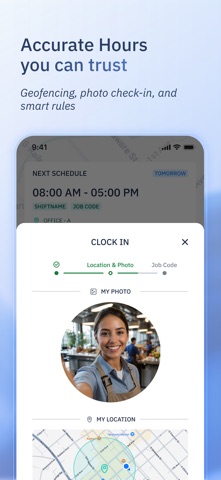
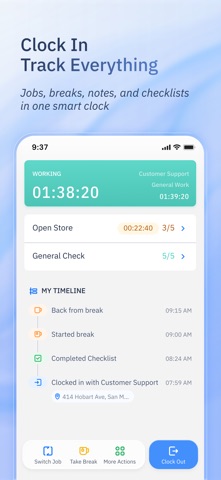
Your team deserves better than messy spreadsheets or clunky and complicated systems. ShiftFlow is a complete time and attendance solution built around how your team actually works. From real-time clock-ins and GPS verification to smart shift scheduling and one-click timesheet exports, we help you save time today — so you can build a stronger business tomorrow. Built for Real Teams, Real Workflows • Get up and running in seconds – No complex setup or onboarding required • Scheduling made simple – Plan shifts and manage availability in one place • Clock-in from anywhere – Use GPS verification, geofencing, and selfie check-ins • Track job codes, earnings, and expenses – Understand where time and money go • Manage time off easily – Approve, decline, or track leave with clarity • Export clean timesheets – Choose CSV or PDF format, filtered by team, job, or date range • Communicate instantly – Team chat, read receipts, and group messaging • Real-time visibility – See who's on the clock at a glance from your home screen What Teams Are Saying “It’s practical, functional, and easy to use.” – Bee. I. g “Good app. Easy to use and friendly. Less paperwork and real-time checking staff attendance.” – BreadNco “Doing payroll just got easy!” – Circle M Ranch “ShiftFlow has been a game-changer for managing our team hours.” – Gloria.WRH “I tried so many others and this one is definitely the best I’ve ever seen.” – J Garoppolo “This app will NOT disappoint. The customer service is amazing.” – Ern Saved by grace “Keeps my work shifts on track — love it!” – danii4358 “I recommend it to every small business owner with employees. It’s amazing!!!” – Deedee Mullen Ready to Simplify Time & Attendance? ShiftFlow is built for real teams who need a reliable, easy-to-use solution for time tracking, scheduling, and payroll. Whether you manage a small crew or a growing workforce, we’re here to help you save time, reduce errors, and focus on what matters most — growing your business. Got questions or ideas? We’d love to hear from you. Contact us at team@shiftflow.app. Terms & Conditions: https://www.shiftflow.app/terms-conditions
What's new · 23.0.2
Color-Code Your Schedule: Add color tags to scheduled shifts for a clearer view of personal calendars, team calendars, and the scheduler. See what’s what at a glance. Fix A Forgotten Clock-Out: If someone forgets to clock out, managers can end their punched shift at an earlier time. Keep recorded hours aligned with when work actually stopped. Find The Right Job Code Fast: Search job codes by name or description, or find them through a linked work site’s name and address. Less scrolling, faster selections. Permissions In One Place: Check location, camera, and notification access from App Preferences. Quickly spot and restore any permission that’s switched off. Your Time Clock, On Your Wrist: Clock in, clock out, and start or end breaks from Apple Watch when your team’s requirements allow. Add a timer to your watch face to keep time in view. Feel Your Team’s Pulse: Team Pulse widgets put who’s in and out, staffing coverage, and each person’s work and break timeline on your Home Screen. Stay on top of the day at a glance. Team Radar On Your Home Screen: View your team’s locations and work sites on a Home Screen map. You can also see how many people are working or on break.
Details