

Photo Ace - Photo Widgets
Donald Latumahina · Photo & Video
Independent analytics for this App Store listing. AppTracker is not affiliated with Donald Latumahina.
Chart standing · US
What changed · US
Listing changes AppTracker has observed for this app in this storefront — new versions, price moves, rating shifts, and store copy.
Refreshed with the newest iOS design
In-app purchases · US
What this app sells inside itself, grouped by kind and priced for this storefront.
Screenshots



About
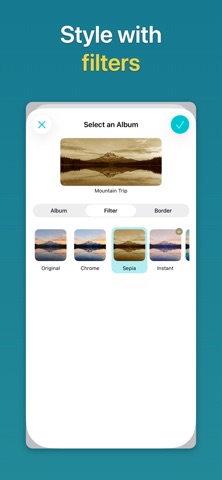
Photo Ace lets you relive your memories right on your Home Screen. With interactive photo widgets, you can browse, shuffle, and change the filters on your photos without opening an app. FEATURES * Add Buttons to Your Widgets You can add buttons to your photo widgets. There are five buttons to choose from: Previous Photo, Next Photo, Shuffle Photo, Previous Filter, and Next Filter. * Get a Surprise The Shuffle Photo button will show you a random photo from the album. It's a great way to relive forgotten memories. * Change the Mood Use the filter buttons to change the mood of your photos directly on the widget. Chrome, Sepia, and Mono are free, and Premium unlocks Instant, Process, Transfer, Fade, Noir, and Tonal. * Select an Album for Each Widget You can configure each widget to show a specific photo album. * Add Multiple Widgets Show one small widget and one medium widget for free, each with its own album. With Premium, add as many widgets as you like and browse multiple albums at once. * Go Large With Premium, add large widgets to see your photos bigger on your Home Screen. * Set a Border You can add a border to your widget with the configuration you specify. * View the Full Size Tap the widget to view the photo in full size. Pinch to zoom, turn your iPhone sideways for landscape photos, and remove the filter if you prefer the original. FREE AND PREMIUM Free: one small and one medium widget, all five buttons, borders, and the Chrome, Sepia, and Mono filters. Premium: large widgets, unlimited widgets, and all filters. * No Subscription Premium is a one-time purchase with no recurring subscription.
What's new · 1.1.0
Refreshed with the newest iOS design
Details