

Less Paper
Johannes Plunien · Productivity
Independent analytics for this App Store listing. AppTracker is not affiliated with Johannes Plunien.
Chart standing · US
What changed · US
Listing changes AppTracker has observed for this app in this storefront — new versions, price moves, rating shifts, and store copy.
See a document's history, and open every section from one menu. • The viewer has a new History section that lists who changed a document and when, the way the web UI shows it — with names instead of ids, relative times, and System for changes the server made itself. It is only offered when the server keeps an audit log and your account may read it. • View and Edit are now one Open menu with one sheet per section: Content, Custom fields, Details, History, Metadata and Notes. Each section opens editable when your account may change the document and read-only otherwise; Details, which has nothing to show read-only, is offered only to users who can edit. Edit remains as a shortcut to Open > Details. • Swipe actions cover the same sections: open any section straight from the list. A swipe you had set to Edit still opens Details, and one you had set to open notes still opens Notes. • Fixed: switching to another saved view briefly kept the previous view's documents on screen under the new view's name. The list now clears to a spinner while it loads. If you hit a problem, please open an issue at https://github.com/plu/less-paper/issues — it is the quickest way to get it fixed.
Ratings breakdown · US
The star breakdown behind this app's rating in this storefront.
In-app purchases · US
What this app sells inside itself, grouped by kind and priced for this storefront.
Screenshots




Keywords this app targets
Search terms AppTracker associates with this app — estimates, not search volume. ❝ = in the app's title; a highlighted number is its current position for that term.
Similar apps
Competitors and close alternatives, as estimated by AppTracker.


About
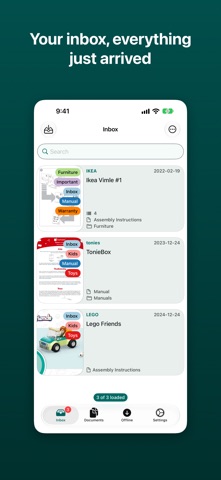
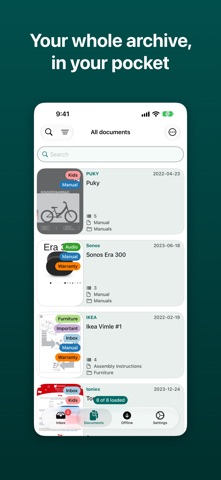
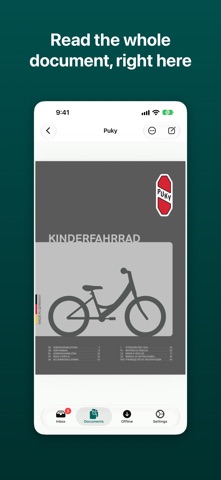
Less Paper is a native iOS client for paperless-ngx 3.x and earlier, the self-hosted document archive. It talks directly to your own server, and to nothing else. FIND ANYTHING The complete filter set from the web interface, custom fields included: title and content, correspondent, document type, storage path, tags, dates and ASN. Save any filter as a view, then create, edit and reorder your saved views without leaving the app. EDIT WHERE YOU ARE READING Fix a title, reassign a correspondent, add tags, notes or custom field values from the document itself — one Open menu leads to every section: Content, Custom fields, Details, History, Metadata and Notes, each editable when your account allows it. History lists who changed what and when, the way the web UI shows it. Select several documents and change them together, merge them, or delete them in one go. READ IT WITH NO SERVER IN REACH Save a document offline and it is kept on the device in full — the PDF, its notes, metadata and custom fields. The Offline tab reads those stored copies, so it works on a plane, in a basement, or anywhere your server is not. Pull to refresh and only the documents that actually changed are fetched again. GET DOCUMENTS IN Send anything on your device to paperless-ngx from the share sheet. Password-protected PDFs are unlocked on import, and the password is kept in the keychain so the next document from the same source opens without asking. The inbox then says what became of each one: File Tasks lists every import — which finished, which are still running, and which failed and why — and a failure can be dismissed once you have dealt with it. BUILT FOR REAL SETUPS Connect as many servers as you like and switch between them. Sign in with a password, or with the single sign-on provider your server is configured with. Client certificates, custom HTTP headers and reverse proxies such as Authelia are all supported. A restricted account works too: the app follows your user's permissions and simply does not show what you may not do. When something does go wrong, a local error log — with anything credential-shaped redacted out of it — is there to read and share, and nothing leaves the device unless you send it. KEEP THE ARCHIVE TIDY Create, rename and delete tags, correspondents, document types and storage paths, and set ownership and permissions on any document. Restore anything you deleted from the trash, or empty it for good. Works with every paperless-ngx from 2.15.3 to 3.x. Universal: iPhone and iPad — on iPad the document opens in a column beside the list rather than covering it. Less Paper is open source. Issues and feature requests are welcome at https://github.com/plu/less-paper
What's new · 3.0.8
See a document's history, and open every section from one menu. • The viewer has a new History section that lists who changed a document and when, the way the web UI shows it — with names instead of ids, relative times, and System for changes the server made itself. It is only offered when the server keeps an audit log and your account may read it. • View and Edit are now one Open menu with one sheet per section: Content, Custom fields, Details, History, Metadata and Notes. Each section opens editable when your account may change the document and read-only otherwise; Details, which has nothing to show read-only, is offered only to users who can edit. Edit remains as a shortcut to Open > Details. • Swipe actions cover the same sections: open any section straight from the list. A swipe you had set to Edit still opens Details, and one you had set to open notes still opens Notes. • Fixed: switching to another saved view briefly kept the previous view's documents on screen under the new view's name. The list now clears to a spinner while it loads. If you hit a problem, please open an issue at https://github.com/plu/less-paper/issues — it is the quickest way to get it fixed.
Details