

Phomo — Photo Suite
Steven Goldberg · Photo & Video
Independent analytics for this App Store listing. AppTracker is not affiliated with Steven Goldberg.
Chart standing · US
What changed · US
Listing changes AppTracker has observed for this app in this storefront — new versions, price moves, rating shifts, and store copy.
New in 3.3.1: • Natural Style — custom ProRAW processing with no film simulation. Compare it with Default, which uses Apple’s processing • Limited Photo Library access — choose which photos populate your gallery • Bug fixes and performance improvements Also in 3.3: • Live film preview in the camera, plus aspect ratio controls — see your look in the viewfinder and apply it on capture • Rebuilt 16-bit film engine for more authentic RAW and ProRAW looks • New film stocks and variants • Much faster album loading • Manage saved edit data and free up storage
Price & rating history · US
Reconstructed from the listing changes AppTracker has observed in this storefront. A field is charted once it has changed more than once, and each line starts at the value it moved from.
Average rating · ★ 4.91 now · 6 changes on record
Ratings breakdown · US
The star breakdown behind this app's rating in this storefront.
In-app purchases · US
What this app sells inside itself, grouped by kind and priced for this storefront.
Screenshots





Keywords this app targets
Search terms AppTracker associates with this app — estimates, not search volume. ❝ = in the app's title; a highlighted number is its current position for that term.
Similar apps
Competitors and close alternatives, as estimated by AppTracker.


About
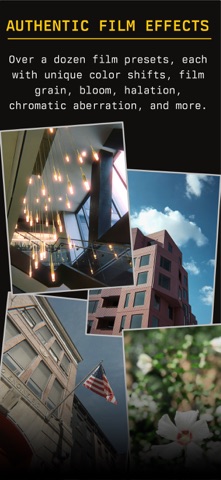
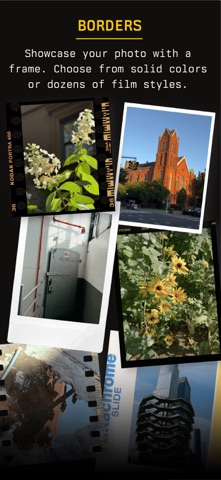
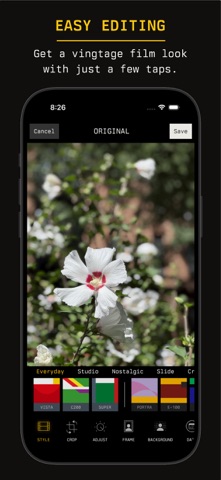
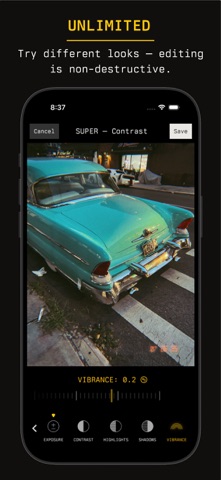
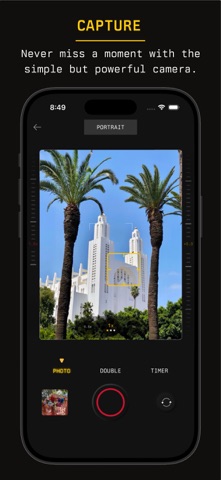
Analog film camera and photo editor for iPhone. Authentic film looks, live viewfinder preview, collages, and albums — fully offline, no account required. Phomo brings together beautiful, straight-out-of-camera film styles, powerful but simple editing tools, custom borders, flexible grids, and album management in one easy package. Avoid the flat “smartphone look” with Phomo’s authentic film simulations. Color shifts, film grain, bloom, halation, chromatic aberration, and more are built into each preset, so you can get the look you want in no time. Preview a style live in the camera and apply it automatically when you capture a photo, or apply different styles to any photo on your device. All edits are non-destructive, so you can try as many looks as you want, or revert to the original at any time. For more control, adjust the strength of the film effects with the Vintage slider, or tweak exposure, contrast, vibrance, and more. Combine your photos into customizable grids — choose from a variety of layouts, then adjust the margins, colors, and aspect ratio. Save grids to your device or share them to another app. Frame your photos with a border — choose a solid color with adjustable thickness and aspect ratio, or use a film frame including 35mm, 120, 4x5, and instant styles. Add analog character with date stamps, light leaks, textures, and double-exposure effects. Use tags and albums to organize your library so you can always find what you’re looking for. Phomo works fully offline; no login or internet connection is required. Phomo is free to use indefinitely. To unlock additional features, you can purchase Phomo Pro as a monthly subscription or a one-time purchase. Phomo Pro includes: Additional film styles Additional film frames Additional light leaks Additional date stamps Additional grid layouts ProRAW photo capture Double-exposure edit mode Background blur strength control By subscribing to Phomo Pro, you agree to the Apple Standard Terms of Use (https://www.apple.com/legal/internet-services/itunes/dev/stdeula/) and our Privacy Policy (https://phomo.pro/#privacy-policy).
What's new · 3.3.1
New in 3.3.1: • Natural Style — custom ProRAW processing with no film simulation. Compare it with Default, which uses Apple’s processing • Limited Photo Library access — choose which photos populate your gallery • Bug fixes and performance improvements Also in 3.3: • Live film preview in the camera, plus aspect ratio controls — see your look in the viewfinder and apply it on capture • Rebuilt 16-bit film engine for more authentic RAW and ProRAW looks • New film stocks and variants • Much faster album loading • Manage saved edit data and free up storage
Details