

eConvert: Video to MP3 Audio
Eyermin Colon Sanchez · Utilities
Independent analytics for this App Store listing. AppTracker is not affiliated with Eyermin Colon Sanchez.
Chart standing · US
What changed · US
Listing changes AppTracker has observed for this app in this storefront — new versions, price moves, rating shifts, and store copy.
We've polished the experience based on your feedback! - Improved stability and performance across all conversion tools - Fixed an issue where the convert button could reopen the video picker unexpectedly - Smoother navigation between Convert, Frames, and Audio Library tabs - General bug fixes and UI refinements Thank you for using eConvert! If you enjoy the app, a quick rating helps us a lot.
Ratings breakdown · US
The star breakdown behind this app's rating in this storefront.
Screenshots


About
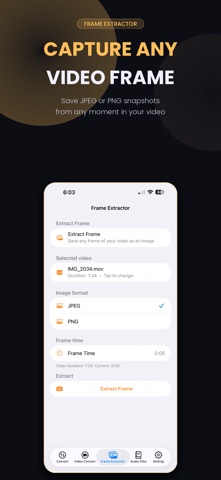
Turn any video into audio, extract frames, or trim clips — all on your iPhone, 100% offline. No internet connection needed, no uploads, no waiting. eConvert is the fast, private way to convert video to MP3, M4A, WAV, or AAC — right from your camera roll. WHY ECONVERT - Works completely offline — your files never leave your device - Fast on-device processing, no upload wait times - Clean, simple interface — no clutter VIDEO TO AUDIO CONVERTER Convert any video to MP3, M4A, WAV, or AAC in seconds. Choose your quality: Low (64kbps) to Max (320kbps). Trim the exact section you need, add fade-in/fade-out, normalize volume, or mix in background music. VIDEO CONVERTER Convert between video formats and resolutions, all without an internet connection. FRAME EXTRACTOR Pull the exact frame you need from any video. Enter a timestamp and export as high-quality JPEG or PNG — perfect for thumbnails, stills, or social media. AUDIO LIBRARY Every converted file is saved and organized in your personal library. Play, search, sort, and share instantly. PERFECT FOR Content creators, podcasters, video editors, musicians, students, and anyone who needs quick audio or image extraction from video — without relying on the internet. Download eConvert and convert smarter, faster, and privately.
What's new · 2.0.1
We've polished the experience based on your feedback! - Improved stability and performance across all conversion tools - Fixed an issue where the convert button could reopen the video picker unexpectedly - Smoother navigation between Convert, Frames, and Audio Library tabs - General bug fixes and UI refinements Thank you for using eConvert! If you enjoy the app, a quick rating helps us a lot.
Details