

Screen Recorder+Face Cam
MELIORAPPS INTERACTIVE, SRL · Photo & Video
Independent analytics for this App Store listing. AppTracker is not affiliated with MELIORAPPS INTERACTIVE, SRL.
Chart standing · US
What changed · US
Listing changes AppTracker has observed for this app in this storefront — new versions, price moves, rating shifts, and store copy.
A redesigned recording and editing experience, built around your timeline. • Edit video, image, text and audio layers on a multitrack timeline. Trim, split, duplicate and move items, keep video and audio linked, and pinch to zoom around the playhead. • Preview your project before exporting and choose the export resolution and frame rate. • Keep editable projects in Studio and finished videos in Record & Video, with quick preview, sharing and Save to Photos. • Create 2–10 second GIFs with a simpler range selector. Move the whole selection without changing its length, resize either end and cancel an export when needed. • Record Face Cam reactions with improved audio handling and a redesigned teleprompter, including words-per-minute speed and a reading preview. • Find livestreaming in its own Live tab, with clearer connection checks and audio controls. • Enjoy updated light and dark appearances, clearer tool controls and improved translations. Premium is required for Face Cam, livestreaming, captions, text, imported music, custom backgrounds and higher recording quality.
In-app purchases · US
What this app sells inside itself, grouped by kind and priced for this storefront.
Screenshots



About
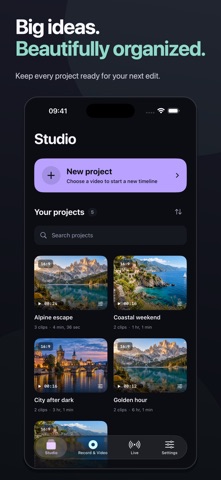
Record your screen, turn clips into a timeline and share the result from one app. Capture gameplay, explain an app or make a tutorial, then refine your video before sharing it. RECORD AND EDIT • Capture your screen with microphone and app audio controls. • Choose your recording resolution, frame rate and bit rate. Higher recording quality requires Premium. • Import videos and photos, arrange clips on multiple tracks and trim directly on the timeline. • Split, duplicate and move clips and layers. Keep video and its audio linked, or unlink them to edit separately. • Adjust playback speed, rotate or mirror clips, and choose landscape, portrait or square layouts. • Pinch to zoom into the timeline, preview the full project and use undo and redo as you edit. MAKE A GIF Choose a 2–10 second section of your timeline. Drag the highlighted range to another moment or move its handles to adjust the length, then create a GIF to share. KEEP PROJECTS AND VIDEOS ORGANIZED Save editable drafts in Studio and return to them later. Preview finished videos in Record & Video, share them or save them to Photos. Choose the resolution and frame rate for your MP4 export. MORE TOOLS WITH PREMIUM An optional Premium subscription unlocks: • Higher recording resolutions and bit rates. • Text layers, imported music, solid color layers and custom backgrounds. • Automatic captions for English speech on supported devices, with editable text on the timeline. • Face Cam reactions: record your camera and microphone over a selected clip, then position and resize your camera overlay. • A Face Cam teleprompter with adjustable text size, reading preview and speed measured in words per minute. Your script stays out of the finished video. • Screen livestreaming to YouTube, Facebook or a compatible custom RTMP/RTMPS destination using your streaming account and connection details. Premium is required to use these tools and to export projects containing Premium text, music or background layers. Basic recording and editing remain available without a subscription. Subscriptions renew automatically unless canceled at least 24 hours before the current period ends. Payment is charged to your Apple Account at confirmation. Manage or cancel your subscription in your App Store account settings. Privacy Policy: https://www.meliorapps.org/privacy-policy Terms of Use: https://www.meliorapps.org/terms-of-service
What's new · 1.0
A redesigned recording and editing experience, built around your timeline. • Edit video, image, text and audio layers on a multitrack timeline. Trim, split, duplicate and move items, keep video and audio linked, and pinch to zoom around the playhead. • Preview your project before exporting and choose the export resolution and frame rate. • Keep editable projects in Studio and finished videos in Record & Video, with quick preview, sharing and Save to Photos. • Create 2–10 second GIFs with a simpler range selector. Move the whole selection without changing its length, resize either end and cancel an export when needed. • Record Face Cam reactions with improved audio handling and a redesigned teleprompter, including words-per-minute speed and a reading preview. • Find livestreaming in its own Live tab, with clearer connection checks and audio controls. • Enjoy updated light and dark appearances, clearer tool controls and improved translations. Premium is required for Face Cam, livestreaming, captions, text, imported music, custom backgrounds and higher recording quality.
Details