

Easy E6B
Robert Deckert · Education
Independent analytics for this App Store listing. AppTracker is not affiliated with Robert Deckert.
Chart standing · US
What changed · US
Listing changes AppTracker has observed for this app in this storefront — new versions, price moves, rating shifts, and store copy.
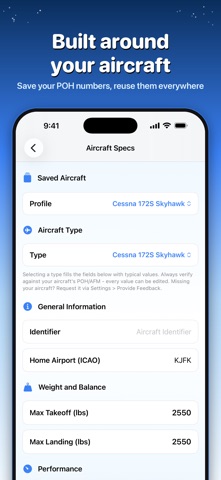
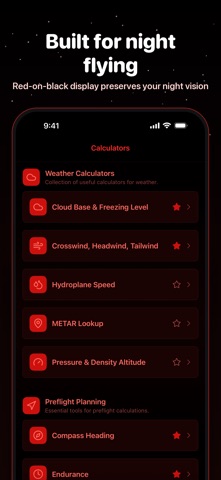
Version 2.1 - "Night Flight" The biggest update yet. Here's what's new on the flight deck: NIGHT MODE • A black-and-red (or black-and-green) cockpit theme that protects your night vision • Automatic Night Mode switches at local sunset and sunrise, so opening the app in a dark cockpit won't cost you your dark adaptation YOUR AIRCRAFT, BUILT IN • Pick your aircraft from a built-in database of popular GA types to prefill typical performance numbers • Save multiple aircraft profiles and switch between them • The new Autofill button pulls your aircraft's numbers straight into the calculators • Crosswind now warns you when the component exceeds your aircraft's max demonstrated crosswind LIVE AIRPORT WEATHER • Fetch the latest METAR straight into the Crosswind, Pressure & Density Altitude, and Cloud Base calculators • METAR winds are converted from true to magnetic automatically, so they line up with runway numbers • The new METAR Lookup screen translates any station's weather into plain English - or paste a raw METAR to decode it offline WIDGETS & SIRI • Home Screen widgets put your home airport's weather at a glance, plus one-tap shortcuts to your favorite calculators • "Hey Siri, open Crosswind in Easy E6B" - open any calculator or run a crosswind check hands-free QUALITY • Improved calculation accuracy and cleaned up a number of bugs throughout the app - every calculation is now backed by automated tests Your feedback shapes the app: request features or new aircraft types right from Settings > Provide Feedback. Blue skies and tailwinds!
Ratings breakdown · US
The star breakdown behind this app's rating in this storefront.
In-app purchases · US
No in-app purchases.
Screenshots


About
Introducing Easy E6B - the co-pilot who never takes a day off and certainly never messes up your coffee order. With more aviation calculators than you can shake a control stick at, this app is a ready companion for fledgling feathered fliers and old birds alike. Don your aviator goggles and see what's on offer: Weather calculators so fine-tuned, they're practically divining rods. Cloud base? Check. Freezing level? Check. Crosswind, headwind, and tailwind measurements? Triple check. Hydroplane speeds and pressure & density altitude? We've got you covered better than an airplane under a hangar. Preflight calculators ready to aid you in fuel calculations, compass headings, and flight leg times. They’re as essential to your flight as remembering to close the cockpit door. Because when you're up in the air, "winging it" should not involve fuel requirement calculations. In-flight calculators to handle your altitude, speed, and distance. We've taken the guesswork out of the equation, so you can focus on the task at hand: not making clouds your unplanned landing site. And a full wing-span of conversion calculators for all your aviator needs. We've got temperature, pressure, altitude, and speed conversions that would even make NASA engineers nod approvingly. The flight deck keeps getting better: a night-vision-friendly Night Mode (with automatic switching at local sunset), aircraft profiles backed by a built-in database of popular GA types, live METARs pulled straight into your calculators (with winds converted to magnetic - your runway numbers will approve), a plain-English METAR decoder, Home Screen widgets, and Siri shortcuts for hands-free calculating. Easy E6B - it's intuitive, it's user-friendly, and it's got more brains than a gaggle of ground controllers. So unless you find joy in juggling jet-lag and calculations, why not let us take the load off? Tap that download button faster than you'd hit eject in a tailspin and take control of your flight preparation today. With Easy E6B, you can save the thrill for the sky and leave the ground-level stress behind.
What's new · 2.1
Version 2.1 - "Night Flight" The biggest update yet. Here's what's new on the flight deck: NIGHT MODE • A black-and-red (or black-and-green) cockpit theme that protects your night vision • Automatic Night Mode switches at local sunset and sunrise, so opening the app in a dark cockpit won't cost you your dark adaptation YOUR AIRCRAFT, BUILT IN • Pick your aircraft from a built-in database of popular GA types to prefill typical performance numbers • Save multiple aircraft profiles and switch between them • The new Autofill button pulls your aircraft's numbers straight into the calculators • Crosswind now warns you when the component exceeds your aircraft's max demonstrated crosswind LIVE AIRPORT WEATHER • Fetch the latest METAR straight into the Crosswind, Pressure & Density Altitude, and Cloud Base calculators • METAR winds are converted from true to magnetic automatically, so they line up with runway numbers • The new METAR Lookup screen translates any station's weather into plain English - or paste a raw METAR to decode it offline WIDGETS & SIRI • Home Screen widgets put your home airport's weather at a glance, plus one-tap shortcuts to your favorite calculators • "Hey Siri, open Crosswind in Easy E6B" - open any calculator or run a crosswind check hands-free QUALITY • Improved calculation accuracy and cleaned up a number of bugs throughout the app - every calculation is now backed by automated tests Your feedback shapes the app: request features or new aircraft types right from Settings > Provide Feedback. Blue skies and tailwinds!
Details