

SanskritTypist
Natalya Murashev · Utilities
Independent analytics for this App Store listing. AppTracker is not affiliated with Natalya Murashev.
Chart standing · US
What changed · US
Listing changes AppTracker has observed for this app in this storefront — new versions, price moves, rating shifts, and store copy.
Next letter prediction suggestions as you type.
In-app purchases · US
No in-app purchases.
Screenshots



Keywords this app targets
Search terms AppTracker associates with this app — estimates, not search volume. ❝ = in the app's title; a highlighted number is its current position for that term.
Similar apps
Competitors and close alternatives, as estimated by AppTracker.
 Nepali Keyboard Pro
Bibhu Rajbhandari
Nepali Keyboard Pro
Bibhu Rajbhandari
 keyInTwi
Community7 L.L.C.
2 shared topics
keyInTwi
Community7 L.L.C.
2 shared topics
 Typster - Big Keys Keyboard
PAAL EIRIK PAULSEN
Typster - Big Keys Keyboard
PAAL EIRIK PAULSEN
 toPhonetics IPA Keyboard
Mu-sonic Ltd
toPhonetics IPA Keyboard
Mu-sonic Ltd
 Pinyin Typist
Wayne Wong
1 shared topic
Pinyin Typist
Wayne Wong
1 shared topic
 Typewise Offline Keyboard
Typewise AG
Typewise Offline Keyboard
Typewise AG
 Ghanakey Pro
Keteke LLC
Ghanakey Pro
Keteke LLC
 Auto Typist (Custom keyboard)
Switt Kongdachalert
Auto Typist (Custom keyboard)
Switt Kongdachalert
About
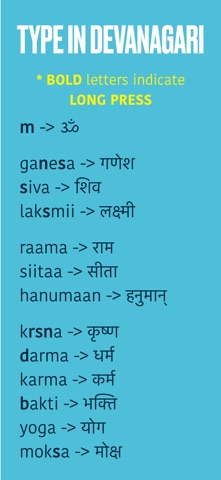
SanskritTypist is the easiest way to type real Sanskrit—right from your keyboard. Whether you’re reading yoga texts, chanting mantras, or composing in scholarly IAST, this custom keyboard makes it fast, accurate, and intuitive. Two Keyboards Built In Switch between two powerful input modes with a tap: • Devanagari: Type Sanskrit with Roman letters and see perfect Devanagari script in real time. • IAST: For scholars and students, type using diacritics (like ā, ṇ, ś) for precise transliteration. Designed for Yoga, Devotion & Study Effortlessly type sacred Sanskrit words like: • ॐ (Oṁ), गणेश (Gaṇeśa), शिव (Śiva), लक्ष्मी (Lakṣmī), कृष्ण (Kṛṣṇa), राम (Rāma), सीता (Sītā), and more. • Ideal for yoga teachers, Sanskrit learners, and anyone chanting or reading ślokas and writing them in their own notes. Smart Typing Features • Instant Transliteration: Type “raama” and get “राम” or “siitaa” and get “सीता”. • Long-Press Support: Hold keys for alternate characters like ण्, श्, ā, ś, and ॐ. • Context-Aware Syllables: Automatically handles matras and full vowels based on position. • Monospaced Examples: View clear input/output pairs so you always know what to expect. Easy Setup 1. Go to Settings > General > Keyboard > Keyboards 2. Tap Add New Keyboard → Select SanskritTypist. Enable Devanagari & IAST 3. Use the globe icon in any app to switch keyboards Whether you’re writing in Devanagari or IAST, SanskritTypist helps you express sacred sounds and verses with clarity and precision. No copy-pasting. No switching apps. Just fluid Sanskrit typing—right from your keyboard.
What's new · 2.5
Next letter prediction suggestions as you type.
Details