

tapSnap: Digital Business Card
tapSnap LLC · Business
Independent analytics for this App Store listing. AppTracker is not affiliated with tapSnap LLC.
Chart standing · US
What changed · US
Listing changes AppTracker has observed for this app in this storefront — new versions, price moves, rating shifts, and store copy.
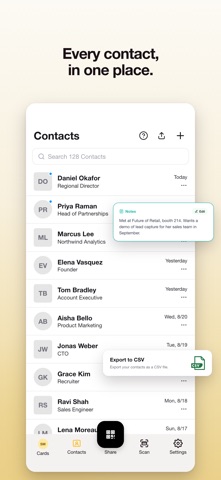
Your tapSnap dashboard is here. Manage your cards, contacts and analytics on your computer at tapsnap.me, and connect the tools you already use. • Contacts: new Integrations sheet. Export to CSV or Outlook, or connect HubSpot, Salesforce, Zapier, Slack, Pipedrive, Zoho CRM, monday.com and Google Contacts. Tap one and we email you a link to finish setup on your desktop. • Sign in on your Mac or PC in one tap: email yourself a login link or copy one to paste into your browser. No password needed, and it works with Sign in with Apple. • A short intro shows you the dashboard the first time you open Cards. • QR codes now use the logo and colour you set on the dashboard. • Accounts using Sign in with Apple now show the email address we send to, including Apple's private relay address. • Toasts now explain why a request failed instead of a generic error.
Ratings breakdown · US
The star breakdown behind this app's rating in this storefront.
In-app purchases · US
What this app sells inside itself, grouped by kind and priced for this storefront.
Screenshots

About
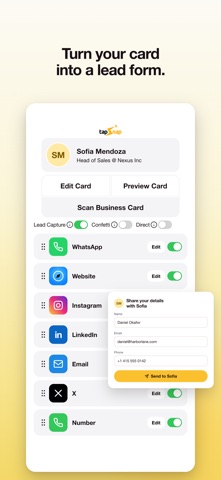
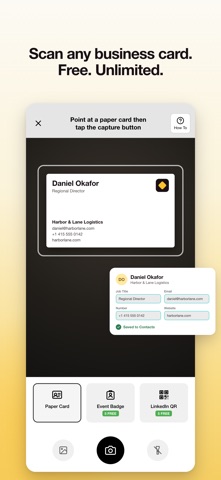
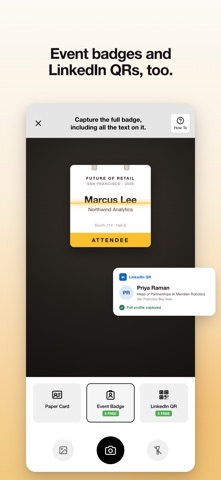
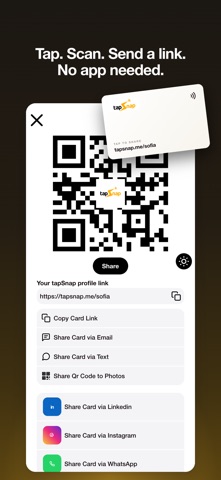
Welcome to TapSnap, the digital business card app with a free, unlimited business card scanner, built for salespeople, founders, agents, recruiters and anyone who leaves an event with a pocket full of paper cards. TapSnap 2.0 turns every handshake into a saved contact while eliminating: - Stacks of paper business cards that never make it into your phone - Typing a stranger's details into Contacts one field at a time - Paying for a scanner app just to read a business card - Reprinting cards every time your title, number or company changes - Carrying one card for a day job, a side business and an event - "Send me your details" follow-ups that never arrive - Forgetting where you met someone and what you talked about - Contacts trapped in an app you can't export from AI BUSINESS CARD SCANNER - FREE AND UNLIMITED - Point your camera at any paper business card and TapSnap AI reads the name, company, job title, email, phone and website into a new contact. - Free for everyone, with no scan limits and no subscription required. Other apps charge for this. We don't. - Snap it on the spot or scan from your camera roll. AI EVENT BADGE SCANNER - Scan the whole conference badge and turn it into a contact before the conversation ends. - Works at any event, on any badge. No scanner rental, no lead-retrieval kit. - 5 free scans to start, unlimited with Pro. LINKEDIN QR SCANNER - Scan the QR code in someone's LinkedIn app and capture their full profile - name, headline, company, location and photo - in one go. - No typing, no misspelled names, no "I'll find you later". - Shares the same 5 free scans, unlimited with Pro. MULTIPLE DIGITAL BUSINESS CARDS - Create separate cards for your day job, your side business and the event you're working this week. - Each card has its own link, QR code, photo, colors and links. Share the version of you that fits the room. - Free includes 1 card. Pro includes 3. Pro+ is unlimited. SHARE WITH A TAP, A SCAN OR A LINK - Tap your TapSnap NFC card to any modern phone, show your QR code, or send your link (tapsnap.me/yourname) by text, email or any app. - The other person doesn't need the app, an account or a TapSnap card to receive your details. - Change your title or number and your link, QR code and NFC card update instantly. Nothing to reprint. LEAD CAPTURE MODE - Switch a card into lead capture mode and a short form appears the moment you share it, so the other person hands you their details. - Captured leads land in your Contacts, ready to follow up. CONTACTS YOU ACTUALLY OWN - Every scanned card, badge, LinkedIn profile and captured lead lives in one list. - Add notes and a photo, and edit any detail. - Export everything to CSV with Pro. Your contacts are yours. MAKE IT LOOK LIKE YOU - Your photo, a cover image and your own colors on every card. - Add your socials, website and any custom link. - Pro: add your company logo and remove TapSnap branding from your profile. TAPSNAP PRO - Free: 1 digital card, unlimited paper business card scanning, 5 badge or LinkedIn scans, 10 contacts. - Pro - $6.99/month or $59.99/year: up to 3 cards, unlimited event badge and LinkedIn QR scanning, unlimited contacts, CSV export, company logo, no TapSnap branding. - Pro+ - $14.99/month or $119.99/year: everything in Pro, plus unlimited cards. - Pro and Pro+ both start with a 2-week free trial. Subscriptions renew automatically unless canceled at least 24 hours before the end of the current period. Manage or cancel any time in your Apple ID settings. JOIN THE TAPSNAP COMMUNITY - Thousands of professionals already share with TapSnap, from solo operators to sales teams on the trade-show floor. OUR MISSION - An introduction should never be lost to a paper card. TapSnap exists so that everyone you meet becomes someone you can actually reach. Privacy Policy: https://www.tapsnap.co/app/privacy Terms of Use: https://www.apple.com/legal/internet-services/itunes/dev/stdeula/
What's new · 2.2
Your tapSnap dashboard is here. Manage your cards, contacts and analytics on your computer at tapsnap.me, and connect the tools you already use. • Contacts: new Integrations sheet. Export to CSV or Outlook, or connect HubSpot, Salesforce, Zapier, Slack, Pipedrive, Zoho CRM, monday.com and Google Contacts. Tap one and we email you a link to finish setup on your desktop. • Sign in on your Mac or PC in one tap: email yourself a login link or copy one to paste into your browser. No password needed, and it works with Sign in with Apple. • A short intro shows you the dashboard the first time you open Cards. • QR codes now use the logo and colour you set on the dashboard. • Accounts using Sign in with Apple now show the email address we send to, including Apple's private relay address. • Toasts now explain why a request failed instead of a generic error.
Details