

Macro Lens
Eduardo Callado · Photo & Video
Independent analytics for this App Store listing. AppTracker is not affiliated with Eduardo Callado.
Chart standing · US
What changed · US
Listing changes AppTracker has observed for this app in this storefront — new versions, price moves, rating shifts, and store copy.
• New Photo Viewfinder: See a wider view of the scene with a framing guide to help you compose shots while zoomed in. Enable “Photo Viewfinder” in Settings, then drag it to either upper corner. The app remembers your preferred position. • Camera Control support: Take photos and start or stop video recording using Camera Control on compatible iPhones. • Lock Screen access: Add the Macro Lens control to your Lock Screen to quickly open the app. • Keep the screen awake: Frame your shots and take photos without interruptions from Auto-Lock. • Refined UI controls: Updated buttons for a more consistent look across the interface.
Ratings breakdown · US
The star breakdown behind this app's rating in this storefront.
In-app purchases · US
What this app sells inside itself, grouped by kind and priced for this storefront.
Screenshots



Keywords this app targets
Search terms AppTracker associates with this app — estimates, not search volume. ❝ = in the app's title; a highlighted number is its current position for that term.
Similar apps
Competitors and close alternatives, as estimated by AppTracker.
 Macro by Camera+
LateNiteSoft S.L.
2 shared topics · 1 shared title word
Macro by Camera+
LateNiteSoft S.L.
2 shared topics · 1 shared title word
 Macro Mode
Kenneth Kao
1 shared title word
Macro Mode
Kenneth Kao
1 shared title word
 Macroscope Cam
Don Vuckovic
1 shared topic
Macroscope Cam
Don Vuckovic
1 shared topic
 Lit Cam : Light and Camera
Lit Studios LLC
Lit Cam : Light and Camera
Lit Studios LLC
 LSC Long Shot Camera
Photurion, Inc.
1 shared topic
LSC Long Shot Camera
Photurion, Inc.
1 shared topic
 CameraPixels PRO
Natalya Petrenko
1 shared topic
CameraPixels PRO
Natalya Petrenko
1 shared topic
 Phocus: DSLR Portrait Camera
RAY INFORMATICS YAZILIM TEKNOLOJI MEDYA DANISMANLIK VE EGITIM TICARET LIMITED SIRKETI
Phocus: DSLR Portrait Camera
RAY INFORMATICS YAZILIM TEKNOLOJI MEDYA DANISMANLIK VE EGITIM TICARET LIMITED SIRKETI
 Manual Camera 4
Kenneth Kao
Manual Camera 4
Kenneth Kao
About
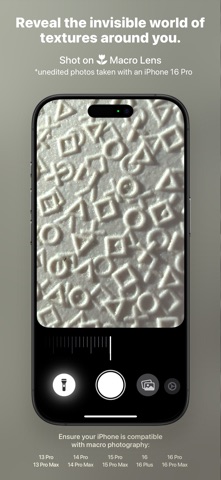
Simple yet powerful, Macro Lens is an all-in-one camera app designed for macro photography enthusiasts. Macro Lens gives iPhone creators a focused macro workflow with real-time controls for focus, zoom, flash intensity, and brightness, plus quick switching between photo and video. • Streamlined Interface: Keep your attention on the subject with dedicated adjustment panels and convenient shortcuts. Touch and hold a control to access its options. • Easy Setup: Get started with guided camera and photo library permissions. Location access is optional, and no account is required. • Manual and Auto Focus: Fine-tune focus with a dedicated slider, or enable continuous autofocus to let the camera adjust as you compose your shot. • Zoom and Pinch Control: Frame tiny subjects using the Zoom slider or a familiar pinch gesture directly on the camera preview. • Adjustable Lighting: Control continuous torch intensity to illuminate small subjects and balance light on dark or reflective surfaces. • Brightness Control: Adjust exposure to brighten or darken your image before capturing. • Photo and Video Modes: Switch directly on the camera screen to capture still images or motion. Record video at 60 fps when supported by your iPhone’s camera configuration. • Photo Viewfinder: Enable an optional overview with a framing guide to help you compose shots while zoomed in. Drag it to either upper corner—the app remembers your preferred position. • Camera Control Support: Take photos and start or stop video recording using the physical Camera Control button on compatible iPhones. • Lock Screen and Control Center Access: Add the Macro Lens control to quickly open the camera from your Lock Screen or Control Center. • Keep the Screen Awake: Take your time composing and capturing without interruptions from Auto-Lock while the app is active. • Save to Photos: Captured photos and videos are saved directly to your photo library. • Optional Location Tags: Add location information to your photos and videos to help you remember where each shot was taken. Have an idea for Macro Lens? Submit a feature request directly from Settings or contact us by email for support. Requires iOS 26 or later. Close-focus capability, torch availability, and video frame rates depend on your iPhone’s camera hardware.
What's new · 1.11
• New Photo Viewfinder: See a wider view of the scene with a framing guide to help you compose shots while zoomed in. Enable “Photo Viewfinder” in Settings, then drag it to either upper corner. The app remembers your preferred position. • Camera Control support: Take photos and start or stop video recording using Camera Control on compatible iPhones. • Lock Screen access: Add the Macro Lens control to your Lock Screen to quickly open the app. • Keep the screen awake: Frame your shots and take photos without interruptions from Auto-Lock. • Refined UI controls: Updated buttons for a more consistent look across the interface.
Details