

Memo - AI Summarize, Recorder
Talgat Kussainov · Productivity
Independent analytics for this App Store listing. AppTracker is not affiliated with Talgat Kussainov.
Chart standing · US
What changed · US
Listing changes AppTracker has observed for this app in this storefront — new versions, price moves, rating shifts, and store copy.
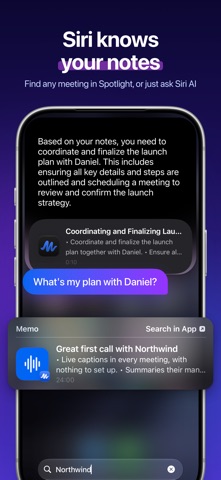
This is the biggest Memo yet. We rebuilt it for iOS 27, so your notes are there wherever you are: in Siri, on your wrist, on your Lock Screen. - Siri AI knows your notes. Ask Memo what you decided about the budget, and the answer appears right in Siri. Open, play, search or translate a note, add a to-do or move it to a folder, all by voice. Looking at a note? Just say "email this to Anna". - Spotlight now finds a note by anything that was said in it. - A redesigned Apple Watch app: your notes and to-dos on your wrist, a Double Tap to finish a recording, the time on your watch face, suggestions in the Smart Stack, and a nudge when your note is ready. - A new Live Activity: pause, resume or stop from the Lock Screen, then watch your note come together. - Start recording from the Lock Screen, Control Center or a widget, and listen back from the Lock Screen or your AirPods. - A brand-new recorder, with live captions and a glow that moves with your voice. Start the next recording while the last one is still being written up. - Every note now has Summary, To Do and Transcript in one place. Make the summary yours with headings, bold and colors, find any word in the transcript, and share it as a PDF, a Word file or audio. - Ask Memo is now a real conversation about your note. - Smarter notes: summaries that fit the length of your recording, and to-dos with the names of the people involved. - A fresh Home with filters and favorites, plus redesigned Folders, Reminders and Settings, with notification sounds to choose from. - Bring in documents, or send files to Memo from any app. - New widgets for your latest note and your to-dos, and To Do on the Lock Screen. - Made for everyone: VoiceOver, Voice Control, text up to the largest sizes, Reduce Motion, Reduce Transparency, Dark Mode and Differentiate Without Color, in eleven languages, Arabic from right to left. Thank you for every note you make with Memo.
Ratings breakdown · US
The star breakdown behind this app's rating in this storefront.
Screenshots





About
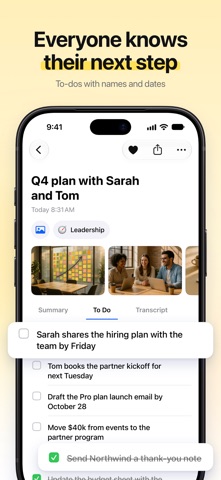
Made for iOS 27. You talk, Memo takes the notes: a transcript you can tap to replay, a summary with a title, the to-dos you mentioned with the people involved, and answers to any question about it. SIRI AI AND APPLE INTELLIGENCE, BUILT IN • Ask Siri AI about a note and hear Memo's answer right in Siri: "Ask Memo what we decided about the budget" • Siri AI works with your notes: open, play, search or translate one, add a to-do, rename it, favorite it or move it to a folder • Siri AI knows the note on screen: "email this to Anna", "what are the action items here" • Spotlight finds a note by anything that was said in it, from an index kept on your iPhone • Image Playground makes a picture for a note (on iPhones that support Apple Intelligence) APPLE WATCH • Record from your wrist and end it with a Double Tap • See the recording's time on your watch face, and tick off to-dos on your wrist • The Smart Stack suggests a recording at the times you usually record • Ask Siri on your watch for your open tasks or your latest note, and get a "note is ready" notification IPHONE AND IPAD • Live Activities and the Dynamic Island follow your recording • Record from the Lock Screen, Control Center or a widget • Play a note from the Lock Screen, Control Center or your AirPods • iPad: your notes and the open note side by side in any window size, with the menu bar and keyboard shortcuts • Designed with Liquid Glass EVERY NOTE, READY TO USE • Summary: the key points and decisions, with a title. Edit it with headings, bold, colors and lists • To Do: tasks from your own words, with names and dates • Transcript: every sentence timestamped. Tap a line to hear it again, or find any word • Ask Memo: chat with your note for an email draft, the key points or anything else • Translate a summary, or share it as PDF, Word or audio • Live captions while you record, and start the next recording while earlier notes are still being made TWO WAYS TO MAKE YOUR NOTES • Cloud AI: accurate transcripts and summaries in 99+ languages, on every iPhone • Offline: notes made on your iPhone with Apple Intelligence, no connection needed (on iPhones that support Apple Intelligence) Memo tells you how your audio will be processed before you record. FOR EVERY CONVERSATION Meetings, lectures and classes, interviews, doctor visits, brainstorms, phone calls, trip planning, everyday notes. ORGANIZE AND FIND • Folders, favorites and filters • Import audio, video and documents, or send files to Memo from any app • Attach photos of the whiteboard or the slides • Widgets for your latest note and your to-dos, and To Do on the Lock Screen DESIGNED FOR EVERYONE Memo works with VoiceOver, Voice Control, text up to the largest sizes, Reduce Motion, Reduce Transparency, Dark Mode and Differentiate Without Color, in portrait and landscape, in eleven languages, Arabic from right to left. MEMO PRO The free plan lets you try Cloud AI with live captions, Ask Memo and imports, and make offline notes. Memo Pro adds longer recordings and lifts the free limits. • Subscription options and prices are shown in the app and may vary by region. • Payment is charged to your Apple Account at confirmation of purchase. • A subscription auto-renews unless auto-renew is turned off at least 24 hours before the end of the current period. • Your account is charged for renewal within 24 hours before the current period ends. • Manage or cancel anytime in your Apple Account settings. Privacy Policy: https://withmemo.app/privacy Terms of Use: https://withmemo.app/terms
What's new · 1.108
This is the biggest Memo yet. We rebuilt it for iOS 27, so your notes are there wherever you are: in Siri, on your wrist, on your Lock Screen. - Siri AI knows your notes. Ask Memo what you decided about the budget, and the answer appears right in Siri. Open, play, search or translate a note, add a to-do or move it to a folder, all by voice. Looking at a note? Just say "email this to Anna". - Spotlight now finds a note by anything that was said in it. - A redesigned Apple Watch app: your notes and to-dos on your wrist, a Double Tap to finish a recording, the time on your watch face, suggestions in the Smart Stack, and a nudge when your note is ready. - A new Live Activity: pause, resume or stop from the Lock Screen, then watch your note come together. - Start recording from the Lock Screen, Control Center or a widget, and listen back from the Lock Screen or your AirPods. - A brand-new recorder, with live captions and a glow that moves with your voice. Start the next recording while the last one is still being written up. - Every note now has Summary, To Do and Transcript in one place. Make the summary yours with headings, bold and colors, find any word in the transcript, and share it as a PDF, a Word file or audio. - Ask Memo is now a real conversation about your note. - Smarter notes: summaries that fit the length of your recording, and to-dos with the names of the people involved. - A fresh Home with filters and favorites, plus redesigned Folders, Reminders and Settings, with notification sounds to choose from. - Bring in documents, or send files to Memo from any app. - New widgets for your latest note and your to-dos, and To Do on the Lock Screen. - Made for everyone: VoiceOver, Voice Control, text up to the largest sizes, Reduce Motion, Reduce Transparency, Dark Mode and Differentiate Without Color, in eleven languages, Arabic from right to left. Thank you for every note you make with Memo.
Details