

Print Master: Air Printer App
THE SOFTWARE SUPPORT LLC · Productivity
Independent analytics for this App Store listing. AppTracker is not affiliated with THE SOFTWARE SUPPORT LLC.
Chart standing · US
What changed · US
Listing changes AppTracker has observed for this app in this storefront — new versions, price moves, rating shifts, and store copy.
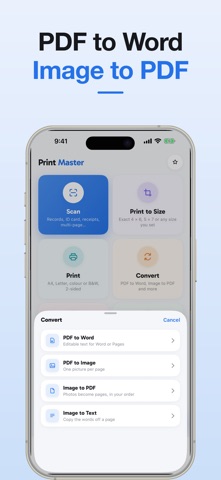
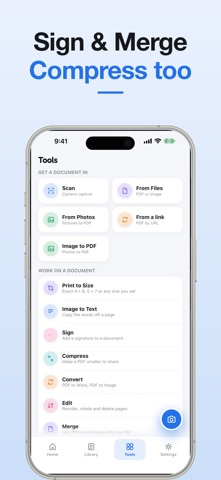
Print Master has been rebuilt from the ground up in Swift — quicker to launch, lighter, and fully native. • A real iPad layout with a sidebar, instead of a stretched-up phone screen • Print to Size: print a photo or document at an exact 4 × 6, 5 × 7, 8 × 10, or any size you set • Clearer conversions: PDF to Word, PDF to Image, Image to PDF, Image to Text • Sign, merge, reorder, rotate and compress your PDFs • Search inside the text of your scans, not just their titles • A brighter design, larger type, and a redesigned navigation bar
Ratings breakdown · US
The star breakdown behind this app's rating in this storefront.
In-app purchases · US
What this app sells inside itself, grouped by kind and priced for this storefront.
Screenshots



About
Print Master: Air Printer App is the ultimate AirPrint App for iPhone and iPad. Supports Apple AirPrint, Epson iPrint, HP Print, Canon Print, ePrint & more.” This way you directly capture Apple AirPrint, Epson iPrint, HP Print, Canon Print, Air Printer App, ePrint all within the highest-weighted lines. Key Features - PDF Scanner & Document Creator Scan notes, receipts, IDs & multi-page documents Auto-detect edges, crop & enhance scans Save as PDF or JPG instantly - Wireless Printing Made Easy Print from iPhone to AirPrint-enabled printers Works with HP Smart, Canon, Epson, Brother, Lexmark & more Print PDFs, Word files, images & web pages - PDF Editor & Reader Add text, highlight, draw & annotate PDFs Sign forms digitally Reorder, rotate & delete pages Use as a fast, secure PDF reader - OCR Scanner (Text Recognition) Extract editable text from scans & images Copy & edit recognized text instantly Ideal for books, invoices & contracts - Convert & Compress PDFs Convert PDFs to Word (DOCX) or images (JPG, PNG) Compress PDFs to reduce file size without quality loss Share files quickly & easily - Smart Document Organizer Rename, search & sort documents Create folders & organize files Access your PDFs anytime, anywhere Why Choose Print Master? All-in-one PDF editor, scanner & printer app Works seamlessly with AirPrint, iPrint & smart printers Compatible with HP Smart, Canon, Epson, Brother & Lexmark Private & secure — files stay on your device Lightweight, fast & easy to use - Go Premium – Unlock Full Access Unlimited printing without ads Full access to PDF annotation & editing tools OCR text recognition & file conversion Best value at $29.99/year Plans: Weekly: $2.99 Monthly: $7.99 Yearly: $29.99 (Best Value – Save 70%) Manage subscriptions in iTunes Account Settings. Auto-renews unless canceled at least 24 hours before the end of the current period. Privacy Policy: https://printmasterapp.com/privacy-policy Terms of Use: https://www.apple.com/legal/internet-services/itunes/dev/stdeula/ Manage subscriptions in iTunes Account Settings. Auto-renews unless canceled at least 24 hours before the end of the current period. Print Master: AirPrint & Scan is your all-in-one PDF scanner, editor & smart printer app. Download now and take control of your documents today!
What's new · 4.0.0
Print Master has been rebuilt from the ground up in Swift — quicker to launch, lighter, and fully native. • A real iPad layout with a sidebar, instead of a stretched-up phone screen • Print to Size: print a photo or document at an exact 4 × 6, 5 × 7, 8 × 10, or any size you set • Clearer conversions: PDF to Word, PDF to Image, Image to PDF, Image to Text • Sign, merge, reorder, rotate and compress your PDFs • Search inside the text of your scans, not just their titles • A brighter design, larger type, and a redesigned navigation bar
Details