

Timer.Coffee
Anton Karliner · Food & Drink
Independent analytics for this App Store listing. AppTracker is not affiliated with Anton Karliner.
Chart standing · US
What changed · US
Listing changes AppTracker has observed for this app in this storefront — new versions, price moves, rating shifts, and store copy.
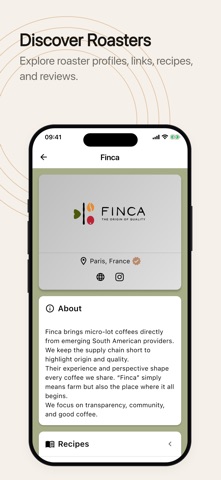
What’s New: • Spot a mistake on a roaster’s page? Tap ⋮ on the roaster profile and choose “Report an error”. Pick what’s wrong, add the correct value if you know it, and send it. We review every report. • If you run a roastery, you can claim its page from the same menu, or from the “Is this your roastery?” link on the profile. Improvements: • The AI recipe check has been removed. The app now always checks the amounts in your recipe steps itself, and still asks you when an amount could mean either coffee or water. • Roasters have one storefront icon throughout the app, and it stands in for a roaster’s logo until one is added.
Ratings breakdown · US
The star breakdown behind this app's rating in this storefront.
In-app purchases · US
What this app sells inside itself, grouped by kind and priced for this storefront.
Screenshots




Keywords this app targets
Search terms AppTracker associates with this app — estimates, not search volume. ❝ = in the app's title; a highlighted number is its current position for that term.
Similar apps
Competitors and close alternatives, as estimated by AppTracker.
 Brew Timer - Coffee Recipes
Stephen Panaro
Brew Timer - Coffee Recipes
Stephen Panaro
 Simple Coffee Timer
Jordan Matthiass
Simple Coffee Timer
Jordan Matthiass
 Shizuku - Brew Timer
NimbleWorks Inc.
2 shared topics · 1 shared title word
Shizuku - Brew Timer
NimbleWorks Inc.
2 shared topics · 1 shared title word
 Single Origin - Coffee Timer
Jon Samp
2 shared title words
Single Origin - Coffee Timer
Jon Samp
2 shared title words
 Barista Espresso Timer
Alexander Zimmermann
1 shared topic · 1 shared title word
Barista Espresso Timer
Alexander Zimmermann
1 shared topic · 1 shared title word
 Coffee Brew Log: Barista
MD Shahariar Nazim Joy
1 shared topic · 1 shared title word
Coffee Brew Log: Barista
MD Shahariar Nazim Joy
1 shared topic · 1 shared title word
 Pour Over Coffee Timer: Gota
Jose Antonio Neto Suarez
2 shared title words
Pour Over Coffee Timer: Gota
Jose Antonio Neto Suarez
2 shared title words
 FourSix Coffee Timer
Jonathan Duenas
FourSix Coffee Timer
Jonathan Duenas
About
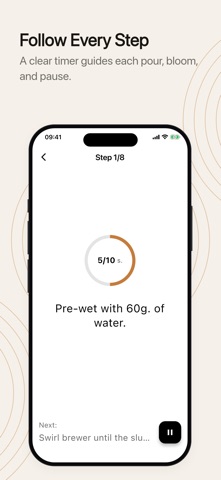
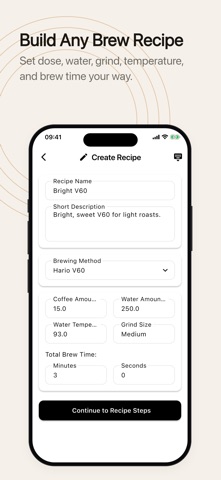
Timer.Coffee is a free, open-source coffee brewing timer and calculator designed to enhance your brewing experience. The app is completely free. Optional in-app donations support ongoing development and never affect access to features. Key Features - 27 Brewing Methods: Step-by-step instructions for Hario V60, AeroPress, Chemex, French Press, Clever Dripper, Kalita Wave, Wilfa Svart Pour Over, Origami Dripper, Hario Switch, and more. - Coffee Calculator: Adjust coffee and water quantities on the fly. - Custom Grind Size: Save your grind settings per recipe — never forget your Comandante clicks again. - Background Brewing: The timer keeps running accurately when you minimize the app — switch apps or check a message without losing your place. - Live Activities: Follow your brew step-by-step on the Lock Screen and in the Dynamic Island without unlocking your phone. - Pulse: See what coffee lovers around the world are brewing right now, in real time. - Create & Share Recipes: Build your own brewing recipes and share them with the community. - Brew Diary: Automatically save timer-guided brews or add entries manually, with notes, ratings, taste, tags, grind, water temperature, and extraction. - Bean Tracking: Manage your coffee bean inventory with AI-powered label recognition. - Favorites: Quick access to your most-used recipes. - Audio Chime: Audio alerts for every brewing step. - Dial In Your Beans: Search and filter your history, bookmark best cups, compare attempts, follow bean journeys, and review monthly progress. - Device Sync: Recipes, beans, and brews synced across all your devices. - 22 Languages: Fully localized for a global audience. - Dark Mode: Easy on the eyes at any hour.
What's new · 3.10.1
What’s New: • Spot a mistake on a roaster’s page? Tap ⋮ on the roaster profile and choose “Report an error”. Pick what’s wrong, add the correct value if you know it, and send it. We review every report. • If you run a roastery, you can claim its page from the same menu, or from the “Is this your roastery?” link on the profile. Improvements: • The AI recipe check has been removed. The app now always checks the amounts in your recipe steps itself, and still asks you when an amount could mean either coffee or water. • Roasters have one storefront icon throughout the app, and it stands in for a roaster’s logo until one is added.
Details