

SCUF Nomad Companion App
Corsair Memory, Inc. · Entertainment
Independent analytics for this App Store listing. AppTracker is not affiliated with Corsair Memory, Inc.
Chart standing · US
What changed · US
Listing changes AppTracker has observed for this app in this storefront — new versions, price moves, rating shifts, and store copy.
Price & rating history · US
Reconstructed from the listing changes AppTracker has observed in this storefront. A field is charted once it has changed more than once, and each line starts at the value it moved from.
Average rating · ★ 3.27 now · 33 changes on record
Ratings breakdown · US
The star breakdown behind this app's rating in this storefront.
In-app purchases · US
No in-app purchases.
Screenshots



About
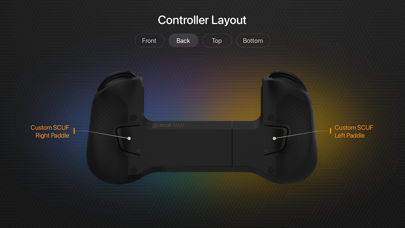
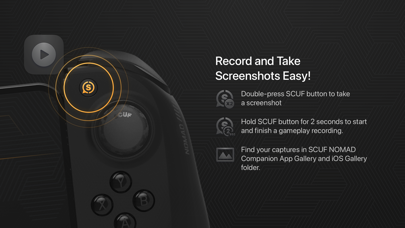
Unleash the full potential of your gaming experience with the Nomad Game Controller Companion App, exclusively designed for SCUF’s groundbreaking Nomad Game Controller. Essential Features: - Bluetooth Connectivity: Quickly connect your Nomad Game Controller to any iOS device for seamless and responsive gameplay. - Firmware Updates: Keep your controller performing at its best with straightforward firmware updates, ensuring optimal functionality and the latest features. - Curated Recommendations: Dive into new gaming adventures with our handpicked selection of recommended games. Easily download these titles from the Apple Store and organize them in your 'My Games' list for quick access. - Customized Play Settings: Tailor your gaming experience with customizable profiles. Adjust key mappings, fine-tune thumbstick sensitivity, and set dead zones to suit your play style. - Content Gallery: Enjoy a vibrant gallery of images and videos captured via your controller's SCUF button. Share your top gaming moments with friends and the community directly from the app. Download now and transform your iOS device into a hub of gaming excellence with the Nomad Game Controller Companion App. Experience unmatched precision and convenience right at your fingertips!
What's new · 1.3.0
- Added feature: Calibration of Thumbsticks and Triggers in Menu > Device > Calibration - Update FW of controller - Updated Games database
Details