

Pyware 3D
Software Shapers, Inc. · Music
Independent analytics for this App Store listing. AppTracker is not affiliated with Software Shapers, Inc.
Chart standing · US
What changed · US
Listing changes AppTracker has observed for this app in this storefront — new versions, price moves, rating shifts, and store copy.
Interactive Reference Tool - New Set Reference Tool — highlight one or many performers on the field in real time - Distance measurement between performers, with show/hide measurement display - Latency indicators between microphone and speaker, with directional arrows and step-back - Set Reference target images - Stage audio equipment: speakers, microphones, and frames (Gaffer) Drill Design Tools - Sequence with multiple shapes at once, with a user-pickable leader for each shape - Sequencing on mirrored morphs - Mirroring in the Resize tool, including Warp mode - Knife Tool: Split at Corners - Multi-shape morph quick-edit handles cover all shapes - Relocation handles in the Push Tool (show/hide state remembered) - Snap To dialog and snap-to-resolution for track path handles; configurable handle snap/drag options - Sequencer stays active in both Draw and Assign modes - Path sizes displayed in "steps to 5" format Visual Tabs - New visual-layer tabs on the count track: label every visual layer, and tabs move with anchors - Show/hide visual layers from the Visuals inspector Sketch - Paste As Sketch - Open sketch books from version 10 - Sketch points always visible while editing - Improved sketch editing handles and actor-based sketch selection Transfer Performers - Utilities > Transfer Performers — move performers between drills Cast List - Cast List import with merge, and export - Add cast members directly in the Cast List Editor Label Tool - Symbol/Color apply modes: All Counts, Anchor Range, Anchor Range To End - Symbol by pattern - Label Autopositioner - Up/Down arrow keys move focus to the next/previous label Selection Tools - Double/triple-click select by Same Instrument/Equipment or Same Uniform/Prop - Lock Selection across all counts - Average interval shown in the HUD - Position and max/min stride info in the status bar; performer info when hovering Printing & Publishing - Drill Book printer - 3da file export from printing - Zoomed printing - Print grid improvements - Secure UDB upload straight to the website, with Grid Terms favorites (save, load, reset) Settings, Sync & Performance - Cross-device settings sync - Performance & Energy Settings dialog — frame rate, quality, and energy controls - Major editing-performance improvements for large drills - Check for beta updates Files & Media - Save a Copy As - Native file picker - Screen-recording improvements - Audio sync improvements, including march speed driven by audio sync Content Library - New instruments and props: guitars and bass guitar, 2026 Drum Corps Models, mini stage, sundial, fountain sculpture, headphone gear, swing flags - Flags with cloth physics and marcher collision - Metronome sounds - Prop opacity control and aspect-ratio-preserving prop sizing Everyday Workflow Polish - Jog marker left/right keyboard shortcuts - Page tab navigation keeps the primary count in view; Jump Thumbnail / Jump Production Sheet scroll the track into view - Alt-click on the tick panel adds a standard page tab - Default staging presets - Expanded localization / translations
Price & rating history · US
Reconstructed from the listing changes AppTracker has observed in this storefront. A field is charted once it has changed more than once, and each line starts at the value it moved from.
Average rating · ★ 0.00 now · 2 changes on record
In-app purchases · US
No in-app purchases.
Screenshots



About
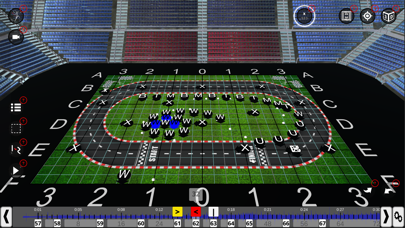
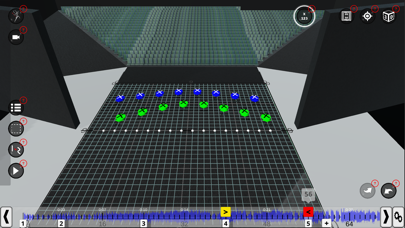
Pyware 3DX brings the most trusted name in drill design to every device you own. Design, animate, and teach your marching show anywhere — on a tablet at rehearsal, a laptop on the road, or a desktop in the studio — with one license and settings that sync across all of your devices. Since 1982, Pyware has been recognized as the leader in drill design software. It is a staple for high school and collegiate marching bands, and it has been used for major events including Super Bowl halftime shows, Olympic opening and closing ceremonies, and the Macy's Thanksgiving Day Parade. DESIGN • A full catalog of professional drill design tools: blocks, curves, shapes, and freehand sketching • Sequence multiple shapes at once, with a hand-picked leader for each • Morph, mirror, resize, and warp formations • Fine-grained snapping, splitting, and path editing • Label performers with symbols, colors, and auto-positioned labels VISUALIZE • Smooth real-time 3D animation of your entire show • Uniforms, instruments, equipment, and props — including flags with realistic cloth physics • Layered visuals with labeled tabs on the count track • Sync animation to your show audio, with metronome support REHEARSE & TEACH • Interactive Reference Tool: spotlight performers and measure distances and intervals right on the field • Print complete drill books, coordinate sheets, and production sheets • Import, merge, and export cast lists • Record video of your drill to share with staff and students WORK ANYWHERE • One license across desktop, laptop, and mobile • Your settings follow you to every device • Securely upload and share your drill online Available in three editions, Pyware 3D can be used by ensembles of any size or skill level.
What's new · 1.0.8
Interactive Reference Tool - New Set Reference Tool — highlight one or many performers on the field in real time - Distance measurement between performers, with show/hide measurement display - Latency indicators between microphone and speaker, with directional arrows and step-back - Set Reference target images - Stage audio equipment: speakers, microphones, and frames (Gaffer) Drill Design Tools - Sequence with multiple shapes at once, with a user-pickable leader for each shape - Sequencing on mirrored morphs - Mirroring in the Resize tool, including Warp mode - Knife Tool: Split at Corners - Multi-shape morph quick-edit handles cover all shapes - Relocation handles in the Push Tool (show/hide state remembered) - Snap To dialog and snap-to-resolution for track path handles; configurable handle snap/drag options - Sequencer stays active in both Draw and Assign modes - Path sizes displayed in "steps to 5" format Visual Tabs - New visual-layer tabs on the count track: label every visual layer, and tabs move with anchors - Show/hide visual layers from the Visuals inspector Sketch - Paste As Sketch - Open sketch books from version 10 - Sketch points always visible while editing - Improved sketch editing handles and actor-based sketch selection Transfer Performers - Utilities > Transfer Performers — move performers between drills Cast List - Cast List import with merge, and export - Add cast members directly in the Cast List Editor Label Tool - Symbol/Color apply modes: All Counts, Anchor Range, Anchor Range To End - Symbol by pattern - Label Autopositioner - Up/Down arrow keys move focus to the next/previous label Selection Tools - Double/triple-click select by Same Instrument/Equipment or Same Uniform/Prop - Lock Selection across all counts - Average interval shown in the HUD - Position and max/min stride info in the status bar; performer info when hovering Printing & Publishing - Drill Book printer - 3da file export from printing - Zoomed printing - Print grid improvements - Secure UDB upload straight to the website, with Grid Terms favorites (save, load, reset) Settings, Sync & Performance - Cross-device settings sync - Performance & Energy Settings dialog — frame rate, quality, and energy controls - Major editing-performance improvements for large drills - Check for beta updates Files & Media - Save a Copy As - Native file picker - Screen-recording improvements - Audio sync improvements, including march speed driven by audio sync Content Library - New instruments and props: guitars and bass guitar, 2026 Drum Corps Models, mini stage, sundial, fountain sculpture, headphone gear, swing flags - Flags with cloth physics and marcher collision - Metronome sounds - Prop opacity control and aspect-ratio-preserving prop sizing Everyday Workflow Polish - Jog marker left/right keyboard shortcuts - Page tab navigation keeps the primary count in view; Jump Thumbnail / Jump Production Sheet scroll the track into view - Alt-click on the tick panel adds a standard page tab - Default staging presets - Expanded localization / translations
Details