

Video Files Converter: MP4,MP3
Ofir Yagil · Utilities
Independent analytics for this App Store listing. AppTracker is not affiliated with Ofir Yagil.
Chart standing · US
What changed · US
Listing changes AppTracker has observed for this app in this storefront — new versions, price moves, rating shifts, and store copy.
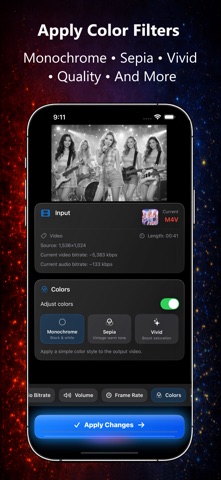
NEW FEATURES: • Change video resolution and output size • Boost volume up to 400% • Trim video and audio to keep only the parts you want • Adjust video and audio bitrate • Modify frame rate • Remove audio from videos • Apply color filters like Monochrome, Sepia and Vivid • Improved format selection interface • Bug fixes As always, everything runs 100% locally on your device with no uploads.
Price & rating history · US
Reconstructed from the listing changes AppTracker has observed in this storefront. A field is charted once it has changed more than once, and each line starts at the value it moved from.
Average rating · ★ 4.40 now · 3 changes on record
Ratings breakdown · US
The star breakdown behind this app's rating in this storefront.
In-app purchases · US
What this app sells inside itself, grouped by kind and priced for this storefront.
Screenshots


About
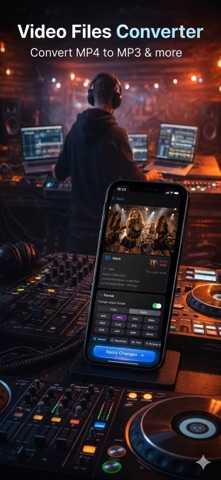
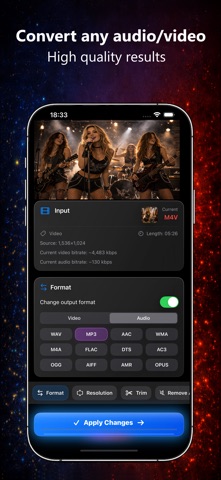
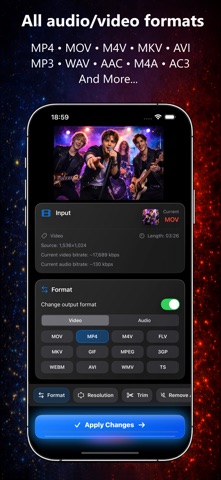
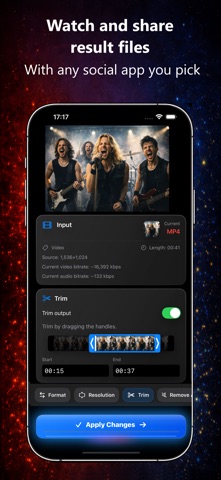
A simple yet powerful video and audio converter and editor. Convert, enhance and optimize media files directly on your device. Supports most well-known video and audio formats. ** Works offline - your media never leaves your device VIDEO & AUDIO CONVERTER: • Convert video or audio files to many popular formats • Convert MP4 to MP3 (or any video to audio format and vice versa) • Extract audio from videos • Quick conversion with high quality results • Load files from Photos, Files app, iCloud or anywhere on your device • Save the result or share instantly with any other app POWERFUL EDITING TOOLS: Enhance and customize your media before exporting: • Change file format (video ↔ audio) • Boost volume up to 400% • Trim videos or audio to keep only what you need • Change resolution and video size • Adjust quality and compression • Control video bitrate and audio bitrate • Change frame rate • Remove audio from video • Apply color filters (Monochrome, Sepia, Vivid) SUPPORTED FORMATS: Load and convert between many common file formats including: VIDEO: MOV, MP4, M4V, MKV, AVI, WEBM, WMV, FLV, MPEG, TS, 3GP, GIF AUDIO: MP3, WAV, AAC, WMA, M4A, FLAC, AIFF, OGG, OPUS, DTS, AC3, AMR GIF MAKER: • Convert videos to GIFs • Perfect for sharing on WhatsApp, Instagram, Facebook and other social media YOUR DATA IS SAFE: • All processing is done locally on your device • No files are uploaded to external servers • No internet connection required • Your original files are never modified HOW TO USE: 1. Choose a file from Photos, Videos or the Files app (including iCloud). 2. Select your format or editing tools and tap “Apply”. 3. Your new file will be ready in seconds. Watch it, save it or share it anywhere. Fast, simple and powerful media conversion — all on your device. --- Privacy Policy - https://ofirapps.blogspot.com/2023/05/video-files-converter-privacy-policy.html Terms and Conditions - https://ofirapps.blogspot.com/2023/05/video-files-converter-terms-and.html
What's new · 2.0.14
NEW FEATURES: • Change video resolution and output size • Boost volume up to 400% • Trim video and audio to keep only the parts you want • Adjust video and audio bitrate • Modify frame rate • Remove audio from videos • Apply color filters like Monochrome, Sepia and Vivid • Improved format selection interface • Bug fixes As always, everything runs 100% locally on your device with no uploads.
Details