

Player for Watch
磊 汪 · Music
Independent analytics for this App Store listing. AppTracker is not affiliated with 磊 汪.
Chart standing · US
What changed · US
Listing changes AppTracker has observed for this app in this storefront — new versions, price moves, rating shifts, and store copy.
- Added full support for iPhone Duo. - Updated for iOS 27 and watchOS 27. - Added local Wi‑Fi transfer for direct media delivery to Apple Watch, making Family Setup transfers and quick one-off transfers easier. - Added FLAC metadata, artwork, and lyrics support. - Improved handling of malformed or incomplete FLAC files for safer imports. - Import audio and video with Shortcuts, optionally sending them to Apple Watch and compressing videos before transfer. - Fixed an issue where lyrics could fall out of sync after seeking. - Improved fast-forward and rewind reliability from widgets and controls, including when the app is not already running. - Added multi-select archive and unarchive actions for media and Inbox items. - Improved local file browsing with fuzzy search, artwork previews, clearer transfer controls, accessibility, and localization. - General bug fixes and improvements.
Price & rating history · US
Reconstructed from the listing changes AppTracker has observed in this storefront. A field is charted once it has changed more than once, and each line starts at the value it moved from.
Average rating · ★ 4.32 now · 8 changes on record
Ratings breakdown · US
The star breakdown behind this app's rating in this storefront.
In-app purchases · US
No in-app purchases.
Screenshots





Keywords this app targets
Search terms AppTracker associates with this app — estimates, not search volume. ❝ = in the app's title; a highlighted number is its current position for that term.
Similar apps
Competitors and close alternatives, as estimated by AppTracker.
 Watch Audio Player
Ashkan Zanjani
1 shared topic · 2 shared title words
Watch Audio Player
Ashkan Zanjani
1 shared topic · 2 shared title words
 WatchVideo Player
Atlum Limited
WatchVideo Player
Atlum Limited
 WatchAudio
Atlum Limited
1 shared topic
WatchAudio
Atlum Limited
1 shared topic
 WatchClips
Zakariya Mohummed
1 shared topic
WatchClips
Zakariya Mohummed
1 shared topic
 FS Music Player
SPADDLEWIT INC.
FS Music Player
SPADDLEWIT INC.
 Watch Kast Audio Player
Ronald Boyd
Watch Kast Audio Player
Ronald Boyd
 ListenBook Pro: book player
Oleg Brailean
1 shared title word
ListenBook Pro: book player
Oleg Brailean
1 shared title word
 ListenBook: audiobook player
Oleg Brailean
ListenBook: audiobook player
Oleg Brailean
About
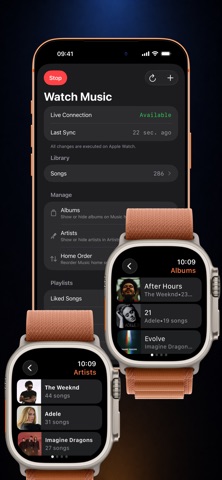
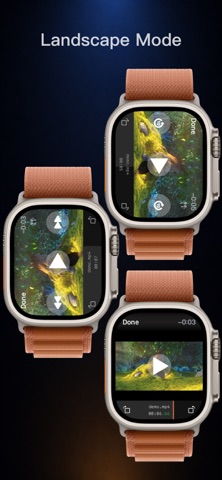
Turn your Apple Watch into an offline music and video player. Player for Watch lets you import local audio and video files, organize your music library, and play media directly from your wrist. Transfer songs, playlists, movies, lectures, podcasts, workouts, or other personal files to Apple Watch and enjoy them when you are away from your iPhone. Built for Apple Watch music and video playback: • Play local audio and video files on Apple Watch • Play through the Apple Watch speaker, AirPods, or connected headphones • Control music from Now Playing with full playback controls • Add music widgets and Control Center controls for playback, repeat, shuffle, like, lyrics, previous, and next • Use AirPods controls for convenient playback from your wrist • Use repeat, repeat one, shuffle, playback speed, and sleep timer controls • See the current playback queue and jump to what plays next • Auto-play the next song or video • Fine-tune music progress with a circular scrub gesture or the Digital Crown • Fine-tune video progress with the Digital Crown • Resume video and music from the last playback position Music library tools: • Browse music by Songs, Playlists, Albums, and Artists • Search your watch library from your wrist to quickly find songs and albums • Create playlists and manage playlist contents • Like favorite songs and access them from Liked Songs • Manage your watch music library from iPhone • Show, hide, and reorder albums and artists • Customize the Music home order on Apple Watch • Fetch matching album and artist artwork from Apple Music when available • Add or modify song cover art from iPhone • View embedded lyrics and imported .lrc lyrics • Show the current lyric line from widgets Video tools: • Watch videos in landscape mode • Compress videos before sending to improve Apple Watch compatibility • Organize videos with folder management • Hide selected videos from your library • Protect hidden videos with a passcode Personalization and accessibility: • Customize the watch app accent color • Use VoiceOver-friendly controls and widget labels Import media your way: • Import from the Files app • Import videos from the Photos app • Share files from other apps with export support • Transfer from Finder on Mac or iTunes on PC • Access Google Drive, Dropbox, iCloud Drive, and other cloud services through the Files app Family Watch transfers: • Transfer media to Apple Watch models set up with Family Setup over local Wi‑Fi Player for Watch is designed for people who want a simple local media player on Apple Watch: offline music, local videos, lyrics, playlists, widgets, and playback controls without extra setup. Supported audio files: mp3, m4a, aac, wav, flac, m4b, aiff, aif, aifc, caf Supported video files: mp4, mov, m4v, 3gp, 3g2
What's new · 6.0.0
- Added full support for iPhone Duo. - Updated for iOS 27 and watchOS 27. - Added local Wi‑Fi transfer for direct media delivery to Apple Watch, making Family Setup transfers and quick one-off transfers easier. - Added FLAC metadata, artwork, and lyrics support. - Improved handling of malformed or incomplete FLAC files for safer imports. - Import audio and video with Shortcuts, optionally sending them to Apple Watch and compressing videos before transfer. - Fixed an issue where lyrics could fall out of sync after seeking. - Improved fast-forward and rewind reliability from widgets and controls, including when the app is not already running. - Added multi-select archive and unarchive actions for media and Inbox items. - Improved local file browsing with fuzzy search, artwork previews, clearer transfer controls, accessibility, and localization. - General bug fixes and improvements.
Details