

Breveto
IdeaPunch, LLC. · Productivity
Independent analytics for this App Store listing. AppTracker is not affiliated with IdeaPunch, LLC.
Chart standing · US
What changed · US
Listing changes AppTracker has observed for this app in this storefront — new versions, price moves, rating shifts, and store copy.
There’s a lot packed into this update! You can now attach files, create Mermaid diagrams, add captions, check your grammar, create math blocks, and more. ## NEW FEATURES • File Attachments — Attach PDFs, documents, and any other kind of file directly to a document. • Mermaid Diagrams — Create flowcharts, sequence diagrams, and more directly in your documents with the new diagram block. • Captions — Add captions to images, tables, code blocks, math blocks, and diagrams. • Grammar Checking — Catch grammar issues as you write with Breveto’s new built-in grammar checking. Enable it from Edit → Spelling and Grammar → Check Grammar. • Multiple Highlighter Colors — Highlight in yellow, green, blue, red, purple, or stick with the standard color. • Math Blocks — Write LaTeX math expressions inline, or use the new math block for larger equations. • Easier Document Linking — Drag a file from the sidebar into the editor to create a link to that document. Copy links to folders or several files at once using File → Copy Deep Link. • Navigate Forward and Backward — Quickly jump between recently opened files with Command + [ and Command + ]. ## IMPROVEMENTS • The iOS formatting menu now highlights active formatting, includes undo and redo, supports images and attachments, and works better on smaller screens. • Images pasted from the web are now added to documents as images automatically. • Markdown, DOCX, and plain text exports are faster and more accurate. • Breveto can now import Textpack files. • See the total number of matches in the find and replace menu. • Export several files at once by selecting them in the sidebar. • Command + W on Mac now closes the open file before closing the window. • The text selection menu on iOS lets you copy and paste as Markdown, HTML, or plain text. • Inline code can now be made into a link. • Improved the behavior of nested list indentation. • Added an option in Focus Mode to dim everything except the active sentence or block. • Added an option to hide the formatting menu entirely on Mac. • Added an option to change the snap position in Typewriter Mode to the top, center, or bottom. • Added an option for completed todos to remain unchanged, without strikethrough or faded text. • Added an option to change the default highlighter color. ## BUG FIXES • Fixed HDR images dimming the rest of the editor. • Fixed document duplication not including unsaved changes or attachments. • Fixed several Markdown import and export issues, including nested code fences, math dollar signs, and inline code next to links. • Fixed find and replace sometimes not receiving focus when opened. • Fixed the spell-check menu becoming too small on Mac. • Fixed the delete menu item not working for files selected in the sidebar. • Fixed the print share button on iOS. • Fixed multiple crashes on iPad and iPhone. • Fixed table row and column menus not closing on iOS when tapping outside them. • And other minor fixes. ## QUESTIONS? FEEDBACK? We’d love to hear your feedback and know how we can make Breveto perfect for you! Get in touch: https://breveto.app/support
Price & rating history · US
Reconstructed from the listing changes AppTracker has observed in this storefront. A field is charted once it has changed more than once, and each line starts at the value it moved from.
Average rating · ★ 4.67 now · 2 changes on record
Ratings breakdown · US
The star breakdown behind this app's rating in this storefront.
Screenshots






About
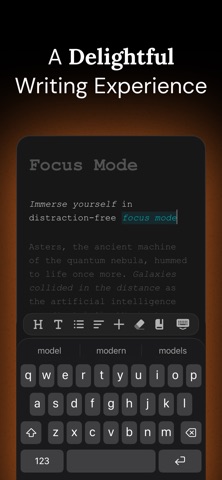
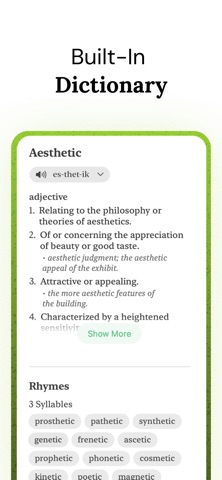
Welcome to your calm workspace for notes, ideas, stories, and everything in between. Breveto is a beautiful and minimal writing app with powerful features to keep your life organized ## A DELIGHTFUL WRITING EXPERIENCE Once you’ve tried Breveto, you’ll never look back. Every detail has been crafted to make writing a joy. • Immerse yourself in distraction-free focus mode. • Effortlessly format documents just by selecting text. • Add images, tables, diagrams, file attachments, math, and more to your notes. • Catch spelling and grammar issues as you write. • Find zen with an aesthetic and minimal writing app. ## YOUR FILES, FINALLY ORGANIZED Drag, drop, and organize your files with Breveto's folder system. Pin essential files, or give each project a dedicated workspace. Everything stays exactly where you left it, so nothing ever gets buried. You can even put folders within folders! ## BEAUTIFUL THEMES Your words are personal. Your workspace should be too. Go beyond dark mode with beautiful built-in themes, or unleash your creativity and make your own. ## SEAMLESS SYNC, ACROSS DEVICES From Mac to iPhone to iPad — Breveto carries your files wherever you go, and even works offline when you’re traveling. Your files sync privately and conflict‑free through iCloud. ## FOR THE POWER USERS Customize every shortcut, open files instantly with Quick Open, and tune Breveto’s settings to fit your workflow. ## BUILT-IN DICTIONARY, SYNONYMS, & RHYMES Search words with one click. Breveto is your dictionary, thesaurus, and rhyme book all in one place. ## MARKDOWN Breveto has first-class support for markdown shortcuts, without the clutter of editing markdown syntax. You can copy, paste, import, and export as markdown too. ## MORE FEATURES • View document stats like reading time and character count. • Use the outline view to see your file’s structure, and quickly jump to major sections. • Attach PDFs, documents, and other files directly to your notes. • Create flowcharts, sequence diagrams, and more with Mermaid diagrams. • Export files as Markdown, Word (DOCX), Plain Text, RTF, Text Bundle, HTML, and more, or copy as those formats. • Print your files with beautiful styles and fonts. • Search all documents or attachments. • Enjoy peace of mind with automatic backups. • Use powerful formatting features: tables, syntax-highlighted code blocks, captions, first-line indents, and more. ## WHAT CAN I USE IT FOR? You can use Breveto for note taking, writing books, journaling, to-do and task lists, drafts, novels, blogging, screenplays, poetry, lyrics, mind mapping, student notes, essays; you name it! > “I use Breveto to keep all my notes, reading list, Breveto's roadmap, songs I write, and more. It’s my personal knowledge base.” — Jordan, Founder of Breveto ## PRICING Breveto is a premium app and requires a subscription. We offer a free trial for new users, and you can explore most of Breveto for free in read-only mode. Along with everything else, Breveto Pro lets you: • Create and edit an unlimited number of files and workspaces. • Search the dictionary, synonyms, and rhymes. • Support the app and a tiny independent software company, proudly made in the USA. ------ ## QUESTIONS? FEEDBACK? We’d love to hear your feedback and know how we can make Breveto perfect for you! Learn how to use Breveto at: https://breveto.app/docs Email: contact@ideapunch.com Twitter: @IdeaPunchLLC Terms of Use: https://breveto.app/terms-and-conditions Privacy Policy: https://breveto.app/privacy-policy
What's new · 2.4.0
There’s a lot packed into this update! You can now attach files, create Mermaid diagrams, add captions, check your grammar, create math blocks, and more. ## NEW FEATURES • File Attachments — Attach PDFs, documents, and any other kind of file directly to a document. • Mermaid Diagrams — Create flowcharts, sequence diagrams, and more directly in your documents with the new diagram block. • Captions — Add captions to images, tables, code blocks, math blocks, and diagrams. • Grammar Checking — Catch grammar issues as you write with Breveto’s new built-in grammar checking. Enable it from Edit → Spelling and Grammar → Check Grammar. • Multiple Highlighter Colors — Highlight in yellow, green, blue, red, purple, or stick with the standard color. • Math Blocks — Write LaTeX math expressions inline, or use the new math block for larger equations. • Easier Document Linking — Drag a file from the sidebar into the editor to create a link to that document. Copy links to folders or several files at once using File → Copy Deep Link. • Navigate Forward and Backward — Quickly jump between recently opened files with Command + [ and Command + ]. ## IMPROVEMENTS • The iOS formatting menu now highlights active formatting, includes undo and redo, supports images and attachments, and works better on smaller screens. • Images pasted from the web are now added to documents as images automatically. • Markdown, DOCX, and plain text exports are faster and more accurate. • Breveto can now import Textpack files. • See the total number of matches in the find and replace menu. • Export several files at once by selecting them in the sidebar. • Command + W on Mac now closes the open file before closing the window. • The text selection menu on iOS lets you copy and paste as Markdown, HTML, or plain text. • Inline code can now be made into a link. • Improved the behavior of nested list indentation. • Added an option in Focus Mode to dim everything except the active sentence or block. • Added an option to hide the formatting menu entirely on Mac. • Added an option to change the snap position in Typewriter Mode to the top, center, or bottom. • Added an option for completed todos to remain unchanged, without strikethrough or faded text. • Added an option to change the default highlighter color. ## BUG FIXES • Fixed HDR images dimming the rest of the editor. • Fixed document duplication not including unsaved changes or attachments. • Fixed several Markdown import and export issues, including nested code fences, math dollar signs, and inline code next to links. • Fixed find and replace sometimes not receiving focus when opened. • Fixed the spell-check menu becoming too small on Mac. • Fixed the delete menu item not working for files selected in the sidebar. • Fixed the print share button on iOS. • Fixed multiple crashes on iPad and iPhone. • Fixed table row and column menus not closing on iOS when tapping outside them. • And other minor fixes. ## QUESTIONS? FEEDBACK? We’d love to hear your feedback and know how we can make Breveto perfect for you! Get in touch: https://breveto.app/support
Details