

SeeClap - IPTV & Xtream Player
See Apps Studio LLC · Entertainment
Independent analytics for this App Store listing. AppTracker is not affiliated with See Apps Studio LLC.
Chart standing · US
What changed · US
Listing changes AppTracker has observed for this app in this storefront — new versions, price moves, rating shifts, and store copy.
- On DLNA-compatible Smart TVs, choose the audio language and text subtitles embedded in your video, with playback resuming at your position. - While a playlist is updating, find your downloads and the “Skip” button more easily at the top of the screen. - On iPad in landscape, movie pages now display their background image correctly. - Cast and crew roles, current programmes: more text is displayed in your language. - More reliable TV casting and sign-out; the rating request appears after a viewing session, without interrupting your video. Thank you for your loyalty. If you enjoy SeeClap, a rating on the App Store helps us a lot. Follow us on Telegram (@SeeAppsStudioNews) and X (@SeeAppsStudio).
Ratings breakdown · US
The star breakdown behind this app's rating in this storefront.
Screenshots





About
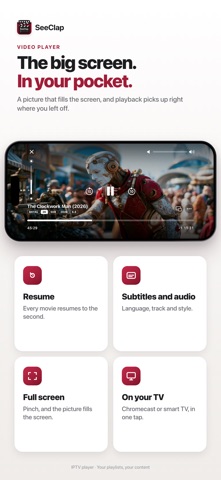
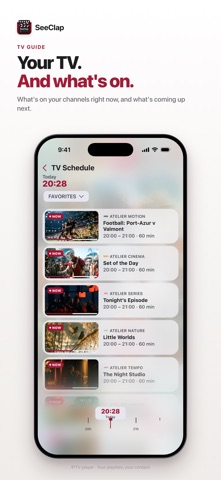
At night you want to press Play. Not hunt through an IPTV playlist twelve thousand lines long. SeeClap is the IPTV player that turns your subscription — Xtream Codes, M3U, M3U8 or 1Stream — into a real library: posters, plot summaries, cast, seasons in order, and playback that resumes exactly where you stopped. On iPhone, iPad, Mac and Apple TV, everything stays in sync. ▸ YOUR IPTV PLAYLIST IN THIRTY SECONDS Paste an Xtream Codes address, an M3U/M3U8 link, or import the file. You can also scan a QR code, or photograph the screen where your provider shows your credentials: SeeClap reads them on the device. No size limit. ▸ LIVE TV, EPG GUIDE AND REPLAY Every channel, what's on now and next, instant zapping, a moving preview before you even enter. Pin a show and get a reminder before it starts. Replay and catch-up on Xtream and 1Stream playlists, whenever your provider offers them. ▸ MOVIES AND SERIES ENRICHED BY TMDb High-resolution posters, synopses, ratings, trailers, actor pages. Series sorted by season, watched episodes marked. Same film in several versions? Each is tagged by language and quality — 1080p, 4K, original audio. ▸ A PLAYER THAT DOESN'T STALL Three playback engines to pick from (KSPlayer, VLC, MPV) and an automatic switch when a format resists: MKV, HEVC, 4K, HLS, TS. Audio and subtitle tracks selectable, external OpenSubtitles support, pinch to reframe. ▸ YOUR OWN VIDEOS TOO Import your files from the iPhone, or over Wi-Fi from a computer's browser. SeeClap finds the poster and summary, and creates or translates their subtitles right on the device (compatible devices). ▸ EVERYWHERE, TOGETHER Favorites, history and playback positions synced across iPhone, iPad, Mac and Apple TV. Native Apple TV app, widgets on iPhone. Cast to Chromecast and smart TVs (DLNA), controlled from your iPhone: SeeClap checks the stream and offers a compatible version when one exists. Offline downloads and Picture in Picture on iPhone and iPad. ▸ ORGANIZED, AND UNDER CONTROL Instant search, filters by genre and country, suggestions computed on your device, parental control with a PIN, light or dark theme. Plus a network diagnostic when your provider goes quiet. FREE, THEN PREMIUM Explore the whole app for free, with two minutes per playback. Premium removes the limit: unlimited playback, favorites, resume, reminders, downloads, your own videos, casting to the TV. What is the best IPTV player for iPhone and Apple TV? The one that plays your formats without stalling, finds the artwork for your films, and follows you from screen to screen. IMPORTANT SeeClap provides NO video content and is not affiliated with any IPTV provider. You must import your own legally obtained subscription. Not affiliated with TMDb or OpenSubtitles. Privacy Policy: https://seeclap.com/en/privacy-policy/ Terms and Conditions: https://seeclap.com/en/terms-and-condition/ Apple Standard EULA: https://www.apple.com/legal/internet-services/itunes/dev/stdeula/
What's new · 2.13.0
- On DLNA-compatible Smart TVs, choose the audio language and text subtitles embedded in your video, with playback resuming at your position. - While a playlist is updating, find your downloads and the “Skip” button more easily at the top of the screen. - On iPad in landscape, movie pages now display their background image correctly. - Cast and crew roles, current programmes: more text is displayed in your language. - More reliable TV casting and sign-out; the rating request appears after a viewing session, without interrupting your video. Thank you for your loyalty. If you enjoy SeeClap, a rating on the App Store helps us a lot. Follow us on Telegram (@SeeAppsStudioNews) and X (@SeeAppsStudio).
Details